
Fake iPod Nano

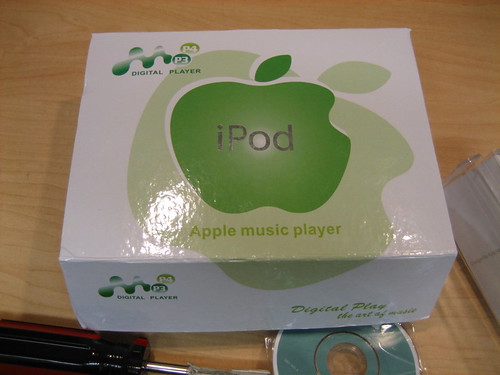
A customer came in with a fake iPod namo last week. She bought it on eBay, and was wondering why it didn’t work like her real iPod Nano. At first glance, the “notPod” looks like the read deal. However, closer inspection reveals it’s a total fake. The box, of course, looks totally fake.

Click on the image to go to our Flickr page to see photos of the “notPod!”
Library - 1306.jpg

Similar Posts

  • Bamboo Fun!

    When you get your first Apple computer, you step into our realm knowing that you are purchasing one of the best creative machines…

  • Hammerhead Screen Protector Install

    Mikhael installs a Hammerhead antiglare screen protector on an iPad, and lets us know how he does it. This awesome screen protector allows…

  • What Is the Archive Utility?

    A long-time Small Dog customer asked me about an item that fleetingly appeared in his dock. It was a generic-looking green icon with a zipper on it called Archive Utility, and when he used Spotlight to search for it, it was nowhere to be found.

    Many of the items you download and receive in your email are compressed files. File compression is nothing new, and is exactly what you think it is: when you compress a file, you make it smaller. This reduces bandwidth loads and expenses on the server side, and can help you save disk space on your computer. However, compressed files cannot be directly accessed; they must first be decompressed.

    Back in the days of twenty megabyte hard drives (my LC II had a 20 megabyte drive in the early nineties), file compression seemed more relevant for conservation of hard disk space. These days, it’s more often used to shrink email attachments and other downloads. Mac OS X always included a built-in compressor and decompressor. By right-clicking on any file or folder in the Finder and selecting “Compress” from the contextual (pop-down) menu, your Mac will create an archive in zip format.

    When you open a compressed file, Mac OS X launches an application called Archive Utility. Its sole purpose is to compress and decompress files. It’s located in /System/Library/CoreServices, and Spotlight doesn’t search there. If you poke around the /System/Library and /Library areas of your hard drive, there’s plenty to learn if you Google intelligently and use extreme caution when moving or deleting anything. Actually–don’t move or delete anything. Just explore and learn!

  • Dual Displays! Yeah!

    In my ongoing pursuit of a more awesome computer set up, I recently purchased a mini DVI to DVI adapter for my iMac….

  • Why AppleCare is Important

    In general I’m not one to buy the extended warranty programs on big ticket items (a stove, dishwasher), and had I not worked…