Apple Brings the M4 Chip Family to the iMac, Mac mini, and MacBook Pro
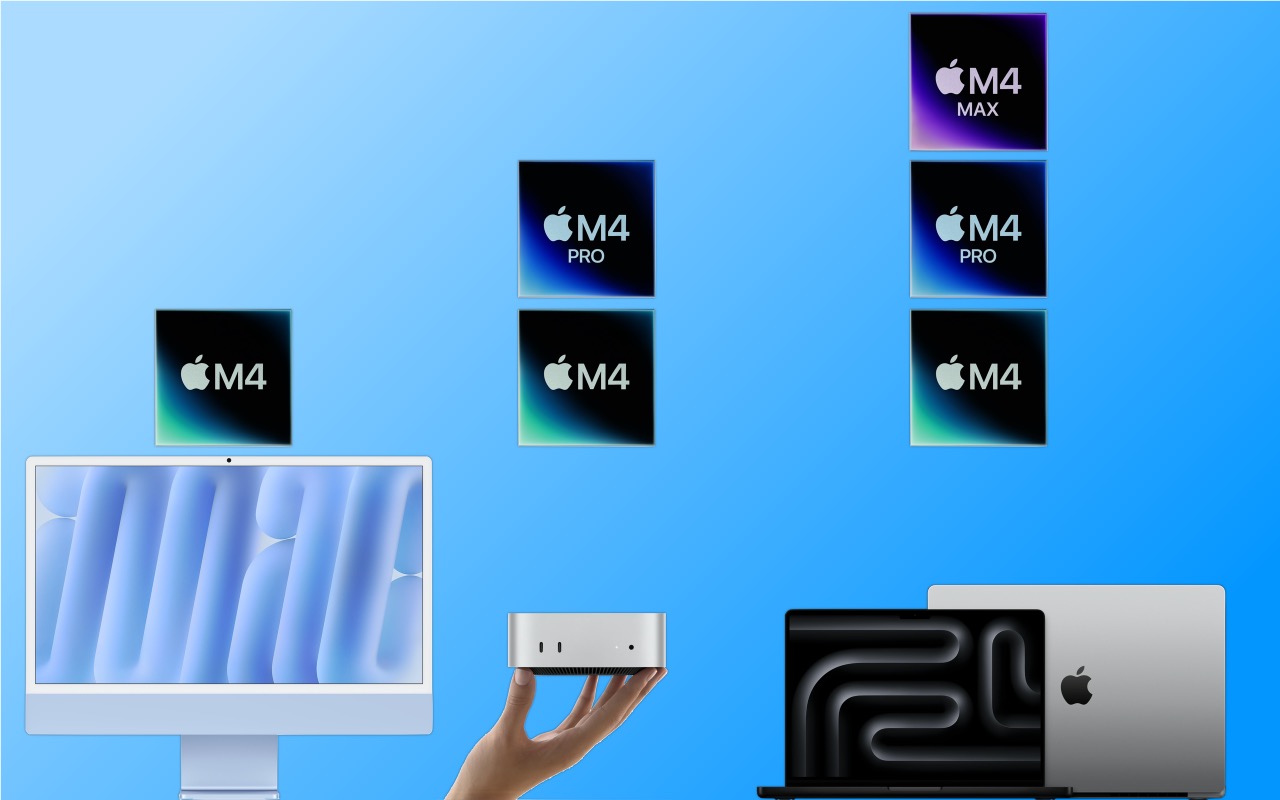
Apple has concluded a three-day release of the first Macs to use the M4 chip family, which debuted earlier this year with the iPad Pro. The updated iMac and MacBook Pro retain the same industrial designs as in the past, while Apple took a shrink ray to the Mac mini.
These are highly compelling Macs, with the M4, M4 Pro, and M4 Max chips providing best-in-class performance; the iMac and MacBook Pro gaining an iPhone-like 12-megapixel Center Stage camera; Thunderbolt 5 offering faster data transfers; and a nano-texture glass option available for those battling glare and screen reflections. If you’re pondering your next Mac, here’s what you can look forward to.
iMac Adds M4 Chip, 12MP Center Stage Camera, and Nano-Texture Glass
Apple’s colorful all-in-one iMac is popular as a public-facing Mac or household workhorse. The M4 chip packs even more power into the iMac’s svelte frame without changing its low starting price of $1499 ($1299 for a two-port model with several odd limitations). To ensure optimal performance with Apple Intelligence, the company increased the base memory from 8 GB to 16 GB, and you can up that to 24 GB for $200 more or 32 GB for $400.

The iMac still boasts a 24-inch 4.5K Retina display that provides crisp text and vibrant graphics. For $200, you can get it with nano-texture glass that cuts down on reflections and glare from windows or bright lights. Apple also replaced the 1080p FaceTime HD webcam at the top of the screen with a new 12-megapixel Center Stage camera that pans and zooms to keep you in the frame as you move around during video calls. (Not having to sit perfectly still makes those lengthy virtual meetings easier to handle.)
Lastly, the M4 chip supports Thunderbolt 4, so the higher-end model of the M4 iMac gives you four Thunderbolt 4 ports instead of the two Thunderbolt and two USB 3 ports in the previous model.

Along with the new colors, Apple is shipping color-matched versions of the Magic Keyboard, Magic Trackpad, and Magic Mouse. They all now charge using USB-C rather than the outdated Lightning. Apple left the Magic Mouse’s charging port on the bottom, which prevents it from being used while plugged in.
While the M4 is roughly twice as fast as the M1, most current users probably won’t benefit greatly from upgrading, and it’s even less of an improvement over the previous M3 iMacs. However, for anyone upgrading from an Intel-based Mac or transitioning from a PC, the new M4 iMac is an extremely attractive option.
Smaller Mac mini Gains M4 and M4 Pro Chips, Plus Thunderbolt 5
The entire point of the Mac mini is the “mini” part—it’s supposed to be small and inexpensive. With the new M4 Mac mini, Apple has reduced its footprint even more, dropping its depth and width from 7.7 to 5.0 inches. To maintain airflow, Apple had to add some height, so it’s now 2.0 inches tall, up from 1.4 in the previous model.

The price for the base M4 model remains $599, and it now includes 16 GB of memory and 256 GB of storage. The M4 Pro model has increased by $100, now starting at $1,399 for 24 GB of memory and 512 GB of storage. You’ll still need to supply your own keyboard and mouse, but Apple updated the Magic Keyboard, Magic Trackpad, and Magic Mouse to charge using USB-C rather than Lightning.
As with the iMac, the M4 model is roughly twice as fast as the M1 version of the Mac mini, and Apple says the M4 Pro is two to three times as fast as the M2 Pro it replaces. It’s probably not worth upgrading for performance alone unless you’re coming from an Intel-based Mac or relying on resource-intensive apps.
Apple also positioned two USB-C ports and a headphone jack on the front panel for easy access. That’s a win unless you connect speakers to the headphone jack, at which point your Mac mini will always have a cable sticking out. The back side features Gigabit Ethernet for networking, HDMI for a display, and three Thunderbolt ports for connectivity. On the M4 model, those ports are Thunderbolt 4; on the M4 Pro model, they use Thunderbolt 5 to provide high-speed data transfers up to 120 gigabits per second.
Finally, those who need lots of screen real estate will appreciate the fact that the M4 Mac mini can support up to three external displays.

As much as the new Mac mini is an impressive and inexpensive package, it has a few trade-offs compared to the previous model. Along with the M4 Pro model’s price increasing by $100 and the possible annoyance of plugging speakers into the front, the previous M2 Pro Mac mini had four Thunderbolt ports, one more than in the new version. Plus, it had two USB Type-A ports, which remain popular despite the ascendance of USB-C. But the strangest thing? The power button is on the bottom, so you must pick up the Mac mini to turn it on or off.

Even if current Mac mini users don’t have much incentive to upgrade, the M4 Mac mini is compelling for anyone still using an Intel-based Mac. In particular, those still using 27-inch iMacs would do well to consider an M4 Mac mini and Apple Studio Display—the performance gains will be incredible.
Powerful MacBook Pros Leverage M4, M4 Pro, and M4 Max Chips, Add 12MP Center Stage Camera and Thunderbolt 5
Apple’s final announcement of the week put all the pieces together. The new 14-inch and 16-inch MacBook Pro models feature:
- A choice of the M4, M4 Pro, or M4 Max chip, with a dizzying array of processor core and memory options that provide everything up to insanely great performance
- A 12-megapixel Center Stage camera that enhances video calls by panning and zooming to keep you in the frame as you move around
- A nano-texture glass option to make the screen easier to read outside in bright sunlight
- Thunderbolt 5 in the M4 Pro and M4 Max models for high-speed data transfers
Along with those improvements from the iMac and Mac mini releases, Apple also added some welcome tweaks specific to the MacBook Pro:
- All models of the M4 MacBook Pro feature brighter Liquid Retina XDR screens rated at 1000 nits outdoors, up from 600 nits.
- The M4 14-inch MacBook Pro now includes three Thunderbolt 4 ports, a step up from the two ports in the M3 version.
- The M4 14-inch MacBook Pro can now drive two external displays along with its built-in screen. The M3 version could do that only if you closed the lid.

The 14-inch MacBook Pro starts at $1,599 with an M4, $1,999 with an M4 Pro, and $3,199 with an M4 Max. The 16-inch MacBook Air starts at $2,499 with an M4 Pro and $3,499 with an M4 Max.
These new MacBook Pro models are nearly ideal. (More ports would always be welcome, but a Thunderbolt hub will help.) The only hurdle is the price, which increases rapidly as you choose faster M4 chips, more memory, and additional storage. You can’t swap chips or expand memory later, but you can save some money by putting less storage onboard and expanding capacity with inexpensive external SSDs.
MacBook Air Models Now Start with 16 GB of Memory
Finally, we can expect Apple to upgrade the MacBook Air, Mac Studio, and Mac Pro to the M4 family sometime next year. Until then, however, Apple has quietly raised the base level of memory for its M2 and M3 models of the MacBook Air from 8 GB to 16 GB. That’s likely to ensure optimal performance for Apple Intelligence, which is rather resource-intensive. Whatever the reason, the M2 MacBook Air still starts at $999 and the M3 model at $1,099, both with 16 GB of memory and 256 GB of storage. They’re great little machines, but if you can wait, the M4 version can’t be too many months away.
(Featured image based on originals by Apple)
Social Media: Apple has started moving the Mac lineup to the M4 family of chips with the updated iMac, redesigned Mac mini, and enhanced MacBook Pro. They’re great machines, particularly for those who need to upgrade from an Intel-based Mac.