
Fake iPod Nano

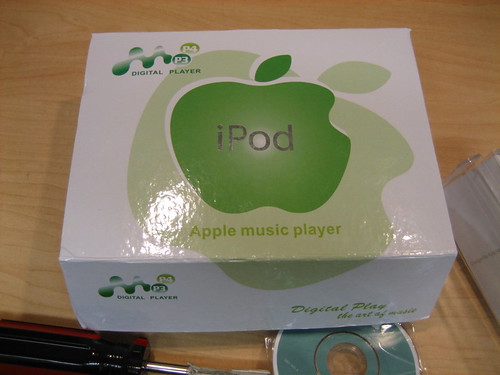
A customer came in with a fake iPod namo last week. She bought it on eBay, and was wondering why it didn’t work like her real iPod Nano. At first glance, the “notPod” looks like the read deal. However, closer inspection reveals it’s a total fake. The box, of course, looks totally fake.

Click on the image to go to our Flickr page to see photos of the “notPod!”
Library - 1306.jpg

Similar Posts

  • Facebook photos for fun!

    Ask any college or high-school student and you’ll discover that online social networking sites like Facebook are so hot right now. One of…

  • Panic Sale!

    We don’t sell any of Panic’s software (hence the “Don’t buy them in a store like this – we don’t even sell them…

  • Synchronization 102

    I received a question from a longtime reader asking me how comfortable I was with Wi-Fi synchronizing of apps versus using a cloud…

  • Crumpler Bags 15% Off!

    Have you taken a look at our colorful Crumpler Bags lately? We have a huge selection to choose from! Check out the Dreadful…

  • Guide to External Storage

    I’m in love with my hard drives. They really are miraculous devices, storing billions of bytes and copying that data to and from drive to drive at amazing speeds. I realize that the world of external storage is pretty vast, with lots of names and terms and numbers, and thought it would be good to do a quickly summarize the differences between external drives.

    The first distinction I make between external drives is their physical size. The case around the actual drive may vary in size but there are only two sizes of hard drives–2.5-inch laptop drives and 3.5-inch desktop drives. Desktop drives require more power than can be supplied via USB or FireWire, and so they are considered “desktop” hard drives because you need to plug them into power separately.

    Laptop drives often can run off USB power supplied by a USB port, so they are considered more portable. Just like comparing laptops and desktops, you will generally get more performance and space out of a desktop drive than you would from a laptop drive.

    If you ever work with large amounts of video or want to play media off of an external drive, then a faster RPM (revolutions per minute) is worth buying. If you are just trying to keep your files backed up, then a lower RPM drive will work fine. The two specifications of drive speeds on the consumer market right now are 5400 and 7200 RPM.

    The third thing to check is the connection type of the external drive. Most drives use only USB, but some drives offer FireWire 400, 800, and/or eSATA. For general backup, USB is perfect because it’s fast, reliable, and can be plugged into almost any computer made in the last 5-10 years.

    FireWire is a connection also known as IEEE 1394. As anyone who works with video knows, FireWire is often required to download video from a camcorder or videocamera. Drives that have FireWire are generally more professionally geared because FireWire is a lower latency connection that makes transferring lots of small files faster than USB.

    eSATA is a very fast data connection but does not supply power. eSata is the fastest type of connection commonly seen in external drives, but Apple does not build this port into its computers at this time.

  • Buy Adobe CS5.5, Get Adobe CS6 Free!

    Purchase a Creative Suite 5.5 full license or upgrade between March 26th and May 6th, 2012 and receive an upgrade to CS6 at…