Back Tapping- new iPhone Hidden Gesture
With iOS 14 Apple has introduced a new gesture to trigger certain actions. This is a somewhat hidden feature but I have already found it useful. With Back Tap, a quick double tap or triple tap on the back of your iPhone can do things like take a screenshot, access the control panel and many other features.
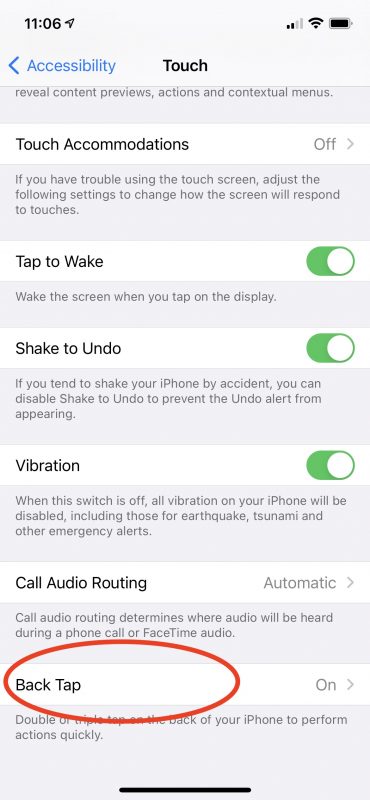
To activate back tap you must be running iOS 14 or higher on an iPhone 8 or later. Go to Settings ->Accessibility->Touch and tap Back Tap.
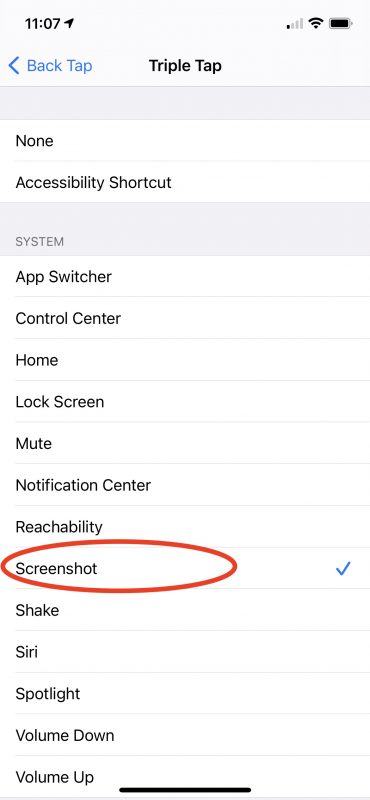
You can then choose either Double Tap or Triple Tap and whatever action you would like. I have chosen for the time being, a double tap to activate Siri and a triple tap to take a screen shot. But you have a big selection of actions ranging from mute, to Home Screen to control center and more. You can even use double or triple tap to trigger an Accessibility shortcut such as Magnifier or Voice Over.