Legitimately Worried That You’re Being Targeted Online? Try Lockdown Mode

Most people fall into one of two extremes when it comes to device security. Many believe they’re not interesting enough to be targeted by online attackers and thus don’t take sensible precautions, like making sure every website account is protected with a strong, unique password. (Most attacks these days are bots, so whether you’re interesting is irrelevant.) Then there are those who see a bogeyman around every corner and refuse to use a password manager or biometric authentication because of misplaced concerns about the security of the stored data. (Really, it’s OK.)

Today we want to focus instead on a very small third group: those who, because of who they are or what they do, have a legitimate reason to fear being targeted by sophisticated digital attacks. Such people might include activists trying to raise awareness about human rights abuses in oppressive regimes, political dissidents, muckraking journalists covering organized crime or government corruption, senior executives in controversial business fields, high-profile government officials, and government employees with access to sensitive information.

For such people, using a password manager and relying on biometric authentication is table stakes. Government intelligence and law enforcement agencies often employ hacking software like Pegasus, which can be installed on target iPhones through zero-click exploits such as simply receiving a malicious text message. Pegasus can read text messages, snoop on calls, collect passwords, track location, access the iPhone’s camera and microphone, and harvest information from apps. Plus, both government agencies and organized crime rings employ hackers to target high-profile targets directly, often through social engineering (pretending to be someone they’re not to gain access to an account or device).

Apple is well aware of the risk to high-value individuals. In November 2021, the company filed a lawsuit against Pegasus maker NSO Group. More practically, Apple introduced Lockdown Mode in iOS 16, iPadOS 16, and macOS 13 Ventura, significantly reducing the attack surface that spyware or hackers could exploit by limiting or blocking specific apps, websites, and features.

Lockdown Mode Limitations

Before we explain how to turn on Lockdown Mode, it’s vital that you understand how it limits your Apple devices:

  • Messages: Most message attachment types are blocked other than certain images, video, and audio. Lockdown Mode also blocks links and link previews.
  • Web browsing: Safari blocks complex Web technologies, potentially causing some websites to load slowly or not operate correctly. It may also block Web fonts and images, so sites may not display as designed.
  • FaceTime: Incoming FaceTime calls are blocked unless you have previously called that person.
  • Apple services: Invitations to Apple services, such as invitations to join the Home app, are blocked unless you have previously invited that person.
  • Shared albums: Shared albums disappear entirely from the Photos app, and shared album invitations are blocked.
  • Device connections: If you want to connect an iPhone or iPad to a computer or accessory, the device must first be unlocked. Similarly, connecting an M-series Mac laptop to an accessory requires explicit approval.
  • Configuration profiles: Lockdown Mode prevents you from installing configuration profiles, and the device can’t be enrolled in Mobile Device Management.

The inconvenience these restrictions create is well worth the protection Lockdown Mode provides if you’re a sufficiently high-value target. But for the vast majority of Apple users, Lockdown Mode’s limitations would just cause confusion and annoyance.

Turning on Lockdown Mode

First, note that you must enable Lockdown Mode on each of your devices separately.

To enable Lockdown Mode on an iPhone or iPad, go to Settings > Privacy & Security > Lockdown Mode (at the bottom) and tap Turn On Lockdown Mode on two separate screens. For the last step, tap Turn On & Restart, and enter your passcode.
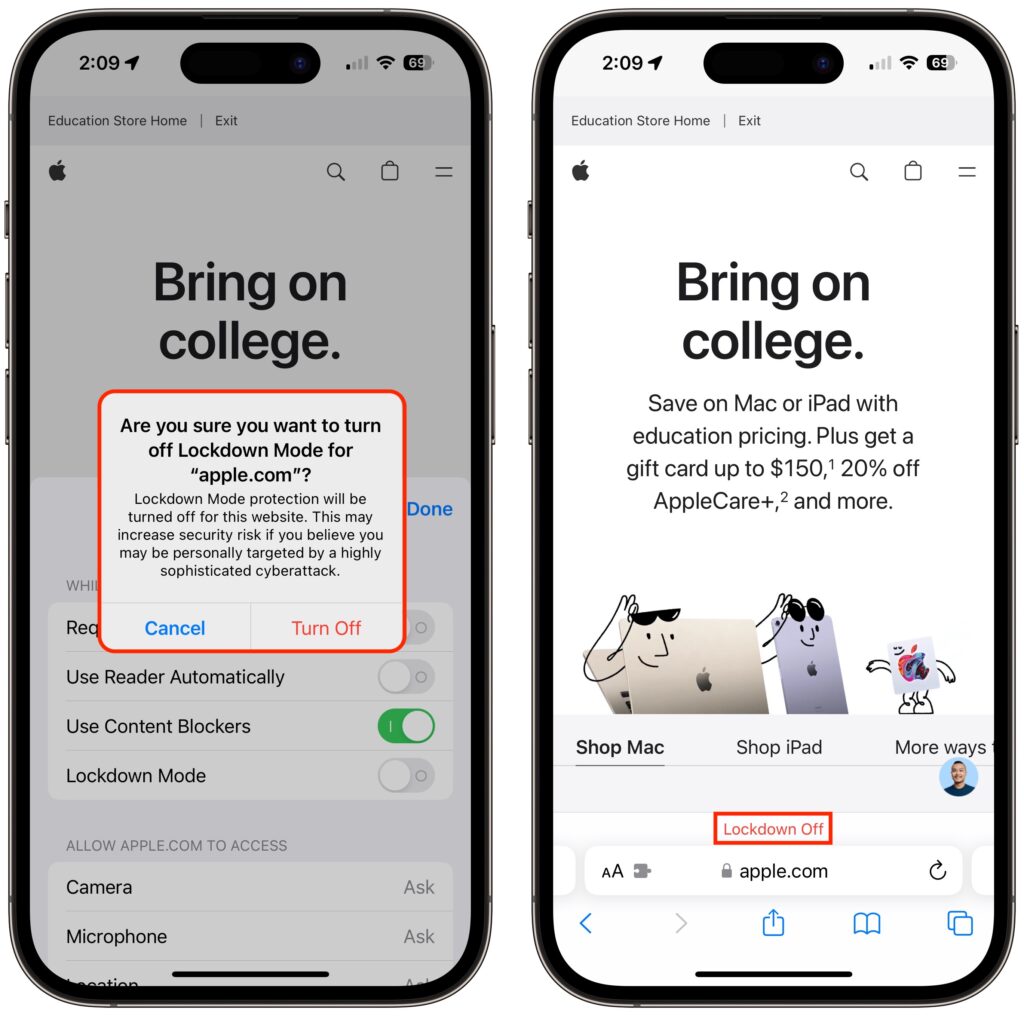
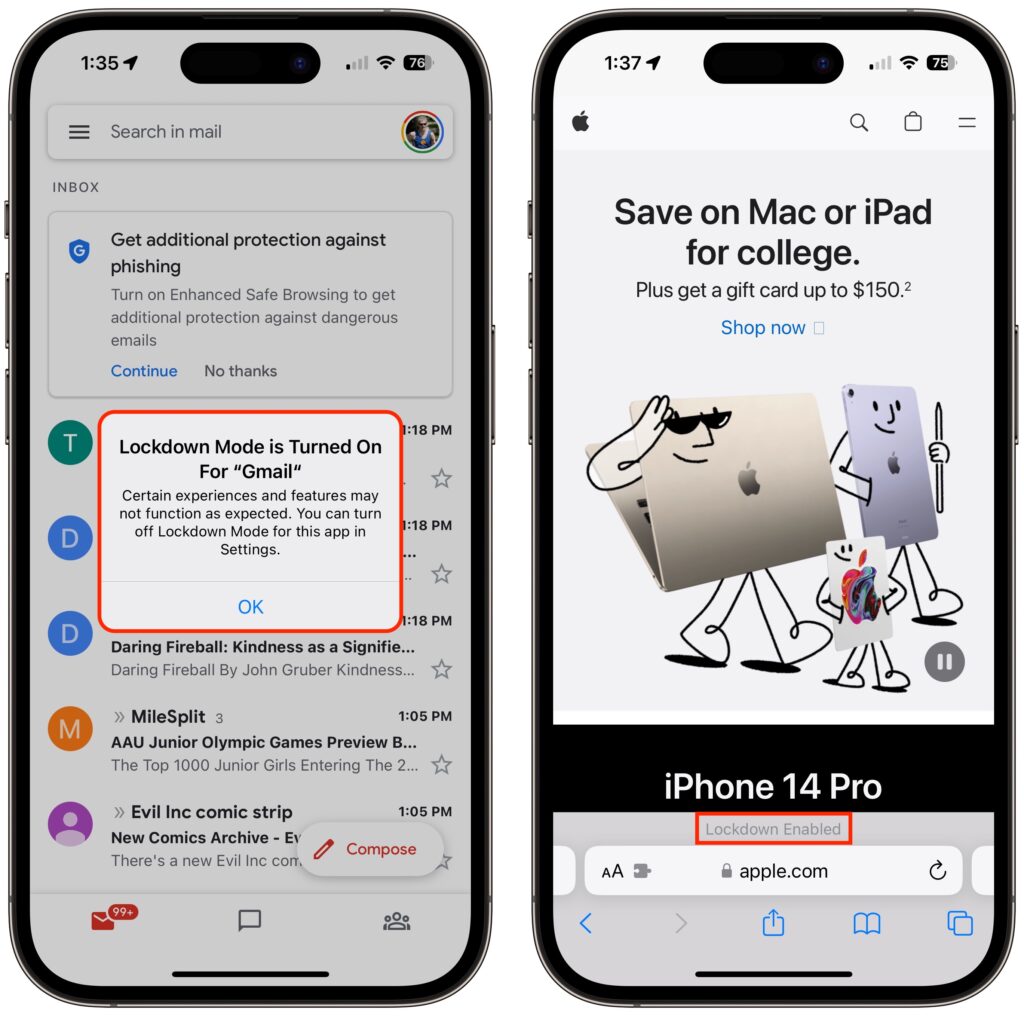
Once your iPhone restarts, it will work mostly the way you expect, apart from the above limitations. You may see notifications when an app has been limited in some way, and a banner appears in Safari to let you know you’re in Lockdown Mode.
On a Mac, turn on Lockdown Mode by going to System Settings > Privacy & Security. Scroll down to Lockdown Mode and click Turn On. Authenticate, then click Turn On & Restart.
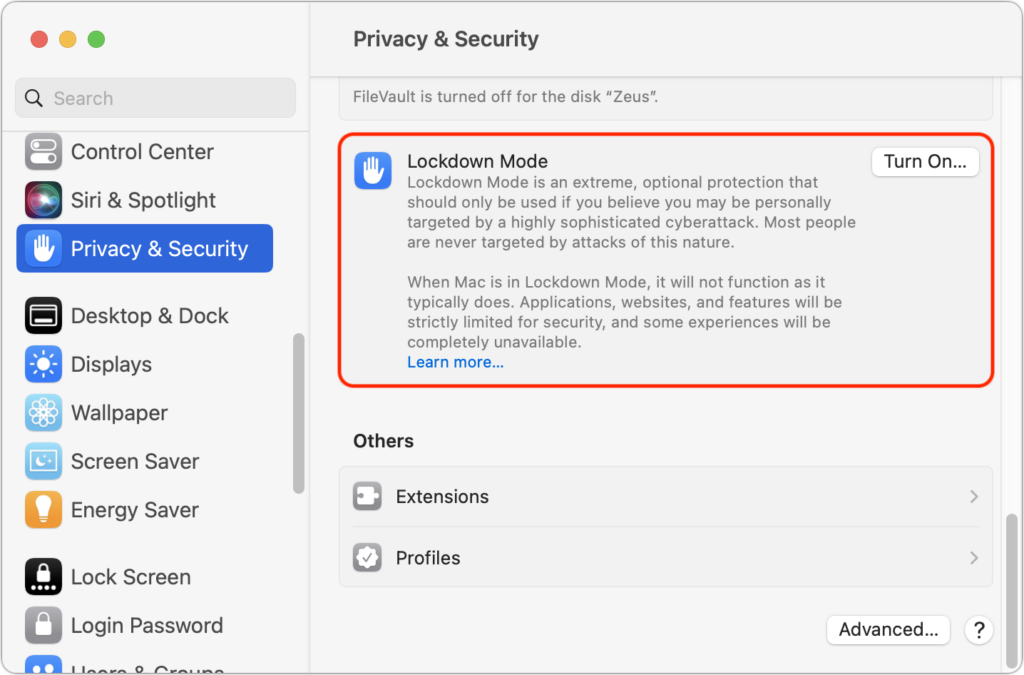
As with the iPhone and iPad, Lockdown Mode mainly makes its presence known by displaying a banner in Safari; you may also receive notifications when an app or feature is limited.

Allow Certain Apps or Websites in Lockdown Mode

If you discover that a particular app or website isn’t operating correctly in Lockdown Mode, you can exclude it from Lockdown Mode’s protections. You’ll have to decide if it’s worth the added risk. To manage exceptions on the iPhone or iPad, go to Settings > Privacy & Security > Lockdown Mode. Then scroll to the bottom, tap Configure Web Browsing, and on the next screen, turn off the switch for the desired app.
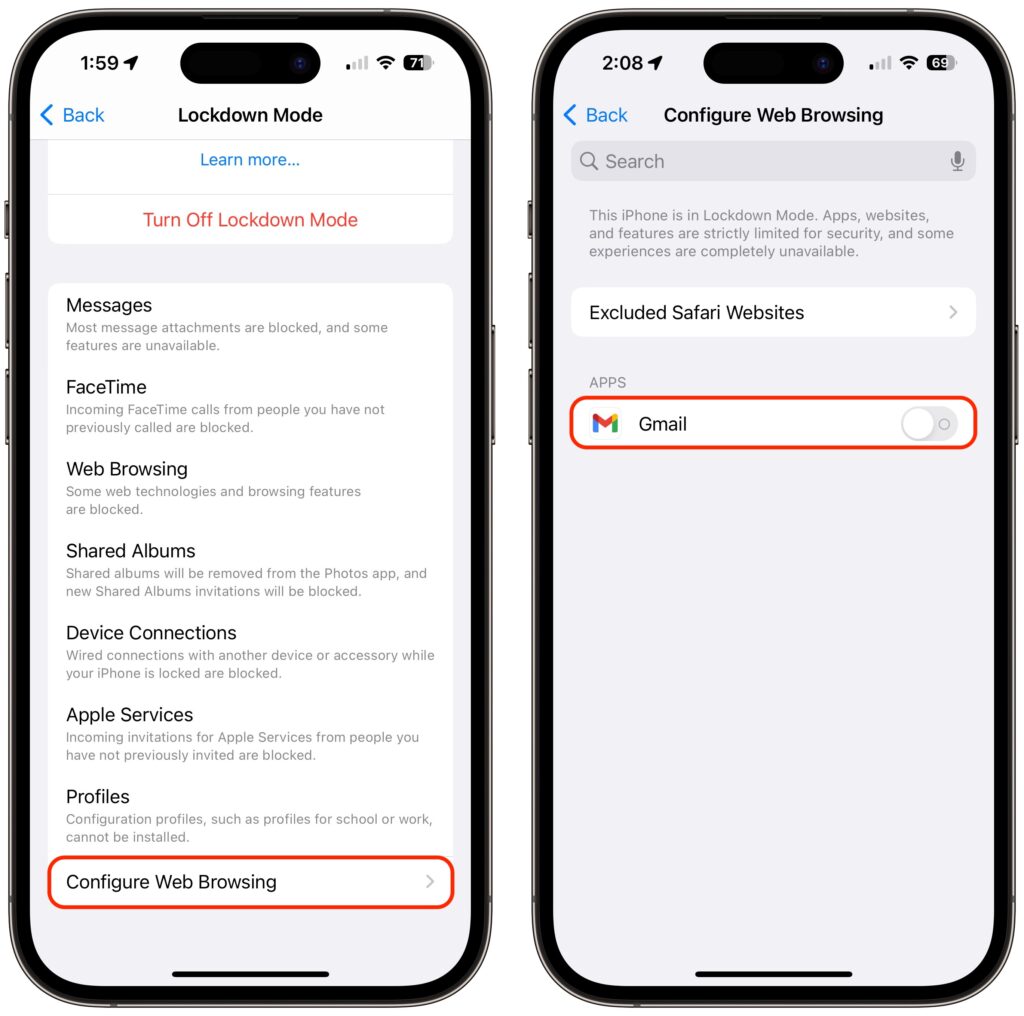
To exclude websites from Lockdown Mode, use Safari. Tap the AA button in the address bar, disable the Lockdown Mode switch, and tap Turn Off. The Lockdown banner changes to Lockdown Off to make sure you know that website is no longer being limited for your protection.

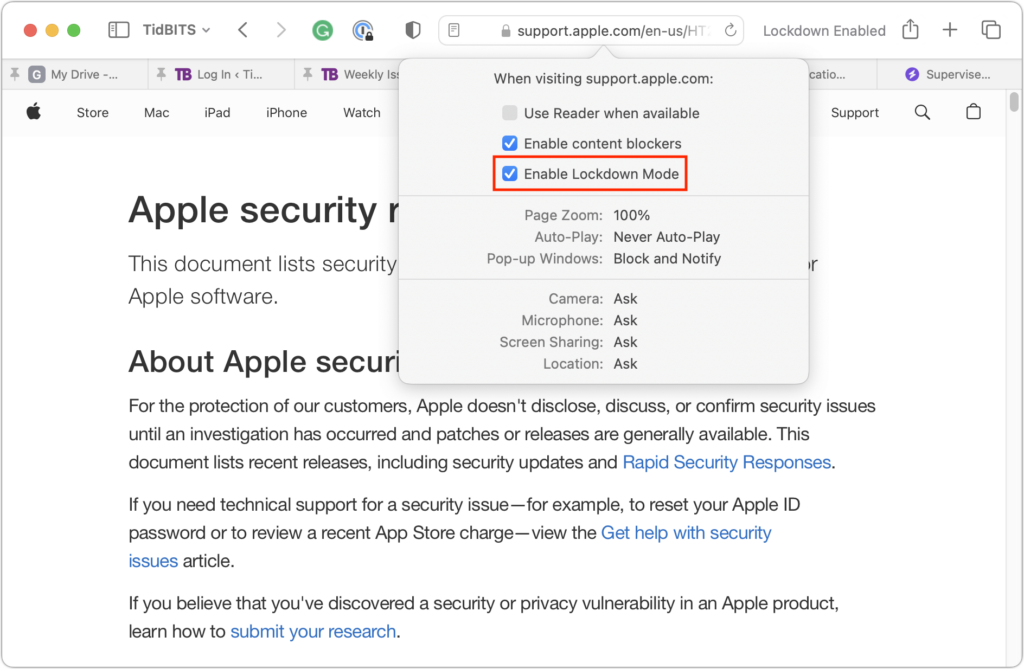
On the Mac, you can exclude websites in Safari, but not apps. While on the site you want to exclude, choose Safari > Settings for website.name. In the popover that appears, deselect Enable Lockdown Mode and then click Turn Off when prompted.
To reiterate, almost no one needs to enable Lockdown Mode. But if you qualify as a high-value target, it’s well worth using Lockdown Mode to reduce the chances that powerful forces will be able to compromise your iPhone, iPad, or Mac.

(Featured image based on originals by iStock.com/Tero Vesalainen and matias giamportone)


Social Media: High-value targets like activists, journalists, and government employees with access to sensitive information should consider enabling Lockdown Mode on their Apple devices to protect against hacking or spying by sophisticated digital attackers.


Similar Posts

  • _Dear Friends,_

    Baseball season is almost upon us as spring training wraps up and the real games begin next week. The hopes for the Chicago Cubs have never been higher with a great line-up and pitching. Could this be our year? To help matters along, Apple and MLB announced this week that they have struck a multi-year deal to supply 12.9 inch iPad Pros with special STM team-logoed cases and a custom app called MLB Dugout. This app will help managers see performance statistics, check videos from games and analyze how pitchers and hitters are likely to perform against each other.

    Baseball has become a game of statistics and until this deal laptops, iPads and iPhones were banned from dugouts. That ban is gone as iPad Pros will replace the notebooks and photographs in big binders. Each team’s data will be downloaded to the iPads before the games. I can see this really speeding up the research about how to play a certain batter or what kind of stuff a pitcher has. Cubs manager, Joe Maddon, is not so sure “This might sound nuts to you, bit it might slow down the process. If there’s that moment that permits time to look up something, it might be OK, but I think thats where the piece of paper has it all over the computer–in that moment.” Well, Joe you are a hell of a manager but I’ll put the iPad Pro up against your binder any day! Fortunately, MLB didn’t ban paper so Joe is all set.

    I have talked many times about being a socially responsible business but this week we saw the power for good that businesses can use. While not yet successful in overturning the North Carolina law that legalizes discrimination against LGBT people, business pressure stopped a similar law in Georgia and the list of businesses lining up for repeal in NC is impressive. It was business that turned the tide when civil unions were first introduced in Vermont and it can be business again that dope-slaps some sense into these backwards legislatures, too.

    This week’s Kibbles & Bytes exclusive features the iPad mini 4 in Space Gray. This 64GB model features Wi-Fi and Cellular and comes with the AppleCare+ protection plan that increases the hardware warranty from 1 to 2 years, technical support from 90-days to 2-years and provides for accidental damage coverage. This is the latest iPad mini that features the Retina display. With 64GB of ram and cellular capability you will never be out of touch. Normally, this bundle is $730 but this week exclusively for Kibbles & Bytes readers you get the “**iPad mini 4 64GB Wi-Fi and Cellular with AppleCare+ for $50 off**”:http://www.smalldog.com/wag900002186 at “**$679.99!**”:http://www.smalldog.com/wag900002186/

  • Apple Stands Up The Street

    $50.6 Billion in revenue, $10.5 Billion in net profit and $235 Billion in the bank. Let’s get one thing straight, 99.9% of the companies in the world would love to have those kind of numbers. And while this fell into the range of Apple’s forward-looking guidance, it did fall short of the expectations of the analysts.

    This was the first time in 13 years (!) that Apple posted lower year-over-year sales. Apple saw lower iPhone sales than last year at this time. However, keep in mind that was when the iPhone 6 was at its peak. Nevertheless, Apple sold 51.1 million iPhones and said they are having difficulty keeping up with the demand for the recently released iPhone 5se.

    Mac sales and iPad sales also declined as expected with Apple selling a bit over 4 million Macs and 10.25 million iPads. On the bright side, Services revenue increased 20% to almost $6 billion and “other” products which include Apple TV, Apple Watch, Beats and iPod generated $2.189 billion which is 30% growth.

    Apple’s board of directors both increased the dividend paid on Apple shares to $0.57 which is about a 10% raise and increased their share buy-back program. With Apple being so widely held, this dividend increase makes Apple one of the largest payers of dividends in the world. Since the start of their dividend and share re-purchase program, Apple has returned over $163 billion to shareholders, the majority of that being in the form of share buy-backs.

    Apple’s guidance for the current quarter which ends at the end of June also projects a year-over-year decline in revenues. They forecast sales in the range of $41-$43 billion which is also lower than analysts predicted.

    There is no sugar-coating these results which were for the most part, a miss. Forecasting demand, revenue and margin is tricky and there are a bunch of factors that enter into this calculation and a bunch more that are ready to blow up the forecast. International monetary trends, new product introductions are all a bit of a wild card.

    There is some good news hidden in the report. Apple said that the iPhone enjoys an unprecedented 95% loyalty rate, Apple Pay is seeing 1 million new users a week, 13 million people subscribe to Apple Music and Apple’s installed base is 1 billion devices and growing.

    Apple had a huge hit with the iPhone 6 and that did push sales to a peak level last year. It was an anomaly, however, and Apple’s business is still incredibly strong, just a bit more down to earth. You can’t hit home runs every time at bat! Tim Cook says the product pipeline is strong and I believe him.

    Hey, I didn’t have to come up with a new adjective to describe what Apple did to the street this quarter. That’s a fringe benefit. Putting this all into perspective is important. It is not like Apple is losing money or losing customers. In fact, the opposite is true. In three short months, they made over $10 billion in profit and sold millions and millions of iPhones, iPads and Macs! Now, if Small Dog could just do a tiny fraction of that…

  • _Dear Friends,_

    Definitely some weird weather in Vermont. One day it is below 0 F and the next day it is in the 40’s and raining. It makes for some tricky driving as wet pavement can hide some black ice. Hopefully as we enter March there will be some snow because the ski areas and local merchants are suffering from the weird weather. We can take a lot of snow and freezing temperatures but this freeze/thaw cycle is just annoying.

    Apple has very strong hardware sales but their hidden gem may be the recurring revenue streams that they develop. Of course, we know about the 11 million+ subscribers to Apple Music that pay a monthly fee and the iCloud storage fees but there are other much larger streams that provide Apple with consistent revenue. The iPhone is a big one that has two parts to it – on the one hand, people want to upgrade to the latest iPhone and that upgrade business is huge. There is also Apple’s new financing of iPhones that spreads the cost of the iPhone over several months and allows much easier iPhone upgrades. The carriers are also offering these easy upgrade programs which enhances the recurring revenue stream. It is sort of like printing money.

    This week’s Kibbles & Bytes exclusive features the “**Apple Factory Reconditioned 21.5-inch iMac**”:http://www.smalldog.com/wag900002159 with 2.7GHz i5 processor, 8GB of ram and a big 1TB drive. We are bundling this with the AppleCare Protection Plan which extends Apple’s 1-year warranty to 3-years and extends your 90-days of free technical support from Apple from 90-days to 3-years. To complete this bundle because we always want you to have a backup of your personal data, we are including the Apple Factory Reconditioned 2TB Time Capsule. The Time Capsule is the combination of an Airport Extreme base station and 2TB hard drive. Because you are buying it at the same time as the iMac it is also covered for 3-years by AppleCare! Normally, if you bought this bundle new it would cost $1769, bought normally as Apple Refurbished it would be $1399 but this week for Kibbles & Bytes readers you can get this great deal on an iMac with Time Capsule and AppleCare for only “**$1299.99!**”:http://www.smalldog.com/wag900002159