Time Machine Now Offers Daily and Weekly Frequencies

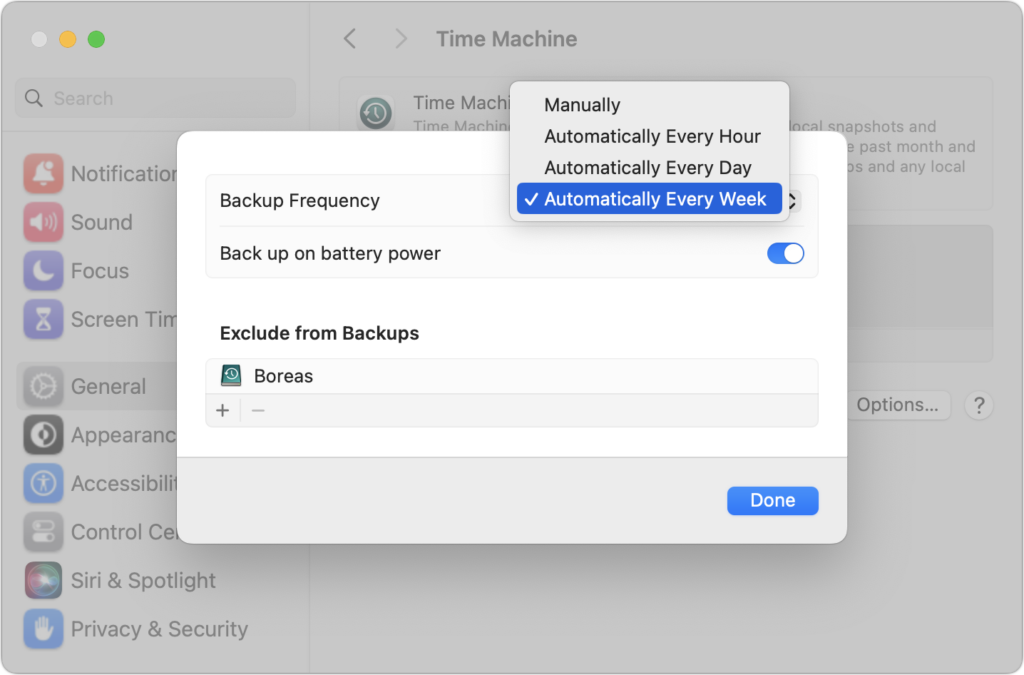
Since its inception, Time Machine has backed up on an hourly schedule. It then keeps hourly backups for the previous 24 hours, daily backups for the last month, and weekly backups back to the start of the backup. Once free space on the backup drive gets low, Time Machine deletes older backups to make room for new ones, always maintaining at least one copy of every backed-up file. The traditional hourly backups are usually fine, but starting in macOS 13 Ventura, Apple lets you choose a daily or weekly schedule instead. One of those might be useful for Macs that are turned on infrequently or where very little important data changes. It also might reduce resource usage and how much data Time Machine backs up. Most people shouldn’t need to change the backup frequency, but if you’ve always wanted to, now you can.

(Featured image based on an original by iStock.com/STILLFX)


Social Media: Has Time Machine’s hourly backup frequency been problematic for you? Starting in macOS 13 Ventura, you can instead choose a daily or weekly backup schedule.

Similar Posts

  • Keep Your Passwords!

    You have a password for the online banking, one for your Apple ID, one to log into your retirement amount. Your password for your bank has to have have at least one numeric number, but can’t start with a number and it can’t have any more than two of the same characters found in your username. Your retirement account must include at least 3 numbers and one special character but they can’t be consecutive.

    Does this sound familiar? In the perfect world we would only need one password, but unfortunately for security purposes and as hackers get better at what they do password strength has become critical and part of our everyday lives. The hassle with this is that most sites have their own sets of rules for password strength leaving many of us to peck away at our keyboards or devices in a sometimes endless game of “remember how you manipulated your favorite password 16 different ways and can’t remember if your banking site used the password with the capitalization or the one with the ampersand”.

    p{text-align: center;}. !http://blog.smalldog.com/images/4644.jpg!

    For a very long time I will admit my method of keeping track of my usernames and passwords was the stickies program on my Mac, much to the dismay of our IT manager! While stickies are easily accessed they are not secure and I do not recommend this method. Where you should keep them is in your keychain. You can access your keychain through applications and then utilities. Once you are in your keychain you can manually add preferred sites, accounts and passwords you wish to store. Another huge benefit is secure notes. Secure notes allow you store additional confidential information. Keychain is safe and secure because in order to view any of the passwords stored there you need to enter your administrator password. Within keychain you can make sure to safely and securely keep your passwords, and when you forget if you needed that capitalization or ampersand in your password you can simply open keychain and enter into the search field the website for which you need to confirm the password.

    Now what if you don’t have a mac? The loss of passwords, and most often your Apple ID password is a huge concern with users of iOS devices only. Luckily there is an easy solution for that, iCloud and “iCloud keychain.”:https://support.apple.com/en-us/HT204085 Simply go to settings, iCloud and then select keychain. Your iOS device will begin to store your logins and websites. Additionally you can add specific websites and passwords manually to your phone or iPad under **safari** and then selecting **passwords**. This is also where you would look if you can’t remember login information.

    Recording safely your logins and passwords is an often overlooked step, especially when users of iOS devices accidentally have the device damaged or lost. Saving your passwords safely and using iCloud keychain can avert your being logged out of accounts.

  • This is the craziest Presidential election cycle that I have seen. I first got involved when President Johnson was running against Barry Goldwater and that seemed pretty crazy especially after I lost faith with the President over Vietnam. But this time it would be great comedy if the stakes were not so serious. I have to tell you that seeing Donald Trump ask people to raise their hands in a pledge is one of the scariest things I have seen in a long time.

    Voting is so important and our system is messy with primaries, caucuses, super delgates and conventions but it is also the basis of our democracy. I am proud to say that the Vermont legislature passed an automatic voter registration bill unanimously this week, meaning when you get a driver’s license you are automatically registered to vote. You really do not have the right to complain about your leaders if you do not get out and vote. So, exercise your right and go to the polls when the circus comes to your state!

    Thank you so much for reading this issue of Kibbles & Bytes!

    Your Kibbles & Bytes Team,

    _Don, Emily & Hadley_