The Importance of Staying Updated

Does it feel like your Apple devices are always asking you to install operating system updates? You’re not wrong—from September 2022 to January 2024, we saw the following releases in Apple’s previous set of operating systems:

  • macOS 13 Ventura: 20 releases
  • iOS 16: 25 releases
  • iPadOS 16: 20 releases
  • watchOS 9: 15 releases
  • tvOS 16: 12 releases

Apple issued many of those at the same time, but since you might not use all your devices every day, it can seem as though you spend all your time installing updates. As annoying as updating can be, we encourage you to do so soon after you’re notified for three reasons.

Reason One: Fewer Bugs

First, as has always been the case, updates fix bugs. You may not have experienced all the bugs that Apple fixes, but when one blocks something you want to do, the fix comes as a huge relief.

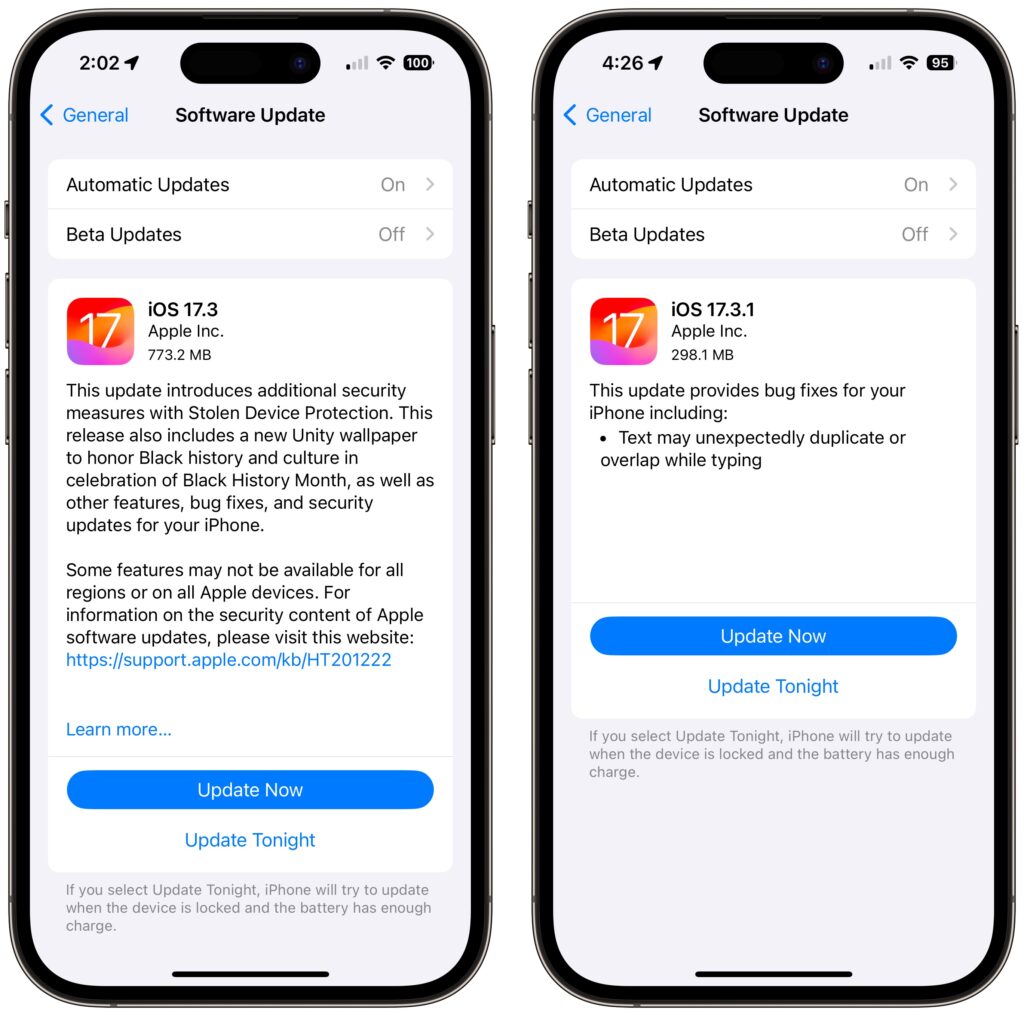
For instance, in a set of releases in January 2024, Apple inadvertently introduced a bug that caused text in many apps, including Mail, Notes, and Safari, to appear to be duplicated and overlap. It was only cosmetic, and switching to another window or resizing the window would make it look right again. But the bug was hugely disconcerting, so Apple fixed it two weeks later in macOS 14.3.1 Sonoma, iOS 17.3.1, iPadOS 17.3.1, and Safari 17.3.1 (which brought the fix to macOS 13 Ventura and macOS 12 Monterey).
Reason Two: Better Security

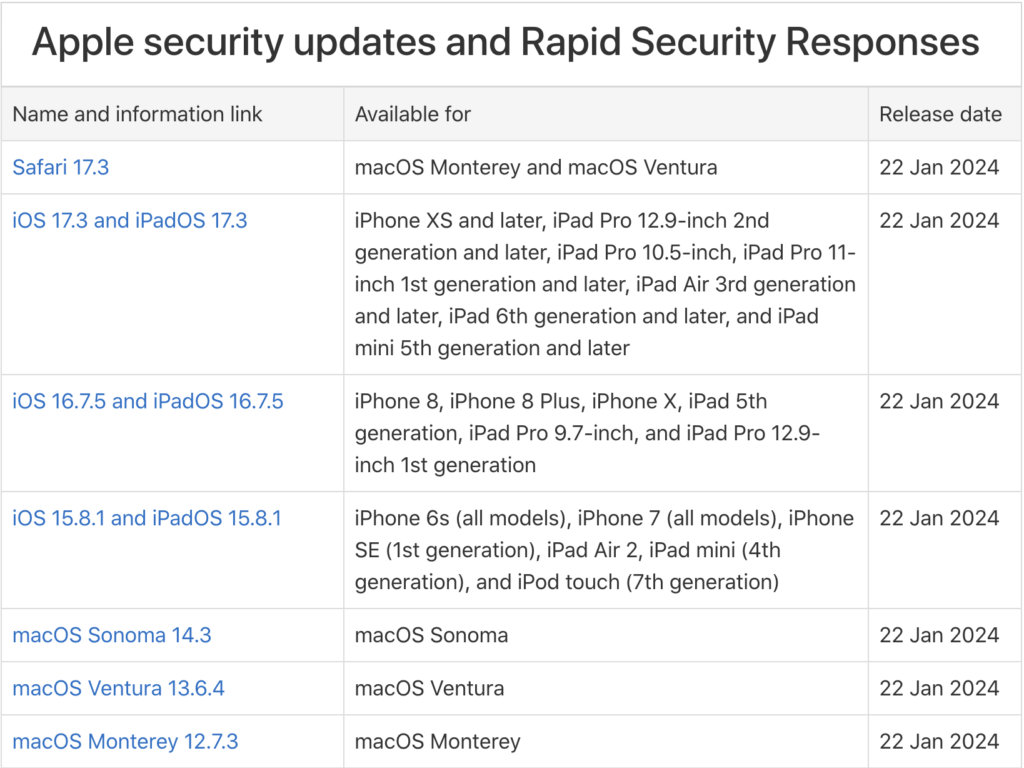
Second, many of the bugs Apple fixes won’t impact your experience of using your device, but they make it possible for attackers to steal information, install malware, spy on your communications, or even take over your entire device. Nearly all of Apple’s operating system updates contain security fixes to address newly discovered vulnerabilities, and some releases only have security fixes. Apple continues to release security updates for the last two versions of macOS and older versions of iOS and iPadOS as appropriate.
It’s easy to think that you won’t be impacted by security vulnerabilities, but remember that as soon as Apple releases an update outlining what it has fixed, attackers know what vulnerabilities exist in unpatched systems. Apple has to react swiftly to some reported vulnerabilities because blocking them can literally be a matter of life or death when it comes to, for instance, iPhone-using dissidents, activists, or journalists working in opposition to repressive governments that employ spyware against their enemies. (All spyware relies on previously unidentified vulnerabilities.)

However, some security vulnerabilities are more likely to impact regular users. For instance, in macOS 14.2.1, Apple fixed a bug in Screen Sharing. If you were sharing your full screen with someone else and had multiple Spaces, Screen Sharing could show the other person random windows in other Spaces, which could range from embarrassing (adult pictures) to seriously problematic (passwords or financial details).

Reason Three: New Features

Third, on the positive side, many operating system releases introduce welcome new features. When Apple unveils its next set of operating systems at the Worldwide Developer Conference in June, some of the promised features won’t appear with the initial releases. New features that shipped in later releases of macOS 14 Sonoma, iOS 17, iPadOS 17, and watchOS 10 include:

  • watchOS’s double-tap gesture for tapping the default button in many apps
  • AirDrop transfers continuing over the Internet when you move out of AirDrop range
  • Adding NameDrop to share contact info when you bring two devices near each other
  • Additional options to control when the iPhone screen shuts off in StandBy
  • The option to choose a specific album for the Lock Screen’s Photo Shuffle wallpaper
  • HomeKey support for Matter locks
  • Expanded Favorites in the Music app
  • A new automatic Favorite Songs playlist in the Music app
  • The addition of Apple’s Journal app
  • A Translate option for the Action button in the iPhone 15 Pro models
  • 10-day precipitation forecasts in the Weather app
  • Sharing of eligible passes in the Wallet app via NameDrop-like proximity
  • A catch-up arrow in Messages that lets you jump to the first unread message
  • Multiple timers in the Clock app on the Mac
  • Stolen Device Protection for the iPhone
  • Collaborative playlists in Apple Music
  • Support for streaming content to TVs in select hotel rooms using AirPlay

Just Update It

Updates provide both a carrot (user-facing bug fixes and new features) and a stick (security fixes). That’s why we recommend updating soon after Apple pushes out a new release and why devices under management usually receive updates quickly. Even if a security breach is unlikely, the liability of allowing devices to remain unpatched is too high for most organizations. Installing updates is an easy way to reduce worry about things like compromised accounts and ransomware.

There are three types of operating system releases:

  • Minor bug fix and security updates: Install these as soon as convenient, usually within a few days. Examples of these include macOS 14.3 to 14.3.1.
  • Interim feature updates: Because these include bug fixes and security updates alongside the new features, you’ll also want to install these within a few days. An example is iOS 17.2.1 to iOS 17.3.
  • Major version upgrades: Because Apple always releases security updates for the two versions of macOS before the current one, you can wait a month or three before installing a major upgrade, such as from macOS 13 to macOS 14. However, once you’ve verified that your apps and workflow are compatible with the new version, we recommend upgrading because skipping a major version of macOS often results in a more difficult upgrade experience.

In each of these cases, if you’re worried about how an update might impact your workflow, check online forums for discussions of each update and feel free to ask us what we recommend for your particular situation.

(Featured image by iStock.com/Fokusiert)


Social Media: We know it seems like your Apple devices are constantly asking you to install an update. Other than for major upgrades, we recommend updating shortly after updates appear so you can take advantage of bug fixes, security updates, and new features.
Similar Posts

  • Audit How You Appear in Google Search

    Google has created a free service that lets you see what of your personal and professional information has been published on the Web….

  • When Should You Subscribe to AppleCare?

    With Apple’s recent launch of AppleCare One, which covers multiple devices, and updates to its traditional AppleCare+ plans, you might be wondering what…

  • Who cares about QR Codes?

    By now you’ve probably seen one of those odd-looking white squares with a bunch of smaller square dots that make up a random pattern inside–that’s a QR code. QR stands for “Quick Response,” and a QR code is a form of barcode, just like on the packaging of nearly everything you buy.

    Usually QR codes are used to store Web links–URLs–so an ad can display just the QR code instead an unwieldy and hard-to-type web address. But QR codes aren’t just for ads. They’ve appeared on business cards, in magazines and books, on coins and bills, and even on tombstones–any place it would be nice to help someone load a Web link into a smartphone but where there isn’t enough room for a URL or in situations where viewers won’t remember the URL later. And the links? They can display anything that can appear on the Web: text, photos, videos, games, and more.

    Only one built-in iPhone app can scan QR codes–the Wallet app in iOS 9–but it can scan only QR codes that are associated with Wallet passes, things like airline boarding passes, concert tickets, and iTunes gift cards. For QR codes that encode any other sort of data, Wallet shows an error. It would be nice if Apple would add general QR scanning capabilities to Wallet or the Camera app, but until that happens, you’ll need another app.
    There are numerous QR code scanning apps in the App Store, but if you need a recommendation, give TapMedia’s QR Reader for iPhone a try. It’s free with ads (remove them with a $1.99 in-app purchase), scans both QR codes and traditional barcodes on most commercial products, and displays the associated information within the app. It can even help you create your own QR codes.

    To use a QR code scanner, launch the app, allow it to access the camera when it asks, and then point it at the QR code. Good apps will scan nearly instantly, but if not, move the camera so the QR code is centered between the guides. If even that doesn’t work, move forward or back so the camera can focus on the centered code.

    Once the code has been scanned, the app will usually bring up an in-app Web browser to display whatever was encoded. For certain kinds of data, like books or grocery items, the app may go right to Amazon or a price comparison site. Good apps will also keep a record of sites you’ve scanned, so you can go back to them later, even if you can no longer scan the QR code.

    So download a QR code scanning app and keep an eye out for QR codes. Once you start looking, you’ll find them everywhere–it’s a modern-day treasure hunt!

  • _Dear Friends,_

    I tuned into the Apple special “Let Us Loop You In” event on my Apple TV. We will talk about the new hardware and software but there were a few things that caught my attention that really help to define Apple as a truly different company.

    The first was Apple’s environmental commitment. They now boast that 90% of their operations, worldwide, are powered by renewable energy and 100% in the USA. This is a unique accomplishment that is made even more remarkable by Apple’s size. While Small Dog Electronics is proud to power our Waitsfield headquarters and S. Burlington store by solar energy, we have not yet reached the point of powering all our operations which is something Apple has done both by purchasing renewable energy and installing large scale solar arrays at their locations both in the USA and China.

    Their environmental commitment goes further with an awareness of the impact their products have on the waste stream. They made a point to describe the materials used which have lower impact and talked about their recycling program, too. The robot, Liam, that disassembles iPhones into its component parts was very cool and is a further demonstration of Apple’s leadership in environmental stewardship.

    The other part of the announcement that caught my eye was the extension of Apple’s altruistic Research Kit tool that has helped researchers gather data on several chronic diseases. CareKit takes that a step further, offering tools that help patients and their medical providers manage those chronic diseases. They already have several new apps in development, including one that provides post-surgical care monitoring and another for diabetes monitoring. Research Kit and CareKit are both open-source software that do not necessarily provide any revenue stream for Apple but provides the tools to improve health. I am very proud of Apple for its initiatives in these areas.

    This week’s Kibbles & Bytes exclusive is a “**home and away USB charger bundle.**”:http://www.smalldog.com/wag900002185/home-and-away-usb-charger-bundle-one-for-the-car-one-for-home This features the Hammerhead 2-port USB Automotive charger and the Hammerhead 2-port wall charger. Both have sufficient power to charge both an iPhone and iPad. If you are like me, you can never have too many chargers and this bundle is a great way to get a spare for you home and car! Normally, this bundle is $34.98 but exclusively for Kibbles & Bytes readers this week, it is $10 off at “**$24.98!**”:http://www.smalldog.com/wag900002185/home-and-away-usb-charger-bundle-one-for-the-car-one-for-home

  • CES Random Thoughts

    I talked a bit about the big Consumer Electronics Show last week and it is rapidly fading in the rearview mirror. I have gone to this show every year for the past decade or more. We actually exhibited our Chill Pill speakers and Hammerhead products at one CES but mostly I have come as a “buyer” to look for new products and trends.

    The Las Vegas convention center is a gigantic venue and the CES show spills out into the parking lot in front but also into some of the surrounding hotels and resorts. The Sands convention center was the second largest and housed some of the more interesting booths. This was the location for 3D printing, health care, fitness, home automation, robots and drones. There were sophisticated baby monitors, constant reporting thermometers, implanted blood glucose monitors and even a company that sold wireless sensors that monitor your soil’s nutrients and moisture. Home automation was huge with several competing standards vying to challenge Apple’s HomeKit. This year more companies were showing HomeKit compatible products so I think that Apple’s vision of your interconnected home is not far off.

    There are lots of ways to move from the Sands over to the LVCC but the best way is the free buses offered by CES. Cabs and the monorail are possible but the buses seem to be the fastest and they are free and comfortable. For me it was a great way to rest my weary feet for a few minutes before going to the other venue to continue walking through the crowds. At the convention center there are three main halls and the international pavilion over at the Westgate (formerly, Hilton). The Center hall is dominated by the big guys with gigantic booths for Samsung, Intel, LG and others. Those booths are usually mobbed so I quickly walked through to check out the TVs and moved on. The North Hall is where the iLounge was born and products for iPad and iPhone dominate that section. The biggest part of the North Hall, however, was the Auto section with concept cars being shown my several manufacturers including Ford, Audi, Mercedes and new electric car upstart Faraday.

    In the past several years the iLounge area and the international area were dominated by all sorts of cases for iPhones and iPads. This year there were a few in each section but cases were definitely not the dominate category. Over at the international pavilion there were lots of hover boards but unlike previous years, demos of the scooters were restricted to the booth area. Nevertheless, all sorts of scooters were being shown. I searched for interesting USB-C products and found some hubs that were not quite ready for prime time and a bunch of cables. I did see the USB-C displays that incorporate a hub and that could be the real solution for the office set-up for the USB-C equipped MacBook.

    I never seem to be able to coordinate my meetings by hall. It seems that I’ll have one meeting in the North Hall, the next in the South Hall and then another back at the hotel. I rode the buses a lot and got to see the whole show floor that way.

    I did find some interesting products that we may add to our offerings, and had some great meetings so it was worthwhile to visit this show that is a window on future technology.