Working Late on Your Mac? Turn on Night Shift to Help Your Sleep

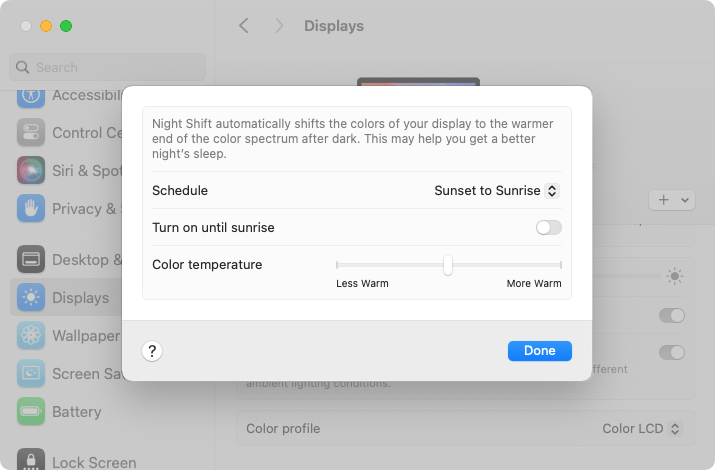
Research suggests that exposure to blue light fools your body into thinking it’s daytime, making it harder to fall asleep if you work late on a Mac with a bright white (which has a lot of blue light) screen. To help, a macOS feature called Night Shift subtly changes the colors of the screen as the sun sets to reduce the amount of blue light hitting your eyes. In essence, everything gets slightly warmer. To configure your Night Shift schedule—so it turns on and off automatically—go to System Settings > Displays > Night Shift. You can set any times, but Sunset to Sunrise adjusts for the sun’s movement in your location throughout the year. One warning: if you edit photos or videos, or work on graphics where specific colors matter, Night Shift’s color changes may be problematic.

(Featured image by iStock.com/PeopleImages)


Social Media: If you regularly work at your Mac late at night and have trouble falling asleep, consider turning on Night Shift to reduce your blue light exposure. By default, it makes the colors of your Mac warmer from sunset to sunrise.

Similar Posts

  • Next week I will be on the road so it will be fun to see how Emily handles the Apple quarterly results that are going to be announced on Tuesday. I guess I’d better write that up in my hotel room from the road.

    Last year, most of our plants suffered while we were gone. Between the lack of water and the chickens we had to do a lot of work to get them back. I installed a nice drip irrigation system this year but we will still have chicken invasions. For those of you that don’t know, Key West protects wild chickens and they are everywhere. That must be why Grace loves Key West so much!

    Thank you so much for reading this issue of Kibbles & Bytes!

    Your Kibbles & Bytes Team,

    _Don, Emily, Hadley & Amy_

  • This is the craziest Presidential election cycle that I have seen. I first got involved when President Johnson was running against Barry Goldwater and that seemed pretty crazy especially after I lost faith with the President over Vietnam. But this time it would be great comedy if the stakes were not so serious. I have to tell you that seeing Donald Trump ask people to raise their hands in a pledge is one of the scariest things I have seen in a long time.

    Voting is so important and our system is messy with primaries, caucuses, super delgates and conventions but it is also the basis of our democracy. I am proud to say that the Vermont legislature passed an automatic voter registration bill unanimously this week, meaning when you get a driver’s license you are automatically registered to vote. You really do not have the right to complain about your leaders if you do not get out and vote. So, exercise your right and go to the polls when the circus comes to your state!

    Thank you so much for reading this issue of Kibbles & Bytes!

    Your Kibbles & Bytes Team,

    _Don, Emily & Hadley_

  • Emily's Favorite Mac Accessories

    I am the kind of gal that admittedly likes gadgets and accessories just because they are cool, I don’t even need to have a use for them to make me want one! If there is a new iPad case, a new speaker, a new product announcement from Apple, I want it. This has resulted in a vast collection over the years of all kinds of gadgets, gizmos and some stuff that I just hang onto for no good reason other than I might need it one day. Some things have been a bit of a fad, others have stood the test of time. Over the years I have found that I few items in my collection of gadgets that have either become invaluable or the kind of item that really stands the test of time.

    p{text-align: center;}. !http://blog.smalldog.com/images/4651.jpg!

    My first must have and favorite gadgets are portable bluetooth speakers, and I have had several over the years. The battery powered speakers from Skullcandy I had were one of my most favorite pocket sized speakers! It took up little room in my bag and I could have my music wherever I wanted. You never realize how much you miss having music wherever you go until you start to use these kinds of speakers and then suddenly don’t have them! I eventually outgrew my little Skullcandy speakers and upgraded to a larger but still portable Altec system. This speaker system went everywhere with us. In fact, it still travels with us in our camper even though it features a 30 pin connection for our phones. What I loved most about this set up was that it had a rechargeable battery, so unlike my little Skullcandy speakers I didn’t need to worry about carrying around spare AA batteries. It also allows me to use a 3.5mm headphone cable and an FM radio. I recently started to use the “**Outdoortech Turtle Shell**”:http://www.smalldog.com/product/85338/outdoor-tech-turtle-shell-2-0-rugged-wireless-boombox-electric-blue speakers to replace the old Skullcandy speakers for immediate portable sound, and as a huge bonus this speaker is bluetooth, something none of my previous portable units had. I will admit, I still haven’t found a better replacement for my aging Altec portable speaker as far as sound quality goes, but I will also admit finding a newer solution would require my having to let go!

    My second must-have gadget is an airport express base station. You might be surprised that it is not the Airport Extreme. Why do I love the “**airport express**”:http://www.smalldog.com/product/80932/apple-airport-express-base-station-802-11n-wi-fi so much? Well part of it might be a bit nostaglic. It was my first introduction into wireless speakers. How cool was it to plug in my Harmon Kardon speakers, simply tap my iPhone while sitting on the couch, and my speakers came to life like magic? But the great features don’t stop there. It’s a really powerful and inexpensive wireless router. For many, we don’t have huge areas we need to cover with wireless. Maybe it’s just a small apartment, or perhaps your house just isn’t that big. When I first started to use the airport express the one draw back was that the only ethernet port had to be designed (in most cases) for your internet modem, but in recent years Apple has added a second ethernet port allowing for more flexibility and versatility with this little gem.

    p{text-align: center;}. !http://blog.smalldog.com/images/4650.jpg!

    iPad and iPhone cases are another huge weakness of mine. I probably have no less then five cases for my phone and for my iPad. You could say I collected cases like some girls collect shoes! But on a serious note, this is a very important accessory for your iPhone or your iPad. Some folks prefer form fitting and minimal, others prefer a more rugged case. I have come to prefer several cases. However, I think cases that combine both slim form factor and serious protection are the “**Lifeproof**”:http://www.smalldog.com/wag900002119 cases. I have one for my phone and one for my iPad. What I love most of them is that they come off easily! I don’t always want a heavy duty case on my devices, but have found that many cases that offer greater levels of protection end up being very difficult to take off your device.

  • It is definitely feeling like spring here in Key West as the flowers are blooming and we wake up each morning to the birds singing (okay and the roosters crowing, too). I get the morning snow (or lack thereof) report from Emily every day and spring hadn’t quite arrived up in Georgia when I was there, either.

    Grace and I are heading up to the 75th Annual Daytona Bike Week for a couple days and then hitting a Cirque du Soleil show in Miami on the way back. Somewhere in there I will be writing Kibbles, perhaps on my iPad mini 4.

    Thank you for reading this issue of Kibbles & Bytes!

    Your Kibbles & Bytes Team,

    _Don, Emily & Hadley_

  • Do you use iCloud for Safari?

    With all the news surrounding the government’s attempt to force Apple to write software that doesn’t exist to crack an iPhone, iCloud has been in the news, too! Do you use iCloud? Apple has some huge server farms to support this amazing technology and I thought it would be good to do a brief review of some of the features as they relate to Safari.

    iCloud has sort of settled to the back of my mind because it just does its thing in the background and serves up features that I take for granted. But this week, I ran into a dilemma that puzzled me for some time. I noticed that I had accidentally deleted one of my folders in my Safari favorites bar. These were important bookmarks and I needed them back. Well, like a good boy, I have a Time Machine backup and quickly went back in time and restored my Safari bookmarks from a time before I had deleted them. Good stuff, but when I went to look the next morning, the folder was gone again. This happened a few times with me going back in time to get the .plist file. Then I figured it out – I had Safari active in iCloud so my bookmarks were being synced in the cloud. So, every time I restored it, it would eventually be overwritten by iCloud. The solution? Really sort of simple, I turned off Safari in iCloud preferences and turned it back on, problem solved.

    Activating Safari in iCloud gives you some great tools. You can start browsing on your iPad and pick up seamlessly from your Mac or you iPhone. It syncs your bookmarks and tabs and if you also use iCloud Keychain it will remember all those passwords for the websites you visit. If you use the reading list function of Safari it will also keep those current across your devices.

    As with the other features of iCloud, the features only work if you are signed on with the same Apple ID on all of your devices. It won’t know that you are signed onto one AppleID with your Mac and another with your iPhone. Most common issues with iCloud come down to this simple issue. Apple has not made it easy to merge Apple IDs so at least for iCloud you should be consistently using the same Apple ID. Open the iCloud System Preference on your Mac and choose Safari to activate iCloud on your Mac or go to the iCloud Setting on your iPhone or iPad to activate.

    You can also access the Safari tabs that you have open on your Mac on your iPhone or iPad. It is a bit different looking on the iPhone or iPad. Open Safari on your iPhone or iPad and then tap the tabs icon. You will see all of your open Safari windows but if you scroll down at the bottom will be all the tabs open on your Mac and you can click on any of those to make it active.

  • _Dear Friends,_

    New data from Piper Jaffray’s teen survey show that Apple is dominating that market at least as far as mobile devices are concerned. They have 71% of the teen market for smart watches and almost 70% for iPhones and 64% for iPad. Another survey has Apple Mac sales showing positive growth while literally the entire PC market is in decline.

    I have been playing around with Amazon’s Echo and I have to say that I like it a lot. I wake up each morning and say “Alexa, what’s new?” and I get the news reports from NPR, CNN, Huffington Post and BBC as well as ESPN Sports and the local weather report. During the day, I ask Alexa to “play the blues” or “play some classical music” and while the speaker is not as good as my Sonos system it does fill the room. I can be around the corner or across the room and the Echo can hear me. Apple needs to step it up a bit and get Siri on the Mac or even better yet, integrated into their networking gear. I would love to be able to tell my Sonos app to play my music from my iTunes library!

    Speaking of networking here’s a Kibbles & Bytes exclusive! This isn’t for everyone but if you have a big house and your Wi-Fi signal isn’t reaching that far corner of the house this could solve three problems for you! I am bundling the Apple Factory Refurbished 3TB Time Capsule with an Apple Factory Refurbished Airport Express. Both have the same 1-year Apple warranty as new but you can save some bucks. The 3TB Time Capsule gives you the Airport Extreme wireless access point and automatic wireless back-ups to the integrated 3 terabyte drive. The Airport Express allows you to extend that wireless network. Normally “**this bundle**”:http://www.smalldog.com/wag900002195/extend-your-network-and-back-up-your-data-for-only-325-99? is around $500 new, but this week for Kibbles & Bytes readers, while supplies last you can buy this refurbished bundle for only “**$325.99!**”:http://www.smalldog.com/wag900002195/extend-your-network-and-back-up-your-data-for-only-325-99?