HomePod and HomePod mini Alerts for smoke or CO
You have a smoke detector that has carbon monoxide detection built-in. But even with those loud alarms when smoke or CO is detected what if you are out in the yard, busy in the shop or playing loud rock and roll music and miss the alarm? Now, with a simple upgrade to your Home app you can have your HomePod or HomePod mini send you alerts if they hear the alarm.
With Sound Recognition, HomePod can detect the sound of a smoke or carbon monoxide alarm in your home, and alert you by sending a notification to your iPhone, iPad, or Apple Watch. On iPhone and iPad, you can tap the notification to check in and make sure everything is all right. After you tap the notification, those at home are alerted that someone is checking in. You can speak to anyone at home, and if you have a HomeKit camera in the same room as HomePod, the camera feed appears while you’re checking in.
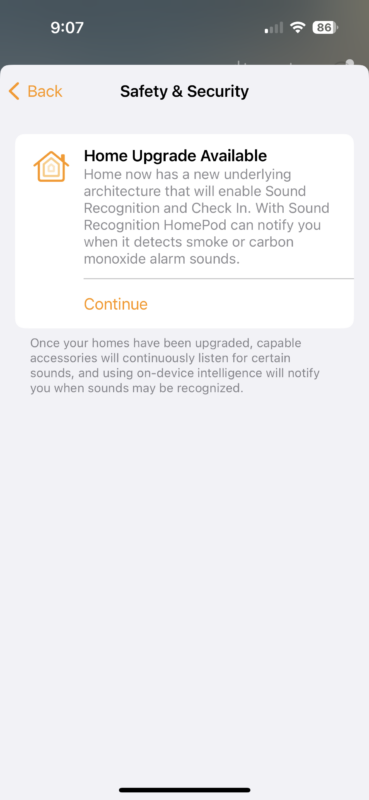
You can turn Sound Recognition on or off in the Home app. Open the Home app on your iPhone or iPad, tap  , tap Home Settings, then tap Safety & Security.
Follow these steps to upgrade any homes you set up to the new Home architecture. All of the homes that you own are upgraded at the same time.
- Open the Home app on your iPhone or iPad running the latest version of iOS or iPadOS, or Mac running the latest version of macOS.
- Tap or click the More button
 .
. - Select Home Settings
 . If you own multiple homes, choose one, then select Home Settings .
 - Select Software Update.
- Tap or click Learn More under Home Upgrade Available, then follow the prompts to upgrade.
Of course, this new feature is not a true smoke or CO detector, it is an alarm detector that relies upon sound to trigger its notifications to you. So be sure to change the batteries each year and test your smoke and carbon monoxide devices to stay safe!