Never Run AppleScripts from Untrusted Sources

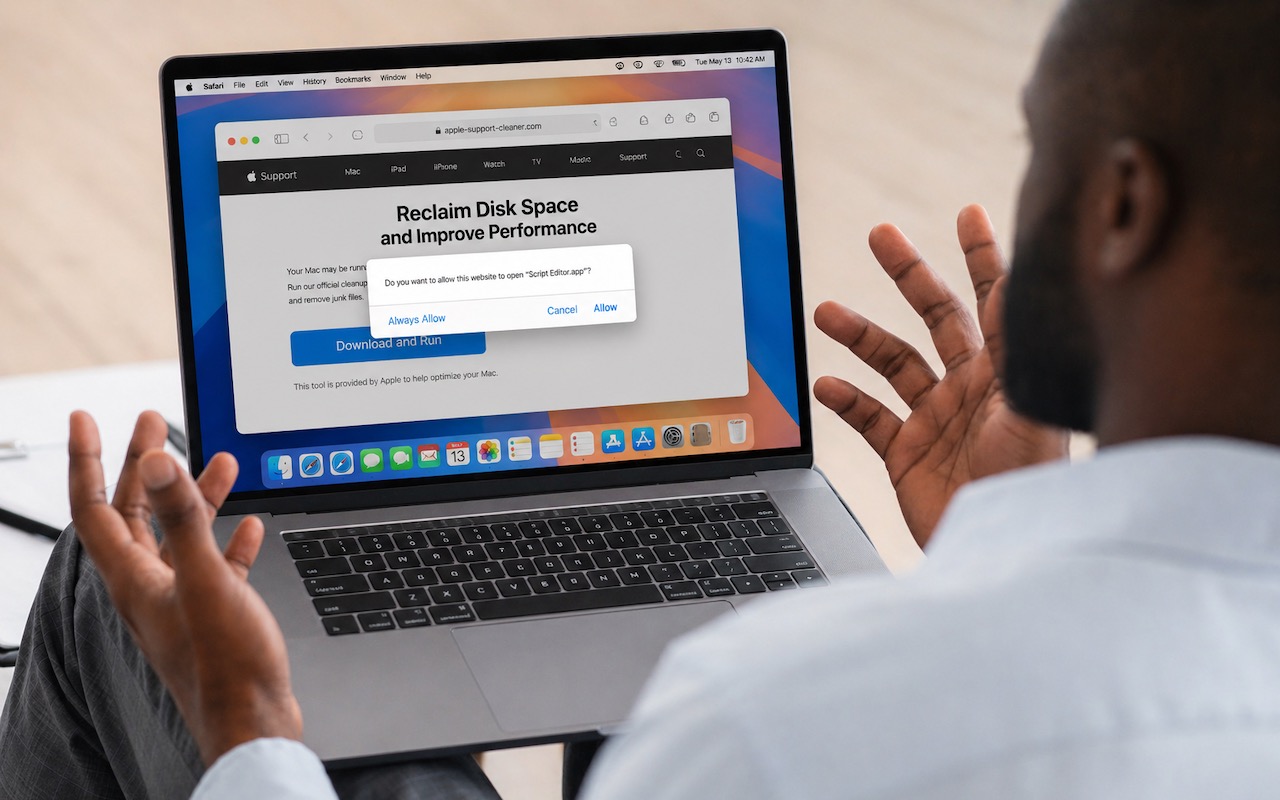
The latest scam to watch out for is fake websites that try to get you to open Script Editor directly from your browser with a pre-filled AppleScript. Don’t do this! Security researchers at Jamf Threat Labs documented an attack where a convincing Apple-themed page claiming to help “reclaim disk space” prompted users to allow Script Editor to open, then used the applescript:// URL scheme to open a seemingly legitimate script that—if the user ran it—would download and install the Atomic Stealer malware. In macOS 26.4, a new warning in Script Editor flags the script as from an unidentified developer, which should alert more users to the danger. (Yet another reason to install macOS updates!) The rule is simple: never run an AppleScript unless you wrote it yourself or acquired the code from a source you trust. If a website asks to open Script Editor—or any other app—click Cancel, and if you ever see this warning, close the script immediately. No legitimate webpage needs to run scripts on your Mac.

(Featured image based on an original by iStock.com/Prostock-Studio)


Social Media: Attackers are now using fake websites to open Script Editor with pre-filled malicious scripts. Never run an AppleScript from any source you don’t completely trust!

Similar Posts

  • New Urbanears Active Headphones

    So by now, it might be clear that I am a bit of a headphone junkie. I’ve come to the conclusion that I can collect and use headphones like I do bags and purses! In my world I can never have enough, so I jumped on the opportunity this week to test our the new “**Hellas**”:http://www.smalldog.com/wag900002177 and “**Reimers**”:http://www.smalldog.com/wag900002181 from Urbanears.

    The Hellas are an over the ear bluetooth headphone. It took a few minutes to get them paired with my computer. My only complaint about these headphones is that I found the touch-less buttons to be a bit clunky to use. The sleek design means you can’t physically see the buttons, so it take some practice and time to learn where the buttons are. However, there are a ton of other features with these headphones that make them extremely appealing. They are incredibly lightweight, comfortable to wear and they have good sound to them. I think my favorite feature about these is that the fabric on the headband and the earpieces are machine washable. You can actually wash the fabric and return your headphones to new condition. As I just started to use these the other day I have not actually tried to wash the fabric, but as more and more people are working out with over the ear headphones this is a huge selling point. Another hidden feature is that there is a built in microphone, so if you are using these with your iPhone, you can take calls without having to remove your headphones.

    Also part of the active line are the Reimers. They deliver on fit and comfort while providing some great sound! I am impressed with how far ear buds have come over the years. What’s interesting about these headphones is that while they are in the active category, they are actually a wired set of headphones. However, Urbanears added several great features to ensure these headphones can stand up to the intensity of any workout. They have two clips for securing them to your clothing and they feature reflective cabling to light up during early morning or late evening runs. They use a new earlock technology that ensures they stay in during your workout, so no more fears of them falling out during sit-ups, push-ups and the like. I admit I am just a runner, so some of the more intense workouts I’ve not tried these, but judging by how well they stayed in for runs I am confident in saying they will stay put! Last but not least, they feature standard iOS controls we have all grown to expect out of headphones.

  • Prep Your Tech for Travel

    Long ago, to get ready for a trip, we’d mostly make sure we had our plane tickets, books and magazines to read, and…

  • Hey Siri, What Can You Do?

    So, I am a little embarrassed to admit it but I bought an Amazon Echo to check out how Alexa compares with Siri. I’m a gadget guy so we will see if we find it useful and if not, I am sure I can find it a home on eBay. I use Siri more and more these days. My most common uses are asking her to settle trivia disputes with Grace or setting the timer for 5 minutes. But there is a lot more that Siri can do!

    Make Relationships with Siri
    When you speak Siri commands, you can refer to people by relationship, rather than name. So, if you want to call your father, you can say “call my father” instead of saying “call Bruce Leibowitz.” But to do this, you need to introduce Siri to your family. First, make sure you have a “card” in the Contacts app for yourself, and then go into Settings > Mail, Contacts, Calendars, scroll down to find and tap My Info, and select your card. Next, make sure you have a contact card for your father, and then tell Siri, “Bruce Leibowitz is my father.” Or, if Siri doesn’t hear you correctly, open Contacts, edit your card (not your father’s!), scroll down, tap “add related name,” tap the default relationship to pick “father,” tap the info “i” icon, select your father’s card, and tap Done.

    You can even use Siri to remember other types of relationships. Artie used to bring manure from his uncle’s farm for my garden and ended up with the nickname, “the spreader”. If I tell Siri “Art Hendrickson is my spreader” I can now just say “text my spreader…” and Siri knows who I am talking about. This works for nicknames but also for lawyers, accountants, doctors or any nickname you want to tell Siri about.

    Take a Picture
    Instead of fumbling to launch the Camera app on your iPhone you can just say “take a picture” and Siri will automatically open the Camera app and you can snap away.

    Siri Converts
    Need to know how many millimeters are in 4 inches? Just ask Siri and you will find that there are 101.6 mm in 4 inches. This works for currency exchange rates, too. Ask Siri how many Euros are equal to $100US you will find that 87.73 Euros is the exchange rate today. Siri has some other strong calculation features too. You can ask Siri how many calories there are in that fish sandwich or to calculate a 20% tip on your restaurant bill. You can ask her to solve math problems involving fractions and other math functions that will be faster than opening the calculator app and punching in the numbers.

    Settling Up
    Okay you can use Siri to look up baseball stats or other information to settle a dispute but what if you are at loggerheads and just want to get a random answer and don’t have a coin to flip. You can ask Siri to “roll the dice”, “flip a coin” or pick a random number.

    Name that Tune
    Siri is integrated with Shazam to help you figure out what song is playing. Just ask her “what song is playing?” and she will listen and let you know and probably try to sell you the song, too!

    Find that Photo
    Siri can search your photo library for you. I know how frustrating it is if your are like me and have literally thousands of photos. You can say something like “find that photo from Daytona Beach from last March” and Siri will launch Photos and take you right to any photos taken at that place and time.

    Siri Takes You Out
    Siri can make your restaurant reservations for you, too! Tell Siri “make a restaurant reservation for four at 7PM” and she will respond with available restaurants nearby and if you have the Open Table app installed can make the reservation for you or give you the phone number to call.

    Are We There Yet?
    If you are using your iPhone for navigation you can just say “ETA” and Siri will let you know how much longer you are gonna be on the road.

    Leave Me Alone
    Siri can do a lot for you but sometimes you just want alone time. You can tell Siri to turn on “do not disturb” and you will not be bothered. Or tell her to “turn on airplane mode” and she will turn off Wi-Fi and cellular signals.

  • Get Organized!

    I have tried a lot of apps over the years for keeping ideas organized, assigning tasks or just keeping track of my goals. The problem I’ve found with many of the organizational applications is that I don’t find them easy to access. If you’re not on your phone or at your computer, often these applications can’t be utilized easily or have widely varied interfaces depending on which device your using.

    “**Trello**”:https://trello.com/ has become my new favorite go-to app for keeping ideas and tasks organized. Trello is a free app with the ability to also pay for upgraded features for minimal fees. Why do I love Trello so much? It’s simple, I can easily use it on my computer, my iPhone or my iPad. There is an app for all three of my devices, and each version works seamlessly with the others. Working with several staff members in different departments here at Small Dog can make keeping track of tasks and to-do lists a bit of a challenge, but this simple application has really helped to streamline things.

    I easily and quickly create what they call “boards”, each board then allows you to create individual categories to which you can then add individual tasks. Within my lists I can upload photos, files, web links, assign due dates and add notes. Once I have created a board, I can also easily share that board with co-workers or whomever I choose to share them with. Anyone I have shared a board with can also be granted access to update and add to the boards, add notes or more files.

    A feature many of us have come to really rely on are the updates that you get from Trello notifying you that someone has made a change. I have found just one complaint thus far about the application. There appears to be no feature to mark a task as completed while still leaving it on your board. You can easily archive tasks and even entire boards, but I prefer to still be able to see those tasks while clearly seeming them marked as completed. However, all in all, I find this to be an invaluable app and one that I utilize all of the time. I have tried and do use google docs and google drive, and I’ve installed those on my devices as well, but for me nothing beats the ease and convenience of Trello.