How AI Vulnerability Detection Changes Software Security

The latest generation of AI models has fundamentally changed how quickly security vulnerabilities can be found in software, for both defenders and attackers. Understanding what’s happening helps explain why we keep emphasizing the importance of keeping your devices updated.

In April 2026, AI company Anthropic announced Mythos Preview, an AI model with unprecedented capabilities for finding security flaws in software. Unlike previous AI-assisted security tools that often produced false positives and created more work for human evaluators, Mythos proved that it can discover true vulnerabilities that have evaded detection for decades—including a 27-year-old bug in OpenBSD, an operating system famous for its security.

Alongside Mythos, Anthropic launched Project Glasswing, a collaborative effort with approximately 50 partners—including Apple, Microsoft, Google, Amazon, and numerous financial institutions—to identify and fix vulnerabilities in critical software before similar AI-powered capabilities fall into the hands of malicious actors. As Firefox engineers said when reporting on their use of Mythos, “The current moment is a perilous one, but also full of opportunity. Let’s work together to secure the internet.”

Why This Matters

The security implications are significant. Within a month of Project Glasswing’s launch, Anthropic reported that partners collectively found more than 10,000 high- or critical-severity vulnerabilities in their software. Several partners reported that their bug-finding rate increased by more than tenfold.

Firefox developer Mozilla published compelling evidence of Mythos’s capabilities, noting that it identified and fixed 271 vulnerabilities in Firefox 150—over 10 times as many as they found in Firefox 148 with the previous-generation Claude Opus 4.6. Of those 271 bugs, 180 were rated high-severity, meaning they could be exploited through normal user behavior, such as browsing a Web page. (The chart below shows higher numbers because it includes bugs from other sources and other versions.)
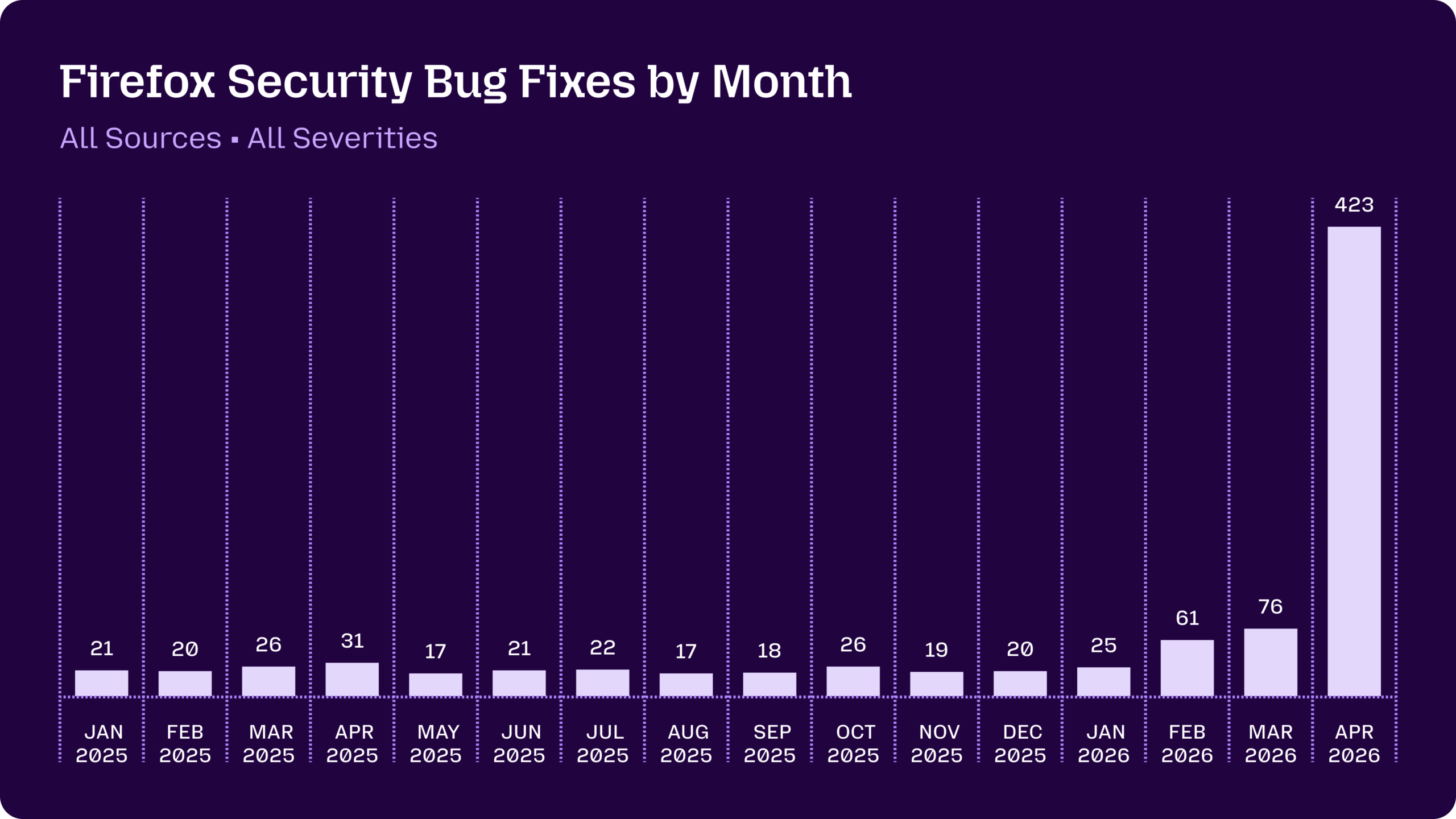
Mozilla’s results are remarkable for both their volume and their quality. Firefox engineers reported finding bugs that had remained undiscovered through many years of traditional security testing.

How Apple Fits In

Apple is a founding partner in Project Glasswing, yet another signal that the company takes security seriously. Apple’s vertical integration—controlling everything from chip design to the operating system to the App Store—gives it a structural advantage in secure design. For instance, Apple’s newest M5 Mac chips and A19 iPhone and iPad chips include Memory Integrity Enforcement (MIE), a hardware-level protection designed specifically to stop memory corruption exploits.

However, even these cutting-edge protections aren’t invulnerable. Security researchers at Calif.io demonstrated the first public macOS kernel memory corruption exploit on M5 silicon in May 2026. Working with Mythos Preview, they built a working privilege escalation exploit in just five days—targeting hardware protections that Apple spent five years developing.

An Arms Race Against Time

The uncomfortable reality is that while Anthropic currently controls access to Mythos, equivalent capabilities will inevitably become more widely available. OpenAI and Google probably already have similarly capable models in development, as do other AI model developers, some of whom may be accessible to or even beholden to hostile entities.

The security dynamics differ depending on whether we’re talking about existing software or new code that hasn’t shipped yet. For new code, defenders have a clear advantage—they can scan for vulnerabilities before release and catch bugs that would never have been found manually.

For existing software already running on billions of devices, the picture is darker. Attackers only need to find one exploitable bug to get in; defenders need to find and fix all of them. Worse, attackers don’t have to test their code to avoid breaking features, schedule a release, or get approval from other departments—they can exploit a vulnerability the moment they find it. As the Zero Day Clock site shows, the window between a vulnerability being discovered and being exploited has dropped precipitously—what once took months now happens in days and is expected to happen in minutes in a year or two.

This transition period—while AI rapidly discovers vulnerabilities in existing code that takes time to patch—is where we’re most at risk. The Zero Day Clock site features a call to action offering 10 suggestions for how the industry—and society—should rethink cybersecurity to stave off this threat.

Keep Installing Updates

For most users, the best defense against AI-powered exploits is nothing new—keep your devices updated—but it’s more important than ever. The fixes in Apple’s updates increasingly include patches for AI-discovered vulnerabilities. Practically speaking, you should:

  • Enable automatic updates: Don’t allow yourself to forget to install updates. On iPhones and iPads, go to Settings > General > Software Update > Automatic Updates. On Macs, go to System Settings > General > Software Update, click the ⓘ button, and turn on all the switches. (If you’re working in an organization with an update policy, check with IT first.)
  • Consider security in hardware upgrades: Although the main reason to upgrade hardware should be functional, keep in mind that a newer device will likely be more secure thanks to improved hardware protections.
  • Replace unsupported devices: Hardware that no longer receives security updates is increasingly risky. This applies not just to your Apple devices but to every piece of gear that can be updated, including network hardware, printers, and smart home devices like cameras and doorbells.

In the long run, the emergence of AI-powered security tools favors defenders—developers will be able to catch many more bugs before shipping. For the near future, however, it’s essential that we keep our devices running the latest and most secure software.

(Featured image by iStock.com/Thinkhubstudio)


Social Media: Anthropic’s Mythos Preview AI model found over 10,000 high- or critical-severity vulnerabilities in one month. Similar AI models will soon be available to attackers, so keeping your devices updated has never been more important.


Similar Posts

  • Hey Dora…

    So we have Siri and I’ve been playing around with Alexa (don’t tell Grace!) but now I have Dora, too. Dora is the computer from Robert Heinlein’s Time Enough for Love, The Number of the Beast, The Cat Who Walks Through Walls which were some of my favorite Sci-Fi as a kid.

    I was helping a customer that has pretty bad arthritis and struggled to use the keyboard. I was straightening out her email and getting her off of AOL (something we do often!) and noticed how difficult it was to type a simple email. So, I showed her dictation on the Mac and wow, it was like a light just got switched on. Dictation has come a long way and if your are on Mavericks, Yosemite or El Capitan, Apple’s enhanced dictation works wonderfully.

    Dictation will not be a satisfying experience for you if you have a lot of noise in the room, i.e. other people talking, music, etc, but if you are working alone in a relatively quiet environment it can be a great tool not only for dictating that email but you can also use spoken commands to direct your Mac to take action.

    Setting up Enhanced Dictation

    * Open System Preferences, then click on Dictation & Speech. Turn on Dictation and set up your options.

    * Click *Use Enhanced Dictation*. This will download a 1.2GB file so that you can dictate without internet connection.

    * Choose your language and dialect. Some languages, such as English, have multiple dialects.

    * Choose the keyboard shortcut you will use to signal that you’re ready to start dictating. The default is pressing the function Fn key twice, which I find convenient but you can customize it.

    * Choose your preferred microphone from the pop-up menu below the microphone icon. Normally, you use the internal microphone but if you are using a headset or external microphone you can choose that.

    Using Dictation

    * Go to a document or other text field and place the insertion point where you want your dictated text to appear.

    * Press the keyboard shortcut for starting dictation. The default shortcut is Fn Fn (press the Fn key twice). Or choose Edit > Start Dictation. When your Mac is listening, it displays a microphone with an input meter that rises and falls as you speak.

    * Speak the words that you want your Mac to type. Use dictation commands to add punctuation, formatting, and more.

    * To stop dictating, click Done below the microphone icon, or press Fn, or switch to another window.

    The more you use Dictation, the better it understands you. Dictation learns the characteristics of your voice and adapts to your accent.

    I will go into some of the more enhanced features like Dictation Commands in next week’s Kibbles & Bytes but I can tell Dora to Open an App, select text, move up or down and much more. I think you will like dictation on the Mac, give it a try!

  • B.B. King – The King of the Blues

    For more than half a century, Riley B. King – better known as B.B. King – defined the blues for a worldwide audience. Since he started recording in the 1940s, he has released over fifty albums, many of them classics. He was born September 16, 1925, on a plantation in Itta Bena, Mississippi, near Indianola. In his youth, he played on street corners for dimes, and would sometimes play in as many as four towns a night. In 1947, he hitchhiked to Memphis, TN to pursue his music career. Memphis was where every important musician of The South gravitated, and it supported a large musical community where every style of African American music could be found. B.B. stayed with his cousin Bukka White, one of the most celebrated blues performers of his time, who schooled B.B. further in the art of the blues.

    B.B.’s first big break came in 1948 when he performed on Sonny Boy Williamson’s radio program on KWEM out of West Memphis. This led to steady engagements at the Sixteenth Avenue Grill in West Memphis, and later to a ten-minute spot on black-staffed and managed Memphis radio station WDIA. “King’s Spot,” became so popular, it was expanded and became the “Sepia Swing Club.” Soon B.B. needed a catchy radio name. What started out as Beale Street Blues Boy was shortened to Blues Boy King, and eventually B.B. King.

    In the mid-1950s, while B.B. was performing at a dance in Twist, Arkansas, a few fans became unruly. Two men got into a fight and knocked over a kerosene stove, setting fire to the hall. B.B. raced outdoors to safety with everyone else, then realized that he left his beloved $30 acoustic guitar inside, so he rushed back inside the burning building to retrieve it, narrowly escaping death. When he later found out that the fight had been over a woman named Lucille, he decided to give the name to his guitar to remind him never to do a crazy thing like fight over a woman. Ever since, each one of B.B.’s trademark Gibson guitars has been called Lucille.

    B.B. was inducted into the Blues Foundation Hall of Fame in 1984 and into the Rock and Roll Hall of Fame in 1987. He received NARAS’ Lifetime Achievement Grammy Award in 1987, and has received honorary doctorates from Tougaloo(MS) College in 1973; Yale University in 1977; Berklee College of Music in 1982; Rhodes College of Memphis in 1990; Mississippi Valley State University in 2002 and Brown University in 2007. In 1992, he received the National Award of Distinction from the University of Mississippi.

    B.B. King came to Vermont many times and I had the pleasure of being at several of his concerts. He died last year at the age of 90 and was performing to sold out crowds right up until he died. B.B. King is gone but the –The Thrill is Gone- lives forever.

  • Find Some Ham Amidst Your Email Spam

    Spam filters work pretty well—99% of the messages in your spam mailbox are probably spam. But it’s frustrating to miss an important message…

  • Emily's Favorite Mac Accessories

    I am the kind of gal that admittedly likes gadgets and accessories just because they are cool, I don’t even need to have a use for them to make me want one! If there is a new iPad case, a new speaker, a new product announcement from Apple, I want it. This has resulted in a vast collection over the years of all kinds of gadgets, gizmos and some stuff that I just hang onto for no good reason other than I might need it one day. Some things have been a bit of a fad, others have stood the test of time. Over the years I have found that I few items in my collection of gadgets that have either become invaluable or the kind of item that really stands the test of time.

    p{text-align: center;}. !http://blog.smalldog.com/images/4651.jpg!

    My first must have and favorite gadgets are portable bluetooth speakers, and I have had several over the years. The battery powered speakers from Skullcandy I had were one of my most favorite pocket sized speakers! It took up little room in my bag and I could have my music wherever I wanted. You never realize how much you miss having music wherever you go until you start to use these kinds of speakers and then suddenly don’t have them! I eventually outgrew my little Skullcandy speakers and upgraded to a larger but still portable Altec system. This speaker system went everywhere with us. In fact, it still travels with us in our camper even though it features a 30 pin connection for our phones. What I loved most about this set up was that it had a rechargeable battery, so unlike my little Skullcandy speakers I didn’t need to worry about carrying around spare AA batteries. It also allows me to use a 3.5mm headphone cable and an FM radio. I recently started to use the “**Outdoortech Turtle Shell**”:http://www.smalldog.com/product/85338/outdoor-tech-turtle-shell-2-0-rugged-wireless-boombox-electric-blue speakers to replace the old Skullcandy speakers for immediate portable sound, and as a huge bonus this speaker is bluetooth, something none of my previous portable units had. I will admit, I still haven’t found a better replacement for my aging Altec portable speaker as far as sound quality goes, but I will also admit finding a newer solution would require my having to let go!

    My second must-have gadget is an airport express base station. You might be surprised that it is not the Airport Extreme. Why do I love the “**airport express**”:http://www.smalldog.com/product/80932/apple-airport-express-base-station-802-11n-wi-fi so much? Well part of it might be a bit nostaglic. It was my first introduction into wireless speakers. How cool was it to plug in my Harmon Kardon speakers, simply tap my iPhone while sitting on the couch, and my speakers came to life like magic? But the great features don’t stop there. It’s a really powerful and inexpensive wireless router. For many, we don’t have huge areas we need to cover with wireless. Maybe it’s just a small apartment, or perhaps your house just isn’t that big. When I first started to use the airport express the one draw back was that the only ethernet port had to be designed (in most cases) for your internet modem, but in recent years Apple has added a second ethernet port allowing for more flexibility and versatility with this little gem.

    p{text-align: center;}. !http://blog.smalldog.com/images/4650.jpg!

    iPad and iPhone cases are another huge weakness of mine. I probably have no less then five cases for my phone and for my iPad. You could say I collected cases like some girls collect shoes! But on a serious note, this is a very important accessory for your iPhone or your iPad. Some folks prefer form fitting and minimal, others prefer a more rugged case. I have come to prefer several cases. However, I think cases that combine both slim form factor and serious protection are the “**Lifeproof**”:http://www.smalldog.com/wag900002119 cases. I have one for my phone and one for my iPad. What I love most of them is that they come off easily! I don’t always want a heavy duty case on my devices, but have found that many cases that offer greater levels of protection end up being very difficult to take off your device.