Expand your mind…er..text

Speed Up Your Fingers with Text Expansion

With all the advances in computing and communications, it’s amazing that—after nearly 150 years!—we still use the keyboard layout from the world’s first practical typewriter for entering text into our Macs, iPhones, and iPads. Sure there are some improving dictation solutions out there but typing is by far how we input text. But we have not gotten that much better as typists, nor do we enjoy typing more—if anything, we increasingly abbreviate to avoid typing, hence “LOL, BRB, etc.” Text messaging aside, wouldn’t it be nice to be able to type less without compromising meaning or making your text look like it was composed by a trained monkey? Thanks to text expansion features built into OS X and iOS, and extended with third-party utilities, you can.

For basic text expansion capabilities in OS X, look in System Preferences > Keyboard > Text, and in iOS 9, go to Settings > General > Keyboard > Text Replacement. For both, you can enter a phrase, and a shortcut that expands into that phrase when typed and followed by a space or punctuation character. (Tip: If text expansion doesn’t work in a Mac app like Mail or Safari, make sure Edit > Substitutions > Text Replacement is selected.)

If you’re signed into the same iCloud account on both your Mac and your iPhone, for instance, the text expansions sync between them automatically. So, you can type “smh” and tap the Space bar to get “Shaking my head!” typed out for you, regardless of what device you’re using. (Another tip: don’t create abbreviations that you will also want to type normally. It might seem like a good idea to use “np” for “No Problem,” but that will get in the way of talking about Nurse Practitioners.)

With such a useful feature built into OS X and iOS, why would you want to spend money on a third-party utility, like TextExpander (Mac and iOS), Typinator (Mac), or TypeIt4Me. Unfortunately, OS X’s text expansion feature doesn’t work in all apps (it likely won’t work if the app lacks the Edit > Substitutions > Text Replacement menu command). The interface for creating new substitutions is cramped and hard to work with, you can’t configure the trigger characters that cause abbreviations to expand, and you can’t include text with styles, variable text like the date, or even graphics.

That’s where text expansion utilities shine. They can include styled text and graphics in expansions, insert the current date and time, respect case when expanding abbreviations, include the contents of the clipboard in expanded text, automatically fix common typos, create fill-in-the-blanks snippets that you customize on each expansion, and much more.

Here are some ideas for the kinds of things you might want to turn over to your computer for typing:
Long or complex words or phrases, such as scientific names. Aedes aegypti, anyone?

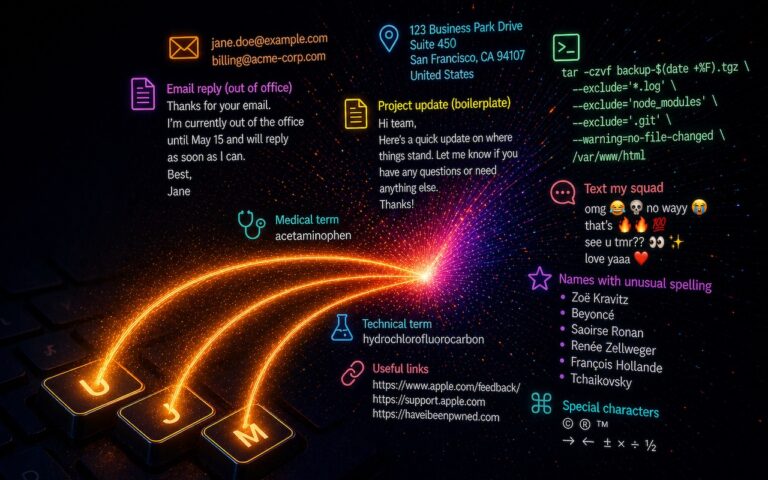
*Your address, phone number, and email address. One of my favorites is “@d” which inserts my email address. I get real tired of typing email address, phone numbers, etc. Text expansion speeds that up!

*Boilerplate text for common email replies.

*The current date and/or time.

*Special characters, so blb could expand to the British pound symbol £.

*Unix commands for Terminal, such as using ssh to log in to a remote computer.

I am sure you can come up with dozens that might work for you and speed up your typing. So think about what bit of text you might want expand automatically and give text expansion a try today!

Similar Posts

  • Be Very Careful with AI Agents!

    AI agents—software that can take actions on your behalf using artificial intelligence—are having a moment. The appeal is obvious: imagine a robot butler…

  • On a plane today and back home to Key West which is only a little more laid back. It is like being in a time machine leaving Las Vegas in the morning and back in the Keys by dinner.

    Thank you for reading this issue of Kibbles & Bytes!

    _Don,Emily, Dean and Scott_

  • The Little Guy(s)

    You know I am a rabid Boston Celtics fan, and I have been since I was a child listening to games on my transistor radio, searching for the gravely voice of Johnny Most. These days our All-Star and team leader is Isiah Thomas who NBA hall of famer, Tommy Heinsohn, always refers to as the “little guy”. We have been thinking of changing our dog, Max’s name to the little guy as a result.

    It was little iPhone and little iPad Pro day at the Apple event. Apple introduced the 4-inch iPhone SE and the iPad Pro 9.7-inch tablet. In other hardware announcements, there were new watch bands for the Apple Watch and a new Lightning to USB 3 camera adapter. The original iPad Air is now discontinued and the iPad Air 2 with a more limited selection becomes the entry-level 9.7-inch iPad.

    I have gotten used to the size of my iPhone 6 but there are many people that want a smaller iPhone. Having a big iPhone 6 or 6+ sticking out of your back pocket is an invitation to theft and they do get a big bulky in the front pocket of your jeans. The iPhone SE uses the iPhone 5 form factor, with a 4-inch screen and aluminum case. The iPhone SE is not crimping on power though, as it meets almost all of the specifications of the iPhone 6s. It fails to match up to the current iPhone lineup only in the lack of the 3D Touch technology, the Taptic Engine that provides feedback you can feel, and slower wireless networking. It’s either $399 or $499, with 16 GB or 64 GB of storage, and comes in the same four colors, Silver, Space Gray, Gold and Rose Gold. We have found that most cases for the iPhone 5 should work with the iPhone SE. These are shipping on March 31.

    p{text-align: center;}. !http://blog.smalldog.com/images/4692.png!

    The 12.9-inch iPad Pro, introduced last year with the Apple Pencil and Smart Keyboard, has enjoyed some moderate acceptance as a productivity device. I can see how for some, it might be their only device. And for artists, architects and others the iPad Pro is a digital drawing board like no other. But it is 12.9 inches and that is just a bit large for some. Apple introduced the 9.7-inch iPad Pro to meet this need, which meets or exceeds many of the larger model’s specs.

    For instance, the smaller model’s screen can display more colors and adjusts its white balance to match the ambient light in the room. Its cameras are notably better — the rear camera is 12 megapixels instead of 8 and has a True Tone flash, while the front camera is 5 megapixels instead of 1.2 and can use the screen as a flash. Plus, the new iPad Pro can record 4K video instead of just 1080p. I assume we will see these upgrades to the 12.9 inch iPad Pro in the future but the smaller version is a powerhouse.

    The 9.7-inch iPad Pro’s A9X chip is somewhat slower, it has half the RAM, and its Lightning port transfers data at only USB 2 speeds. But if the size is right for you, prices start at $599 for 32 GB of storage and go up to $899 for 256 GB. It will be shipping on March 31 in four colors: silver, gold, space gray, and rose gold. Cases and accessories designed to fit the iPad Air 2 should work with the 9.7-inch iPad Pro. We have our orders in with Apple and should have stock by the launch date. I think this new iPad Pro is going to be the iPad of choice for a lot of people.

    p{text-align: center;}. !http://blog.smalldog.com/images/4689.png!

    Apple also introduced the $39 Lightning to USB3 camera adapter. It is much more than a camera adapter though and opens the Lightning port to a lot of USB devices. With the Lightning to USB 3 Camera Adapter, it’s easy to transfer photos and videos from your high-resolution digital camera to your iPad Pro.
    If you connect with a USB Power Adapter, you can connect USB peripherals like hubs, ethernet adapters, audio/MIDI interfaces, and card readers for CompactFlash, SD, microSD, and more. This is a new and important step by Apple in making the Lightning port much more versatile.