Avoid Confusion by Setting iPhone Password Autofill to Only One App

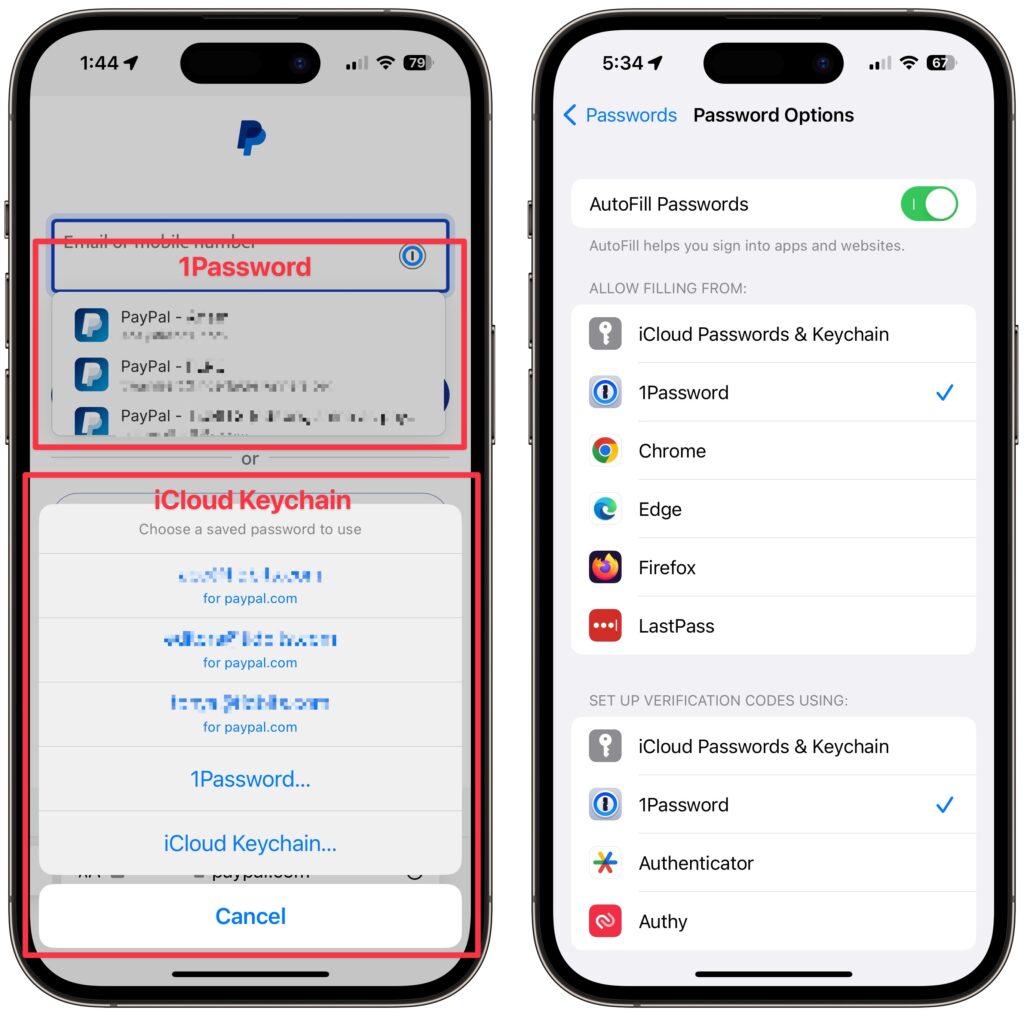
Let’s say you use 1Password (or another third-party password manager) on an iPhone or iPad. When that’s the case, it’s easy to end up in a situation where your device will present passwords from both 1Password and iCloud Keychain, possibly along with another app. That won’t break anything, but as you can see in the screenshot below, dueling password managers can be confusing, particularly if one doesn’t have up-to-date passwords. To make logging in easier, go to Settings > Passwords > Password Options and select just one app in Allow Filling From. For instance, if you’re using 1Password, turn off iCloud Passwords & Keychain and all the other apps.
(Featured image based on an original by iStock.com/Kostiantyn Filichkin)


Social Media: Do you suffer from dueling password managers on your iPhone or iPad? If you’re using a third-party password manager, turn off password autofill for iCloud Passwords & Keychain and any other apps to avoid confusion.

Similar Posts

  • Get Organized!

    I have tried a lot of apps over the years for keeping ideas organized, assigning tasks or just keeping track of my goals. The problem I’ve found with many of the organizational applications is that I don’t find them easy to access. If you’re not on your phone or at your computer, often these applications can’t be utilized easily or have widely varied interfaces depending on which device your using.

    “**Trello**”:https://trello.com/ has become my new favorite go-to app for keeping ideas and tasks organized. Trello is a free app with the ability to also pay for upgraded features for minimal fees. Why do I love Trello so much? It’s simple, I can easily use it on my computer, my iPhone or my iPad. There is an app for all three of my devices, and each version works seamlessly with the others. Working with several staff members in different departments here at Small Dog can make keeping track of tasks and to-do lists a bit of a challenge, but this simple application has really helped to streamline things.

    I easily and quickly create what they call “boards”, each board then allows you to create individual categories to which you can then add individual tasks. Within my lists I can upload photos, files, web links, assign due dates and add notes. Once I have created a board, I can also easily share that board with co-workers or whomever I choose to share them with. Anyone I have shared a board with can also be granted access to update and add to the boards, add notes or more files.

    A feature many of us have come to really rely on are the updates that you get from Trello notifying you that someone has made a change. I have found just one complaint thus far about the application. There appears to be no feature to mark a task as completed while still leaving it on your board. You can easily archive tasks and even entire boards, but I prefer to still be able to see those tasks while clearly seeming them marked as completed. However, all in all, I find this to be an invaluable app and one that I utilize all of the time. I have tried and do use google docs and google drive, and I’ve installed those on my devices as well, but for me nothing beats the ease and convenience of Trello.

  • _Dear Friends,_

    Vermont is back in the freezer as April becomes the most frustrating month for the Green Mountains. The days are longer, there is sun but it is too early to work in the garden. The roads are muddy and while the black flies haven’t awoken yet, it is hard to stay in the house but challenging to go outside.

    The iPad Pro 9.7-inch model has arrived at our stores and the initial sales have been strong. While this new iPad, at first glance, looks like the old iPad, once people start using it, playing with the Apple Pencil and realizing the advancements of this latest iPad they are hooked. Size-wise, I think that it might be ideal. The iPad Pro 12-inch model is, well it is big. The iPad mini is good for reading or checking your email abut the 9.7-inch iPad Pro is just right.

    I am very pleased to introduce the latest member of the Small Dog Team, Amy Farnsworth, who joins us as our Marketing and Design manager. Amy has strong marketing and graphic design background from her work in Utah and has recently relocated to Vermont with her husband. She says “I am a graphic designer, daydreamer, dog lover, wife, sister, best friend, Netflix junky & secret dad joke lover.” I think she will fit in fine! Please join me in welcoming Amy!

    This week’s Kibbles & Bytes exclusive features the Apple Certified Refurbished MacBook Pro. This is not a stripped down MacBook Pro but a fully-configured unit ready for your toughest challenges. It features the 2.8 GHz i7 intel processor, 16GB of ram, a 1TB hard drive and the NVIDIA 750M graphics chip driving the awesome “15-inch Retina display.”:http://www.smalldog.com/wag900002189 This Macbook Pro comes with the same 1-year warranty as new Macbook Pros but we are bundling it this week with Applecare that not only extends that 1-year warranty to 3-years but also extends your 90-days of free tech support from Apple to 3-years as well. “Kibbles & Bytes readers save $100 on this bundle at only $2925.98!”:http://www.smalldog.com/wag900002189

  • _Dear Friends_,

    It was a long trip up to Daytona using the “avoid highways, avoid tolls” feature of Google Maps. I was using my Blue Ant Pump Lite Bluetooth earbuds connected to my iPhone in my pocket. I not only got the turn-by-turn directions from Google Maps but also some great tunes from my playlists. I even was able to take a phone call, although I pulled over both for safety reasons and so I could hear better. We travelled through Florida’s farm belt, orange groves (hey, their trees are full of oranges!) and Lake Okeechobee before we headed towards the coast.

    It is official, Apple has sent out notices for the special “Let Us Loop You In” event on Monday. It is expected to see some new iPhones and iPads and perhaps other announcements. For those of you with a 4th Generation AppleTV there is a new app called “Apple Events” that you can download for free to watch the event which starts at 10AM Pacific time. The live stream will also be available on Macs and iOS devices through Apple’s event website. iOS 7 or OS X 10.8.5 with Safari 6.0.5 or later is required. We are excited to hear about the latest from Apple!

    I am going to talk about Time Machine and Time Capsules a bit in the article below, however, this week as a Kibbles & Bytes exclusive, I am featuring the Apple factory reconditioned 2 and 3 TB Time Capsules. You can save a bunch on these Time Capsules that have a 1-year Apple warranty. Normally, the 2 TB Time Capsule, new is $299.99 and the 3TB Time Capsule is $399.99. With $20 off for Kibbles & Bytes readers, the “**2TB Time Capsule is only $159.99**”:http://www.smalldog.com/wag900002182/save-20-on-an-apple-factory-refurbished-2tb-time-capsule and the “**3TB is $259.99!**”:http://www.smalldog.com/wag900002183/save-20-on-an-apple-factory-refurbished-3tb-time-capsule This is a great way for you to have automatic wireless backup and the superior Apple Airport Extreme wireless access point!

  • _Dear Friends,_

    Don’s making the voyage home this week from Key West back to the Green Mountains. He’s in for a bit of a shock when he gets back. Mother Nature seems to have gotten a bit confused this week. I mentioned in the fall that I was taking a new stance on winter and was going to embrace it this year and I truly did my best though we didn’t see much snow. But when we get a snow in late April, I choose to just ignore it. I didn’t bother to shovel off my deck and I left the hose to water my horses just thrown on the ground. In the end both these decisions only made my life harder. I had to lug water buckets for my horses as my hose was not only frozen to the ground, but frozen itself because I didn’t take the time to drain the water out of it. All the slush and snow I ignored on my deck was a sprained ankle waiting to happen and my screen door only opened halfway once everything froze back up. Well, let’s just hope this was finally the last of it and spring will finally show up for real. It always looks a little funny when the trees are starting to bud and there is still snow on the ground.

    The snow this week was a bit of a shock to many of us, and so was the latest financial report from Apple. For the first time in 13 years, Apple’s financial report showed lower than expected sales figures. iPhone sales showed their first decline since their release and iPad sales have been sluggish for several quarters now, but we’ll have more on this later in Kibbles.

    This week’s Kibbles & Bytes exclusive is perfect for the on-the-run Mom on your list or anyone who is on the go and trying to fit time in for themselves between home and the office. This week only, save $40 on this perfect on-the-run bundle. Get the OutDoor Tech Kodiak mini, the BlueAnt Pump Mini headphones and the Belkin Slim-Fit Plus armband for “**$99.97**.”:http://www.smalldog.com/wag900002212 This bundle is perfect for ensuring the mom who does it all can keep can keep her phone going to capture those special moments or squeeze in an important call during her workout.