The Hardware You’ll Need to Run Apple’s 2023 Operating Systems

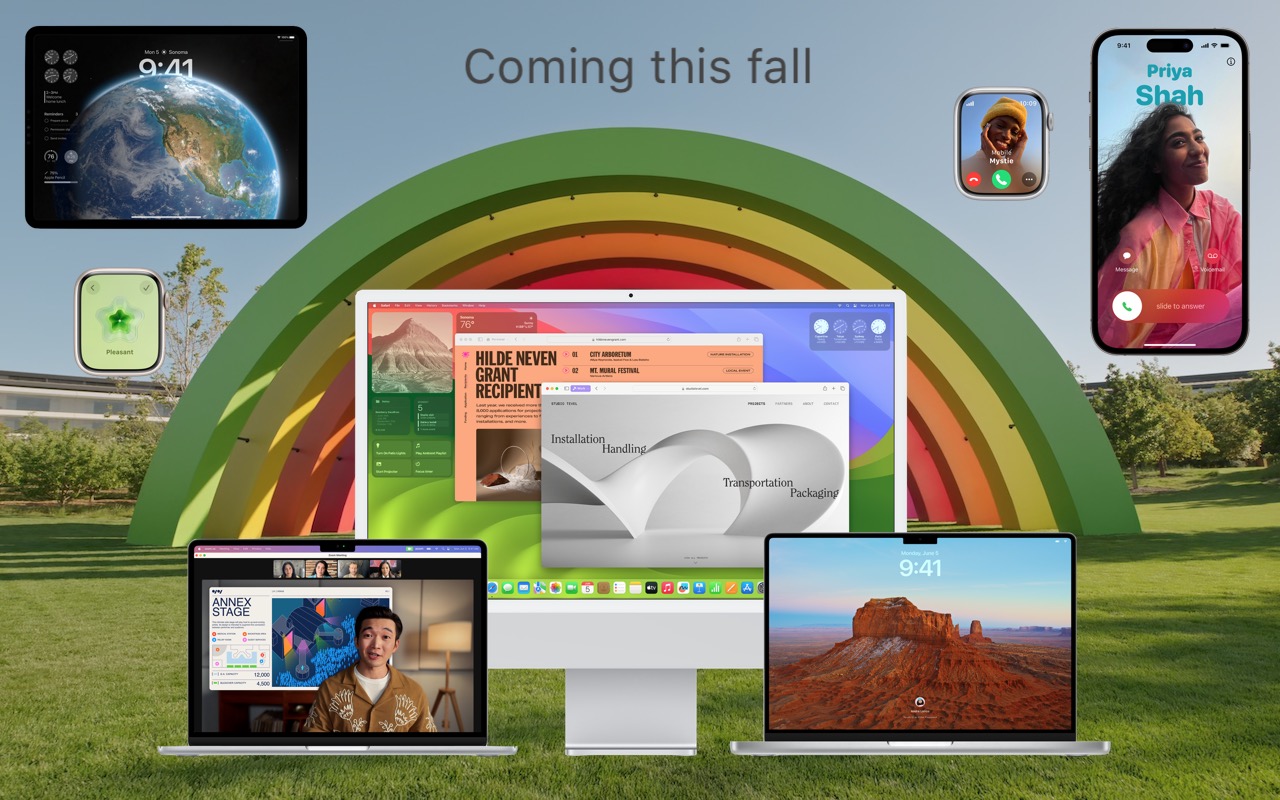
At Apple’s Worldwide Developer Conference in June, the company unveiled the upcoming versions of its operating systems: macOS 14 Sonoma, iOS 17, iPadOS 17, watchOS 10, and tvOS 17. They won’t be available until September or October of 2023, and even once they ship, we recommend waiting a few weeks before upgrading your smaller Apple devices and holding off on macOS upgrades for a couple of months.

Regardless, it’s worth considering how these operating systems might impact your plans to buy new hardware in the next six months. Any Apple device you purchase now—or have bought in the last five years—can run the new operating systems. But some devices that can run the current macOS 13 Ventura, iOS 16, and iPadOS 16 won’t be upgradable to their replacements later this year. More importantly, some older devices that can be upgraded won’t support all the new features.

Here’s what you’ll need and compatibility gotchas to keep in mind.

macOS 14 Sonoma

For macOS 14 Sonoma, Apple has dropped support for Mac models released before 2018. That works out to five models across the iMac, MacBook Pro, and MacBook product lines. If you rely on one of those Macs and want to run Sonoma, think about when it would make sense to buy a new Mac, perhaps in early 2024. By then, all new Macs will likely ship with Sonoma. These Macs can run Sonoma:

  • iMac: 2018 and later
  • iMac Pro: 2017
  • MacBook: None
  • MacBook Air: 2018 and later
  • MacBook Pro: 2018 and later
  • Mac mini: 2018 and later
  • Mac Pro: 2019 and later
  • Mac Studio: 2022 and later

The specific 2017 Mac models that are stuck at Ventura are:

  • iMac: 21.5-inch and 27-inch
  • MacBook Pro: 13-inch and 15-inch
  • MacBook: 12-inch

Unsurprisingly, some new features in Sonoma require sufficient processing power that they work only on Macs with Apple silicon—one of the M1 or M2 chips.

  • Game Mode: This special mode automatically gives games top priority on the CPU and GPU, lowering usage for background tasks. It also reduces latency for wireless accessories, like game controllers and AirPods, for improved responsiveness.
  • Just “Siri”: Although dropping “Hey” from the “Hey Siri” trigger phrase works on all iPhones with iOS 17 and iPads with iPadOS 17, it requires a Mac with Apple silicon or when using the AirPods Pro (2nd generation).
  • Made for iPhone hearing aids: Apple-compatible hearing aids can now be paired directly with Macs, but only those with an M1 Pro, M1 Max, M1 Ultra, or M2. That works out to the MacBook Pro (14-inch, 2021), MacBook Pro (16-inch, 2021), Mac Studio (2022), and all Macs with the M2.
  • Presenter Overlay: You can keep your image visible while sharing your screen on a video call, either in front of the shared screen or in a small movable bubble.
  • React with your hands: During video calls, 3D augmented-reality reaction effects like hearts, confetti, and fireworks can be triggered with hand gestures, but only on Macs with Apple silicon or when using Continuity Camera with an iPhone 12 or later.
  • Screen Sharing performance improvements: Apple has radically improved the performance of the Screen Sharing app over high-bandwidth connections, but it requires the advanced media engine in Apple silicon.

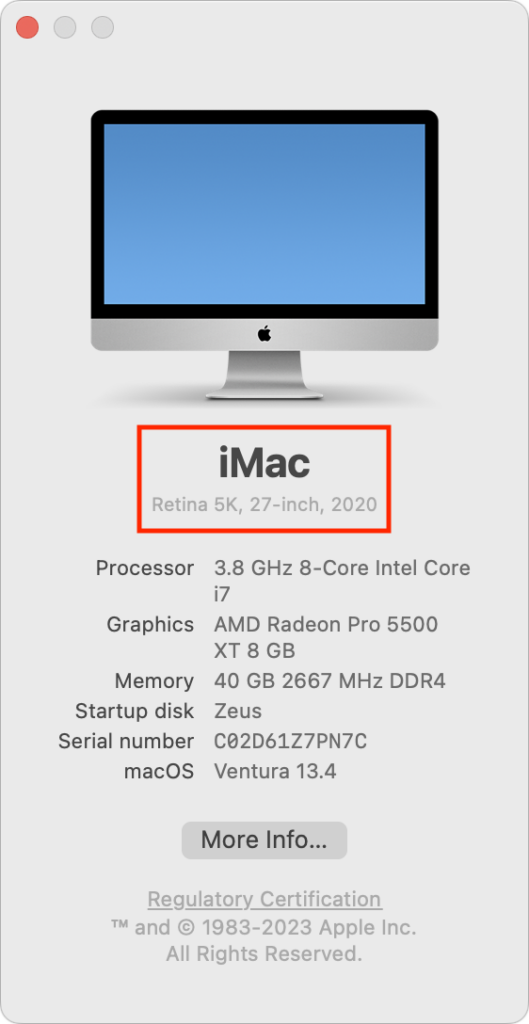
If you’re unsure which Mac you have, choose About This Mac from the Apple menu.
iOS 17

With iOS 17, Apple has maintained the same cutoff date as Sonoma, supporting all iPhone models released in 2018 and later. That means you’ll be able to run iOS 17 on these iPhones:

  • iPhone 14/Plus/Pro/Pro Max
  • iPhone 13/mini/Pro/Pro Max
  • iPhone 12/mini/Pro/Pro Max
  • iPhone 11/Pro/Pro Max
  • iPhone SE (2nd generation or later)
  • iPhone XR/XS/XS Max

Practically speaking, these iOS 16-compatible devices won’t be able to upgrade to iOS 17:

  • iPhone X
  • iPhone 8/8 Plus

Several new iOS 17 features have more restrictive system requirements.

  • Enhanced autocorrect: iOS 17 enhances autocorrect so it works better (and yes, it will let you use curse words), and it temporarily underlines autocorrected words so you can see which ones were changed. It requires an iPhone 12 or later.
  • Inline predictions: Similarly, inline predictions of what you’re going to type—so you can just accept the suggestion rather than tapping out all those letters—require an iPhone 12 or later.
  • Point and Speak: Those with vision disabilities might appreciate the Point and Speak feature that makes it easier to interact with physical objects that have text labels, but it works only on the Pro models of the iPhone 12, iPhone 13, and iPhone 14.
  • React with your hands: The hand-triggered video call reactions require an iPhone 12 or later.

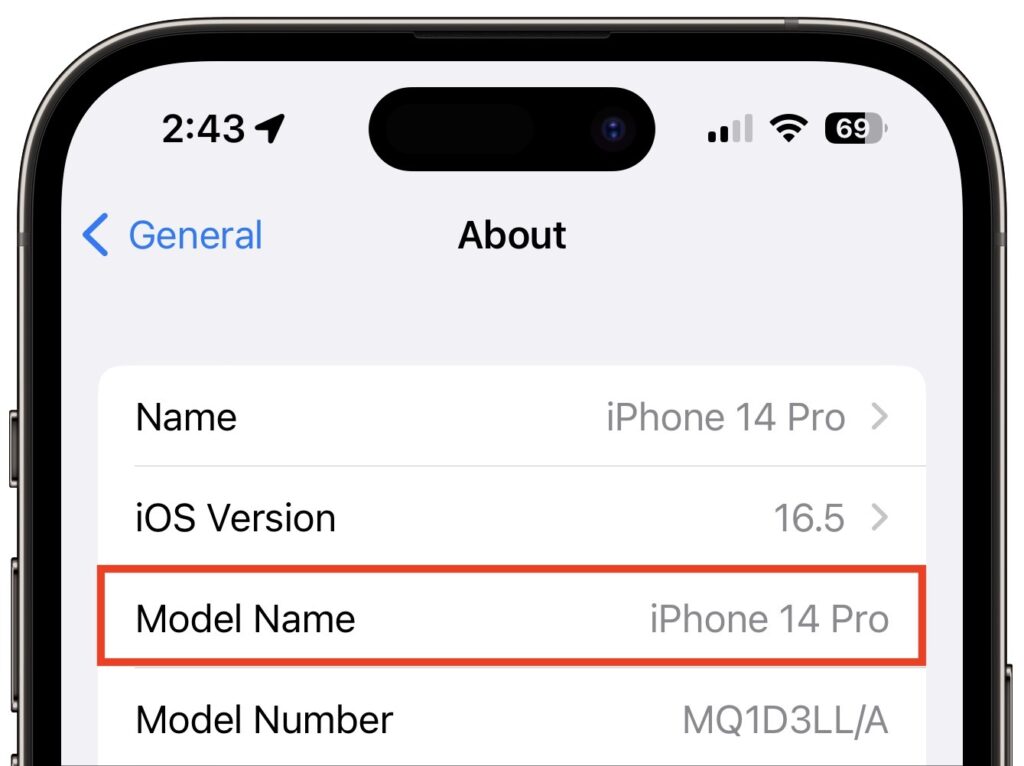
If you can’t remember which iPhone model you have, go to Settings > General > About and look next to Model Name. This works for the iPad, too.
iPadOS 17

It’s more involved to determine whether your iPad can upgrade to iPadOS 17 because there are four different iPad model types with varying capabilities. These models can run iPadOS 17:

  • iPad Pro 12.9-inch (2nd–6th generation)
  • iPad Pro 11-inch (1st–3rd generation)
  • iPad Pro 10.5-inch
  • iPad Air (3rd–5th generation)
  • iPad (6th–10th generation)
  • iPad mini (5th & 6th generation)

While that list encompasses a lot of iPads, a simpler way to look at it is that only three iPad models that can run iOS 16 won’t be able to upgrade to iOS 17:

  • iPad Pro 12.9-inch (1st generation)
  • iPad Pro 9.7-inch
  • iPad (5th generation)

Because Apple extended overall iPadOS 17 compatibility somewhat further back than it did with iOS 17 and macOS Sonoma, quite a few iPadOS 17 features work only on select models:

  • Back-to-back Siri requests: Although all iPhones will let you issue multiple requests to Siri without reactivating it, on the iPad, the feature works only on an iPad Pro 12.9-inch (3rd generation and later), iPad Pro 11-inch (1st generation and later), iPad Air (3rd generation and later), iPad mini (5th generation and later), or iPad (8th generation and later).
  • Enhanced autocorrect: This improvement to typing requires an iPad Pro 12.9-inch (5th generation and later), iPad Pro 11-inch (3rd generation and later), iPad (10th generation), iPad Air (4th generation and later), or iPad mini (6th generation).
  • External display cameras: If you want to take advantage of an external display’s camera while it’s attached to the iPad, you’ll need an iPad Pro 12.9-inch (3rd generation and later), iPad Pro 11-inch (1st generation and later), iPad (10th generation), iPad Air (4th generation and later), or iPad mini (6th generation).
  • FaceTime with Apple TV: Using an iPad’s mic and camera for FaceTime on an Apple TV 4K (2nd generation) requires an iPad Pro 12.9-inch (3rd generation and later), iPad Pro 11-inch (1st generation and later), iPad (8th generation and later), iPad Air (3rd generation and later), or iPad mini (5th generation and later).
  • Inline predictions: Getting suggestions about what to type next on the iPad requires an iPad Pro 12.9-inch (5th generation and later), iPad Pro 11-inch (3rd generation and later), iPad (10th generation), iPad Air (4th generation and later), or iPad mini (6th generation).
  • PDF AutoFill: iPadOS 17 will use machine learning to analyze PDFs, and if it detects a form, you can fill it out automatically using your contact information. But only if you’re using an iPad Pro 12.9-inch (3rd generation and later), iPad Pro 11-inch (1st generation and later), iPad Air (3rd generation and later), iPad mini (5th generation and later), or iPad (8th generation and later).
  • React with your hands: As with the iPhone and Mac, only some models let you trigger reactions with gestures: the iPad Pro 12.9-inch (5th generation and later), iPad Pro 11-inch (3rd generation and later), iPad (10th generation), iPad Air (4th generation and later), and iPad mini (6th generation).
  • Screen Distance: This health-related feature is supposed to encourage kids to hold the iPad farther away to reduce the likelihood of developing myopia. But how many kids read on an iPad Pro 12.9-inch (3rd generation and later) or iPad Pro 11-inch (3rd generation and later)?

watchOS 10

The Apple Watch has a simple upgrade story: every model compatible with watchOS 9 can also run watchOS 10. That means everything from the Apple Watch Series 4 up through the Apple Watch Ultra, including the Apple Watch SE. (Look in the Watch app on your iPhone if you can’t remember which model you have.)

Two of the new features promised for watchOS 10 work only on specific models:

  • The NameDrop feature that lets you transfer contact information wirelessly with just proximity works with all iOS 17-compatible iPhones, but it can communicate only with an Apple Watch SE, Apple Watch Series 6 or later, or Apple Watch Ultra.
  • The Time in Daylight feature that helps parents track whether their kids are spending the recommended 80–120 minutes per day outside requires an Apple Watch SE (2nd generation), Apple Watch Series 6 or later, or Apple Watch Ultra.

tvOS 17

As with the Apple Watch, the Apple TV upgrade situation is easy to understand: tvOS 17 will run on the Apple TV HD and Apple TV 4K (1st and 2nd generation), just as with tvOS 16.

However, note that the promised option to let you use the mic and camera from an iPhone or iPad for FaceTime calls on the Apple TV works only if you have an Apple TV 4K (2nd generation). That might be the first real reason to upgrade from an older Apple TV.

(Featured image by Apple)


Social Media: Later this year, Apple will release macOS 14 Sonoma, iOS 17, iPadOS 17, watchOS 10, and tvOS 17. Here’s the hardware you’ll need to run these operating systems—and to support some of the whizzier features.

Similar Posts

  • Droids, Drones, Scooters, Cars and USB C

    I remember only a couple years ago when drones were new and cutting edge technology. Now, there are huge sections of the show devoted to drones of all sorts: fighting drones, mini drones, paper airplane drones and dancing drones. I don’t know if it is the Star Wars influence but droids were everywhere, including “laundroids” for folding your laundry, grill cleaning droids, window washing droids and all kinds of robots.

    3D printers were new and unique and again whole sections of the show were devoted to “replicators” making everything from iPhone cases to clothing to spare body parts. Several companies were there just to show their filaments for these 3D printers.

    Scooters were everywhere. You know, the ones in the news that have the batteries that blow up. Well, literally dozens of companies were showing their versions and the original Segway had a booth, too. Some one-wheel scooters were there as well as shoes with wheels that zipped you around.

    p{text-align: center;}. !http://blog.smalldog.com/images/4638.jpg!

    Self-driving cars and technology for self driving cars dominated the North Hall and some concept cars were shown, too. My favorite was the Faraday electric car that looked like a single seat batmobile.

    USB-C made its debut at the show with hubs, cables and some USB display port displays, too. I think we will see a lot of USB-C stuff coming up!

    Less prevalent this year was the huge variety of iPhone and iPad cases. There were huge sections last time but while there were several companies showing cases it was toned way down. In their place, power banks of all sorts were being shown in every imaginable shape and size. The Apple battery case, aka the hump, was universally panned but several companies had slim battery cases for the iPhone.

    p{text-align: center;}. !http://blog.smalldog.com/images/4641.jpg!

    I did walk through the TV section but it was not as notable as in past years. The 3D fad has sort of expired and 4K displays are common. I still love the OLED displays, though.

    Other areas that were huge were health care and fitness with a lot of wearable fitness devices and health monitors or all sorts from implantable blood glucose devices to blood pressure cuffs, thermometers and scales. The home automation section was larger than previous years and there were some new HomeKit compatible devices. I liked the NoLok offering of bluetooth compatible padlocks and bike locks that work similar to the Kevo system.

    It was a quick trip out to Vegas but it was certainly worthwhile. I will follow up next week with a bit more.

  • Apple's Not The Only Game In Town

    I have the pleasure of being able to not only work behind the scenes here at Small Dog, but also on the front line with our customers. This past week while working in our “**Rutland, VT store**”:http://www.smalldog.com/rutland I had two customer interactions that brought an interesting subject light when talking about iPads. We have seen over the last two years or so there has been a slight drop in the number of iPads sales in comparison to when they first hit the market back in in April of 2010 and a lot has changed since then. There are more tablets out there than ever before including ones that run Android, Windows, Kindle and more.

    The draw away from Apple for some customers is that in many cases the same Apps and functions you can do on an iPad can be done on a another device and for less money. It’s easy to be persuaded by these draws and overlook some some other key aspects. What makes Apple stand apart is often pushed aside temporarily when comparing these products. With Apple everything is designed to work together. iCloud can sync all your information across multiples devices, from your iPad to iPhone to your computer. “**Handoff**”:https://support.apple.com/kb/PH18754?locale=en_US allows you to start a project on your iPad and then with a quick tab, pick up that project on your computer. Wanting to show your friends the pictures from your weekend trip to the mountains? With photo stream it doesn’t matter what Apple device you’ve picked up, your photos will be there. Have a great home video of your child or grandchild and just have to show everyone who came to Friday night dinner? No problem. With the Apple TV you can airplay that video and save yourself from passing your phone around the room for everyone to see. Another benefit? Apple devices last a long time! I have been using the original iPad mini for four years now and each week I interact with customers who are also using iPads that are two or three years old with no issues.

    In addition to all the integration, we’ve seen price drops for the iPads over the last several years as well. No longer do you need to spend $500 or more for an iPad. You can get an “**iPad Mini 2**”:http://www.smalldog.com/product/84491/ipad-mini-2-16gb-space-gray starting at **$269** and “**iPad Air**”:http://www.smalldog.com/product/86240/ipad-air-16gb-wi-fi-silver for **$399**. So the next time your considering tablet options, take a few moments to consider that while Apple isn’t the only game in town anymore, it’s still the leader of the pack!

  • A Swinging Hot Spot in Paradise

    You are visiting Key West, accompanied by your trusty iPhone and MacBook Air. Suddenly there’s an emergency at work, and you need to get online with your Mac. You can pick up a cell signal with the iPhone, but there’s no Wi-Fi that isn’t locked up. Well, my first thought might be “oh well, I’m on vacation!” but you are dedicated and need to be online.

    Don’t worry! You can use your iPhone’s cellular data plan to create a personal Wi-Fi hotspot that lets your Mac access the Internet through your iPhone. Also called “tethering,” it’s fast, easy, and can be a life-saver when you just have to get online with a Mac or your Wi-Fi-only iPad. It supports up to 5 users, too, which means you can get your team online, too!

    Before we explain how to do set up a personal hotspot, note that most but not all cellular carriers allow tethering on existing plans. For some, you might have to pay more for tethering. Keep in mind that any data consumed by your Mac while tethered will count against your data allowance and may generate overage fees. Carriers with “unlimited” data, like T-Mobile and Sprint, generally throttle your bandwidth to slower speeds if you use too much data.

    Along those lines, if you use a file sharing service like Dropbox or Google Drive, or an Internet backup service like CrashPlan or Backblaze, turn them off before connecting. Particularly if they haven’t connected in a while, those services can transfer a lot of data quickly, which could result in a hefty overage charge or awkward data throttling for the rest of the month.

    With those warnings out of the way, follow these steps in iOS 9 to turn on Personal Hotspot:

    1. On your iPhone, if you’ve never enabled the feature before, go to Settings > Cellular > Personal Hotspot. Once you’ve turned Personal Hotspot on once, it moves up a level, so you can access it from Settings > Personal Hotspot.
    1. Tap on Wi-Fi Password and enter a password that’s at least 8 characters long and easy to type. It doesn’t need to be super secure because you can keep Personal Hotspot turned off unless you’re using it. But you do want a password so random people nearby can’t connect and use your data.
    1. Once you’ve entered a password, slide the Personal Hotspot switch.

    That’s it! The Personal Hotspot screen provides basic instructions for connecting to the iPhone via Wi-Fi, Bluetooth, and USB. Stick with Wi-Fi, since it’s the easiest and most reliable in most cases.

    • To connect to your new Personal Hot Spot on your Mac, click the Wi-Fi icon in the menu bar and choose your iPhone’s name.
    • On your iPad, go to Settings > Wi-Fi and choose your iPhone.
    • Enter your password when prompted, making sure to select Remember This Network. That way, you won’t even have to enter your password the next time.
    • The Mac or iPad then connects to your iPhone, showing a hotspot icon instead of the usual wave icon for the Wi-Fi menu.

    Could it get any simpler? When you’re done, the safest thing to do, to ensure you don’t accidentally end up using too much of your data allowance, is to turn off the Personal Hotspot switch in Settings > Personal Hotspot. Your Mac or iPad will automatically disconnect.

    Actually, it CAN be simpler! Your Mac can automatically use the personal hotspot on your iPhone to connect to the Internet when they’re within range of each other.

    Use Instant Hotspot on your iPhone (with iOS 8 or later) to provide internet access to your Mac computers and other iOS devices (with OS X Yosemite or iOS 8) that are in range and signed into iCloud using the same Apple ID. Instant Hotspot uses your iPhone — you don’t have to enter a password or even turn on Personal Hotspot.

    Make sure your iOS device and your Mac are signed into iCloud with the same Apple ID.

    On your Mac, click the Wi-Fi status icon in the menu bar, then choose your iPhone or iPad.

    After you connect to the iPhone or iPad Personal Hotspot, you can check the cellular signal strength and the battery status of the iPhone or iPad in the Wi-Fi status menu.

    When you’re not using using the hotspot, your devices automatically disconnect to save battery life.

    One more big advantage of Personal Hot Spots. When you are shopping for that new iPad, perhaps you don’t need the cellular model if you nearly always have your iPhone handy. That’s what I do. If I need internet access on my Wi-Fi iPad, I simply connect to my Hot Spot! Saves me the added cost of a cellular-enabled iPad and the monthly fees from the cell carrier!