Forget Your Just-Changed Passcode? iOS 17’s Passcode Reset Has Your Back

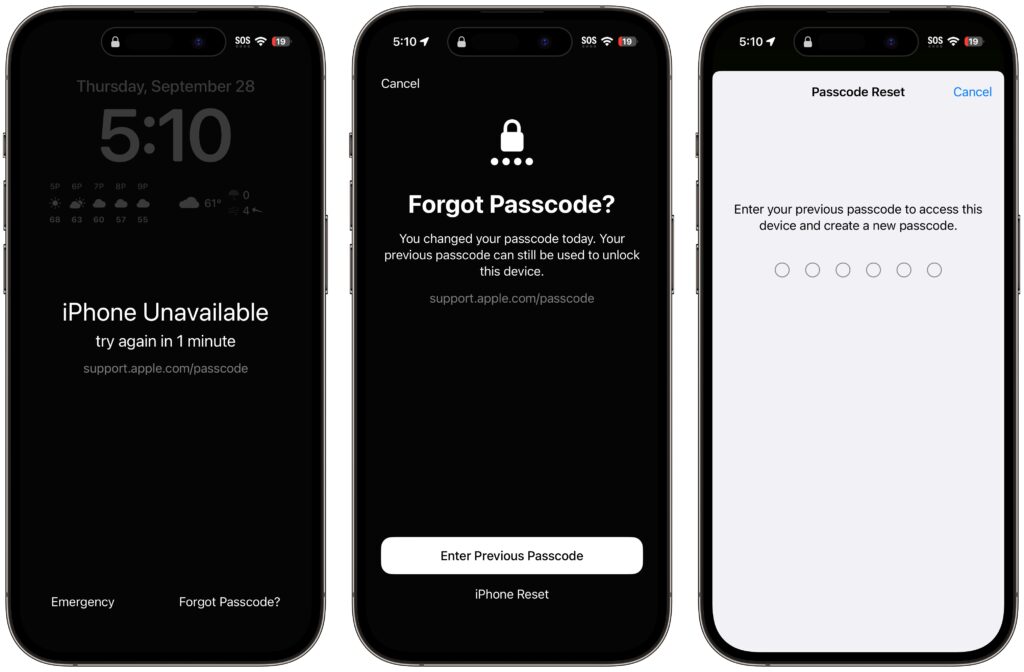
The hardest time to remember your iPhone or iPad passcode is right after you’ve changed it. Generally speaking, there’s no reason to change your passcode, but if you inadvertently or intentionally shared it with someone with whom you wouldn’t trust your bank account information, changing it to something new is a good idea. We could also imagine a child who knows your passcode changing it on you as a prank. For whatever reason, if you can’t enter your new passcode, a new iOS 17 feature called Passcode Reset lets you use your old one for 72 hours. Once you’ve tried the wrong passcode five times, tap Forgot Passcode , enter your old passcode , and create a new one . If you’re certain you know the new one, you can expire the old one sooner in Settings > Face ID/Touch ID & Passcode.
(Featured image by iStock.com/NazariyKarkhut)


Social Media: If you change your passcode and can’t remember it (or it was changed for you by a prankster), iOS 17 lets you use your old passcode for 72 hours. It’s a helpful backstop for the results of a memory lapse or mischievous child.

Similar Posts

  • Spring Fever

    We’re all starting to chat the itch to spend some more time outside around the office. Most of us enjoy winter activities throughout the winter months, but we are coming out of one of the worst winters in a long time. There was little snow and many winter activities were cancelled over the past several months. To help get us out of the winter funk, we thought it was appropriate to celebrate “**Spring Fever**”:http://www.smalldog.com/springfever/spring-fever in our stores by putting together some great deals for accessories that you can use to enjoy the warmer weather that is upon us.

    Recently we have brought in products from several new manufacturers of speakers, headphones and iPhone accessories. One of my favorite new items that we have brought in are new “**Bluetooth speakers from Cambridge Audio**”:http://www.smalldog.com/product/87874/. These portable speakers come in a variety of colors, they easily sync to both your computer and iPhone (though not at the same time) and they have an auxiliary connection if you wish to plug the speaker directly into your device. We’ve all been impressed by the ease of pairing the speakers as well as the sound quality. These speakers normally sell for $99.99 but we have the titanium colored ones on sale for **79.99**. They are an excellent quality at this price point. Last week I introduced new Bluetooth headphones from “**BlueAnt**”:http://www.smalldog.com/category/?mmfg%5B0%5D=BlueAnt and we’ve decided to bundle these headphones with a **FREE** Belkin armband for iPhone 6/6s. We are really liking these new headphones! Check out these great “**Spring Fever deals**”:http://www.smalldog.com/springfever/spring-fever and more.

  • My sister and her partner are coming to visit this week so I hope the sun comes out. It has been sort of cool and rainy here for this week. It is hard to believe that we are already in the middle of January and the Iowa caucuses are only a couple of weeks away.

    I know you will join me in congratulating (or consoling) Emily for her most recent promotion. A frequent contributor to Kibbles & Bytes, Emily has done just about every job at Small Dog, starting out in the shipping department way back when, when the computers were heavy. Emily is now the General Manager of Small Dog Electronics to reflect her pivotal role at the company.

    Thank you for reading this issue of Kibbles & Bytes and for all of the support for Small Dog Electronics. We know it is you, our loyal customers, that sustain us and we appreciate you!

    Your Kibbles & Bytes Team,

    _Don, Dean, Scott & Emily_