If Mail Fails to Send, Try, Try Again (Instead of Changing Servers)

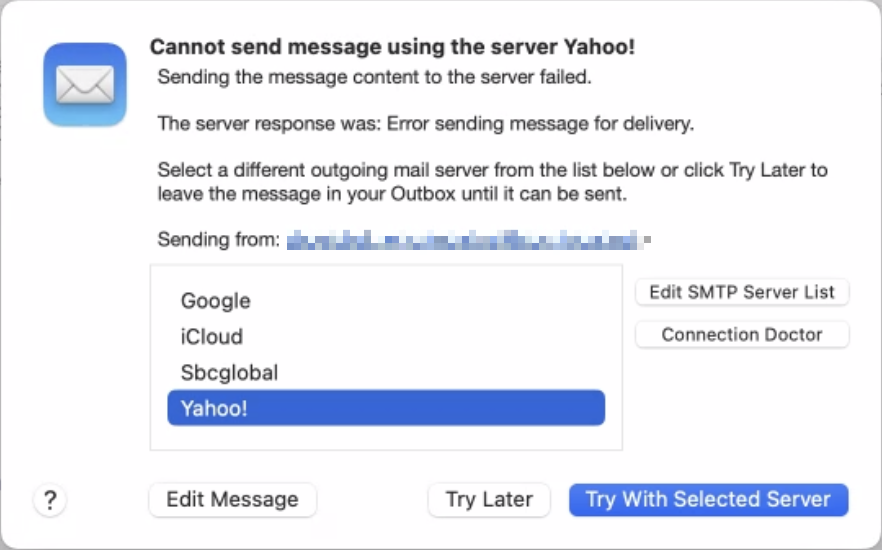
Sometimes, something goes wrong, causing Mail on the Mac to have trouble sending a message. When it does, you may see an error like the one below, encouraging you with a default button to try another configured server. Don’t do it! Always click Try Later. If that still doesn’t work, contact your favorite tech support professional to troubleshoot the problem with the SMTP server associated with the account from which you’re sending. Attempting to send through another SMTP server is a recipe for trouble because various anti-spam checks may fail, causing your message to be filtered as spam or bounced back to you. Worse, if you select a different server and click Try With Selected Server, Mail remembers that choice going forward, so you will have to reset it manually later.
(Featured image by iStock.com/Marut Khobtakhob)


Social Media: If Mail on your Mac throws an error about being unable to send a message, always have it try again later rather than switching to a different server. Otherwise, your messages may look like spam and be blocked.

Similar Posts

  • Spring Fever

    We’re all starting to chat the itch to spend some more time outside around the office. Most of us enjoy winter activities throughout the winter months, but we are coming out of one of the worst winters in a long time. There was little snow and many winter activities were cancelled over the past several months. To help get us out of the winter funk, we thought it was appropriate to celebrate “**Spring Fever**”:http://www.smalldog.com/springfever/spring-fever in our stores by putting together some great deals for accessories that you can use to enjoy the warmer weather that is upon us.

    Recently we have brought in products from several new manufacturers of speakers, headphones and iPhone accessories. One of my favorite new items that we have brought in are new “**Bluetooth speakers from Cambridge Audio**”:http://www.smalldog.com/product/87874/. These portable speakers come in a variety of colors, they easily sync to both your computer and iPhone (though not at the same time) and they have an auxiliary connection if you wish to plug the speaker directly into your device. We’ve all been impressed by the ease of pairing the speakers as well as the sound quality. These speakers normally sell for $99.99 but we have the titanium colored ones on sale for **79.99**. They are an excellent quality at this price point. Last week I introduced new Bluetooth headphones from “**BlueAnt**”:http://www.smalldog.com/category/?mmfg%5B0%5D=BlueAnt and we’ve decided to bundle these headphones with a **FREE** Belkin armband for iPhone 6/6s. We are really liking these new headphones! Check out these great “**Spring Fever deals**”:http://www.smalldog.com/springfever/spring-fever and more.

  • Clean Your iPhone’s Camera Lens

    Serious photographers take care of their lenses. The rest of us just stuff our iPhones into our pockets or purses and pay no…