
Where Can You Control Automatic Smart Quotes and Dashes in macOS?

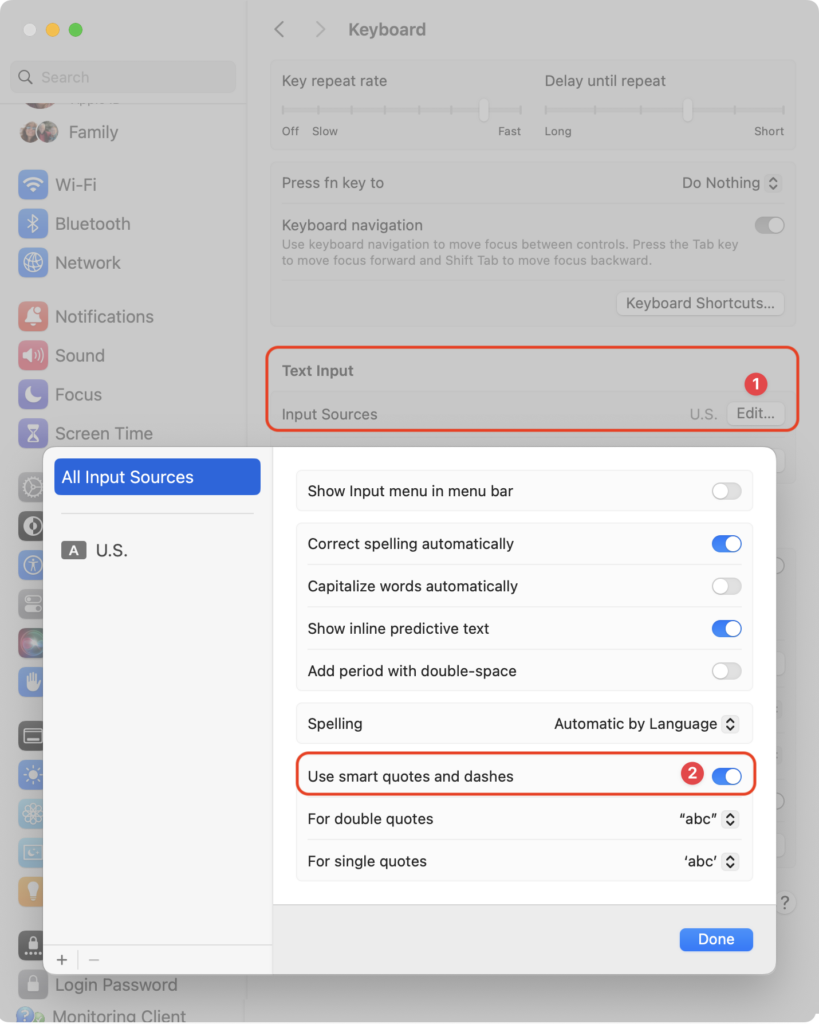
Most people like smart quotes and dashes, at least most of the time. Your Mac is probably set up to turn the single (‘) and double (“) hash marks and double hyphens (–) that you type into the apostrophes (’) and single smart quotes (‘’), double smart quotes (“”), and em dashes (—) used in professional publications. However, in some situations, like programming, smart quotes and dashes are problematic. To prevent macOS from automatically inserting them, open System Settings > Keyboard and click the Edit button next to Input Sources. In the dialog that appears, turn off “Use smart quotes and dashes.” As a bonus tip, if you occasionally want single or double hash marks, such as to indicate feet and inches, instead of turning the entire feature off, immediately press Command-Z after typing a single or double hash mark to undo the change from straight to curly.
(Featured image by iStock.com/Wirestock)


Social Media: Smart quotes and dashes usually make your text look more professional. But if they’re problematic, you can turn off the feature that inserts them automatically or revert them on a one-off basis.

Similar Posts

  • _Dear Friends,_

    It is raining today here in Key West but as with most tropical showers it will likely pass over soon and the sun will come back. My neighbor, Glenn Thomas, posted a picture of the first daffodil at our Prickly Mountain location so I guess it is safe for me to head back north. Grace and I will be packing up and driving up I-95 next week.

    Apple quietly made some changes to the 12-inch Macbooks and 13-inch Macbook Airs this week that I will review below and as promised we will talk some more about dictation. Apple did not hold a big event for these laptop upgrades but they are welcome changes that should be a precursor to updates to the rest of the laptops in Apple’s lineup. We will have these new Macbooks and Macbook Airs in stock this week and have some great deals on the newly discontinued models with up to $200 off.

    This week’s Kibbles & Bytes exclusive features the Hammerhead Jacket case for the iPhone 5, 5s or the new 5se. This case offers exceptional corner protection with a double injection molded design featuring strong polycarbonate and flexible TPU. Anti-slip sides keep the phone securely in your hand when in use. Of course, all the ports and buttons are easily accessible through this protective case. We have ten designs for this case: Watermelon Red, Hubcap, Pride, Snake Skin, Helmet, Hammerhead Purple, Lemon Yellow, Black, Sky Blue and Hammerhead Orange. I know you can decide which to use so for this week we are offering a 10-pack featuring one of each case. Change as your mood sees fit or give one to a friend. Normally, these cases are $14.99 each but “**exclusively for Kibbles & Bytes readers you can get all ten for only $49.95!**”:http://www.smalldog.com/wag900002206