Stay Safe – Please Call Apple Support Scam
“Please Call Apple Support” alerts are nothing more than a scam. Don’t call the number in the pop-ups. Apple’s error and warning messages never include a phone number. Apple does not send unsolicited email messages or make unsolicited phone calls to request personal or financial information or fix your device. Treat all unsolicited phone calls or pop-ups with skepticism. Do not provide any personal information.
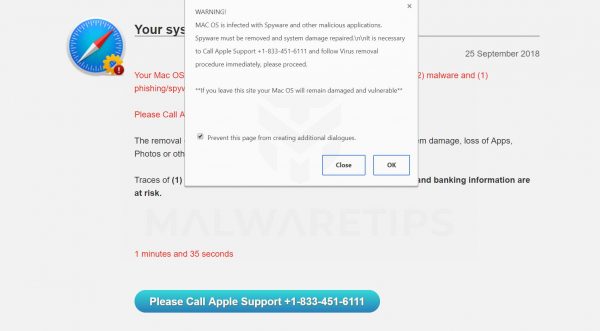
DO NOT CALL. What happens when you call is that a very friendly voice will try to pry personal information from you, will try to sell you fake support and usually by the time I get the panicky phone call, the scammer has convinced you to “screen share” allowing them access to your Mac which might allow them to install malicious software or otherwise compromise your personal data.
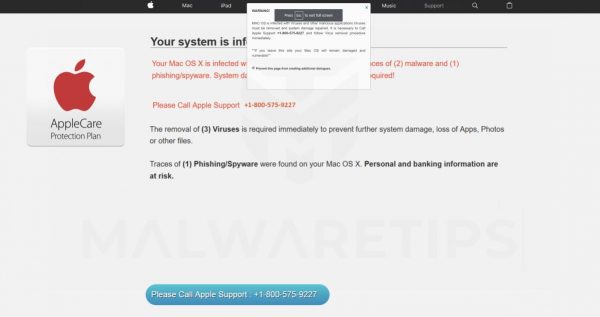
DO NOT CALL! Apple never does pop-ups, does not give you a phone number to call, etc. You should not purchase anything from numbers listed in these “Please Call Apple Support” alerts. Whatever you do, please do not call the phone number for support because it is not Apple’s but rather a group of scammers waiting to rob you of hundreds of dollars under false pretenses.
Small Dog Electronics will remove malware for a fee, however, you can protect yourself with Malwarebytes but if you see applications in your applications folder such as WeKnow, MacSaver, MacVX (and variants like MacVaX), MacCaptain, MacPriceCut, SaveOnMac, Mac Global Deals or MacDeals, MacSter, MacXcoupon, Shop Brain (or variants like SShoP Braaiin), PalMall, MacShop, MacSmart, News Ticker Remover, Shopper Helper Pro, Photo Zoom, Best YouTube Downloader, ArcadeYum, Extended protection, Video download helper, FlashFree or GoldenBoy – you are infected and need to clean up!
Remember, pop-ups in Safari, Chrome, Firefox or other browsers that tell you to call Apple support are ALWAYS FAKE!