Use Split Screen to Use the Huge Monitor
Okay, so I bought myself I giant 38-inch display and while I can have a bunch of windows open and scroll between them, I often need to move between my browser and WordPress or between Photos and Luminar Ai and the workflow simply is easier with split screen.
With Split View, your Mac allows you to work in two apps side by side without having to resize them, and without the distraction of other apps.
1. In MacOS Catalina, go to the upper left corner of a window, and either hover your mouse over or click and hold the green full-screen button.
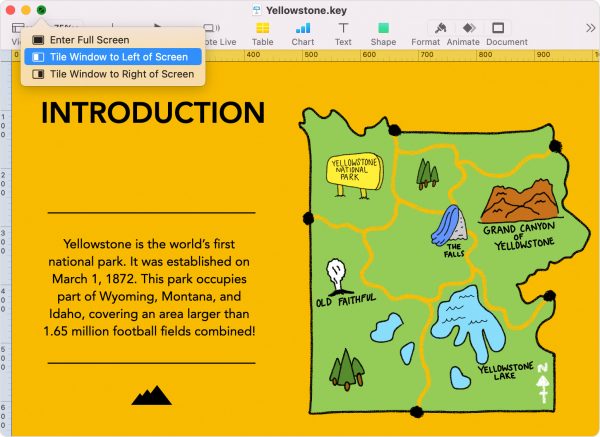
2. Choose Tile Window to Left of Screen or Tile Window to Right of Screen from the menu, and the window will fill that side of the screen. In past versions of MacOS (you need OS X El Capitan or later to use Split View), click and hold the green full-screen button, and drag the window to the left or right of the screen to tile it.
3. To get out of split screen, hit the Esc key on your keyboard.
If Split View doesn’t work, choose Apple menu > System Preferences, click Mission Control, and make sure that “Displays have separate Spaces” is selected.