Avoid Confusion by Setting iPhone Password Autofill to Only One App

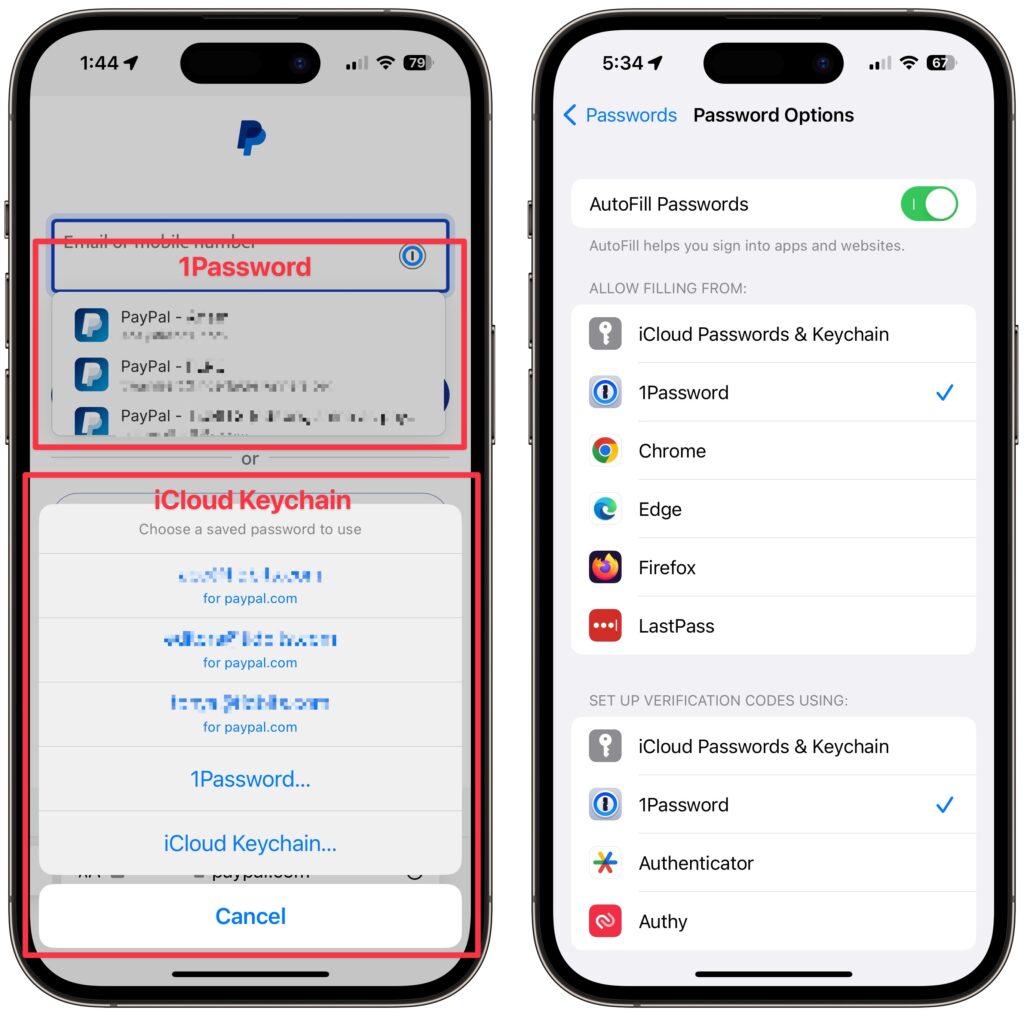
Let’s say you use 1Password (or another third-party password manager) on an iPhone or iPad. When that’s the case, it’s easy to end up in a situation where your device will present passwords from both 1Password and iCloud Keychain, possibly along with another app. That won’t break anything, but as you can see in the screenshot below, dueling password managers can be confusing, particularly if one doesn’t have up-to-date passwords. To make logging in easier, go to Settings > Passwords > Password Options and select just one app in Allow Filling From. For instance, if you’re using 1Password, turn off iCloud Passwords & Keychain and all the other apps.

(Featured image based on an original by iStock.com/Kostiantyn Filichkin)


Social Media: Do you suffer from dueling password managers on your iPhone or iPad? If you’re using a third-party password manager, turn off password autofill for iCloud Passwords & Keychain and any other apps to avoid confusion.

Similar Posts

  • _Dear Friends,_

    The trip up the the Everglades was pretty uneventful although we did see alligators and eagles as we were watching nature go by. Grace wants to go back up for an airboat ride so we will have to put that on the list.

    I am very happy to report that Small Dog Electronics now offers Go-Pro cameras and accessories. It took us many tries but I was able to meet with someone that could make a decision at CES in Las Vegas so we are now all set and Go-Pro should be in all of our stores. We’ll feature skiing and motorcycling kits up in the Green Mountains and some surf-oriented bundles down in Key West.

    I guess this should be in a soapbox but I just want to make a quick statement that I feel that Tim Cook and Apple are 100% correct in resisting the government’s attempt to force them to create software to defeat the encryption inherent in the iPhone. One of Apple’s most valuable commodities is safety. You know when you buy an Apple product that your data is safe. Safe from most viruses, malware, ransomware and also that your private data remains just that…private. While I certainly sympathize with those investigating the horrible San Bernadino terrorist actions, I do not feel that we should pay an even higher price and sacrifice our liberty and privacy as a result. Bravo to Tim Cook and Apple.

    This week’s Kibbles & Bytes exclusive is the “**Tempus Pro Weather Station.**”:http://www.smalldog.com/wag900002092 This complete wireless weather station has been one of out best selling devices. It combines an indoor monitoring station with an outdoor instrument and an iPhone or iPad App to give you complete weather information. It includes sensors for indoor and outdoor temperature, humidity, barometric pressure, rainfall and wind speed. It is simple to install and works by Bluetooth between the outdoor and indoor sensor and Wi-Fi to your iPhone. This is normally $159.99 but for this week for Kibbles & Bytes readers it is “**$25 off at $134.99!**”:http://www.smalldog.com/wag900002092

  • _Hello Friends,_

    The big winter storm called Jonas is heading for the east coast and Vermonters are hoping that it tracks north of the current projections but it looks like it might miss northern New England and hit the coastal areas. The lack of snow in Vermont and the unusually high temperatures have hit the Vermont ski areas and local merchants pretty hard. Here it is the end of January and no significant snow in Vermont. Well for all the skiers and especially for the businesses I hope that those areas that can’t really handle snow get bypassed and Vermont gets the big dump because Vermonters are ready.

    Down here in Key West it has been sort of cool meaning I have to wear long pants and shoes, although if it was this warm in Vermont everyone would be in shorts. Down here when it gets below 65 you see people with down coats. NOAA reported this week that 2015 was the warmest year in recorded history breaking the record from 2014 by far.

    Apple honored Dr. Martin Luther King, Jr. on its home page on the national holiday on Monday with Dr. King’s quotation “Life’s most persistent and urgent questions is, What are you doing for others”. Tim Cook tweeted his respects, too. I had the honor of marching with Dr. King and share this respect, he was truly one of the great Americans of all time

    We always advertise our “Celebrate Diversity” slogan during this time of the year. We strongly feel that you gain strength through diversity whether it is race, religion, national origin or sexual orientation. I remember a long time ago we had a series of Celebrate Diversity web banners that created a lot of controversy with some sites refusing to run them. Diversity is much more mainstream now despite some candidates for President attempting to divide us.

    This week’s Kibbles & Bytes Exclusive is weather related with $20 off the “**Tempus Pro Bluetooth Weather Stations.**”:http://www.smalldog.com/wag900002127/special-save-20-on-tempus-pro-bluetooth-weather-station This was one of the most popular gifts this holiday season and is a great way to keep track of the weather in your microclimate. This complete weather station includes indoor and outdoor sensors that measure temperature, humidity, rainfall, wind and barometric pressure. Complete with mounting hardware it is simple to install and once you download the App you can monitor the weather on your iPhone or iPad. Read a Small Dogger review of the Tempus Pro “**here.**”:http://blog.smalldog.com/article/fody-weather-station/ Normally, $159.99 this week Kibbles & Bytes readers can get the Tempus Pro Weather Station for only **$139.99**

  • Expand your mind…er..text

    Speed Up Your Fingers with Text Expansion

    With all the advances in computing and communications, it’s amazing that–after nearly 150 years!–we still use the keyboard layout from the world’s first practical typewriter for entering text into our Macs, iPhones, and iPads. Sure there are some improving dictation solutions out there but typing is by far how we input text. But we have not gotten that much better as typists, nor do we enjoy typing more–if anything, we increasingly abbreviate to avoid typing, hence “LOL, BRB, etc.” Text messaging aside, wouldn’t it be nice to be able to type less without compromising meaning or making your text look like it was composed by a trained monkey? Thanks to text expansion features built into OS X and iOS, and extended with third-party utilities, you can.

    For basic text expansion capabilities in OS X, look in System Preferences > Keyboard > Text, and in iOS 9, go to Settings > General > Keyboard > Text Replacement. For both, you can enter a phrase, and a shortcut that expands into that phrase when typed and followed by a space or punctuation character. (Tip: If text expansion doesn’t work in a Mac app like Mail or Safari, make sure Edit > Substitutions > Text Replacement is selected.)

    If you’re signed into the same iCloud account on both your Mac and your iPhone, for instance, the text expansions sync between them automatically. So, you can type “smh” and tap the Space bar to get “Shaking my head!” typed out for you, regardless of what device you’re using. (Another tip: don’t create abbreviations that you will also want to type normally. It might seem like a good idea to use “np” for “No Problem,” but that will get in the way of talking about Nurse Practitioners.)

    With such a useful feature built into OS X and iOS, why would you want to spend money on a third-party utility, like “**TextExpander**”:https://smilesoftware.com/textexpander (Mac and iOS), “**Typinator**”:http://www.ergonis.com/products/typinator/ (Mac), or “**TypeIt4Me**”:http://www.ettoresoftware.com/products/typeit4me/. Unfortunately, OS X’s text expansion feature doesn’t work in all apps (it likely won’t work if the app lacks the Edit > Substitutions > Text Replacement menu command). The interface for creating new substitutions is cramped and hard to work with, you can’t configure the trigger characters that cause abbreviations to expand, and you can’t include text with styles, variable text like the date, or even graphics.

    That’s where text expansion utilities shine. They can include styled text and graphics in expansions, insert the current date and time, respect case when expanding abbreviations, include the contents of the clipboard in expanded text, automatically fix common typos, create fill-in-the-blanks snippets that you customize on each expansion, and much more.

    Here are some ideas for the kinds of things you might want to turn over to your computer for typing:
    Long or complex words or phrases, such as scientific names. Aedes aegypti, anyone?

    *Your address, phone number, and email address. One of my favorites is “@d” which inserts my email address. I get real tired of typing email address, phone numbers, etc. Text expansion speeds that up!

    *Boilerplate text for common email replies.

    *The current date and/or time.

    *Special characters, so blb could expand to the British pound symbol £.

    *Unix commands for Terminal, such as using ssh to log in to a remote computer.

    I am sure you can come up with dozens that might work for you and speed up your typing. So think about what bit of text you might want expand automatically and give text expansion a try today!