
Apple Introduces New iPad Air, iPad Pro, Apple Pencil Pro, and Magic Keyboard
After no new iPads throughout 2023, Apple has unveiled new 11-inch and 13-inch iPad Air and iPad Pro models, plus a more capable Apple Pencil Pro and a redesigned Magic Keyboard for iPad Pro. The company also refined the iPad lineup by dropping the ninth-generation iPad and reducing the price of the tenth-generation iPad to $349. Only the iPad mini was left untouched. We wouldn’t be surprised to see a new iPad and iPad mini before the end of 2024.
iPad Air Adds 13-inch Model and Moves to the M2 Chip
The 11-inch iPad Air has long been Apple’s mid-range iPad, offering more power and better specs than the iPad while leaving the high end to the iPad Pro. With this refresh, Apple significantly enhanced the lineup by adding a 13-inch model of the iPad Air, a screen size previously limited to the iPad Pro. Both iPad Air models now position their front-facing camera on the longer landscape edge, so you appear to others on landscape-orientation calls as if you’re looking directly at them rather than off to the side, as happened with the previous shorter portrait edge location. They continue to use Touch ID via a top-mounted sensor.
Apple switched the iPad Air from the M1 to the M2 chip, improving performance by 50%. Storage has also increased, with the base level jumping from 64 GB to 128 GB. For those needing more space, Apple now provides storage tiers of 256 GB, 512 GB, and 1 TB. Finally, Apple updated the iPad Air with the latest wireless technologies, Wi-Fi 6E and Bluetooth 5.3.
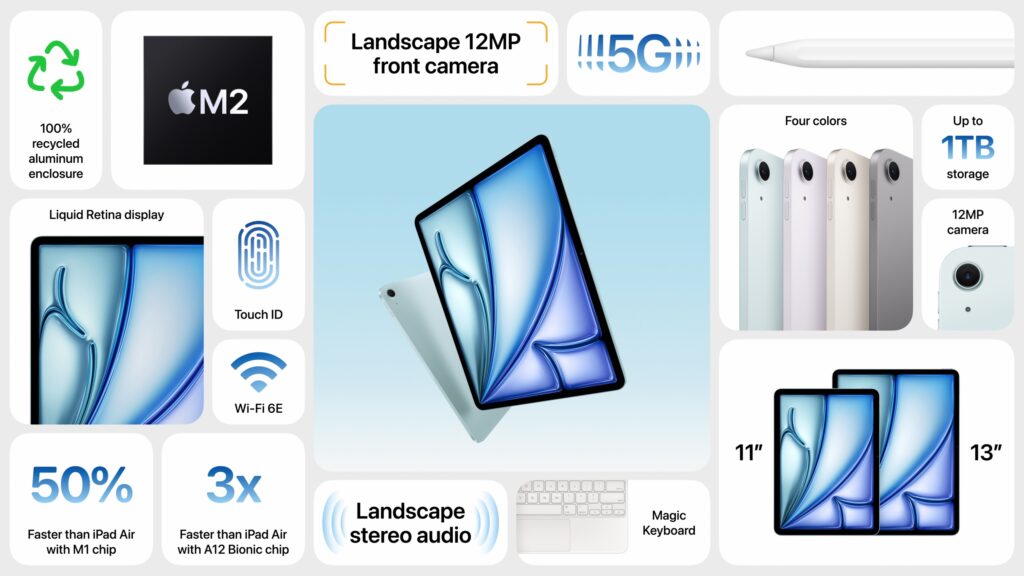
Those who want a keyboard can purchase the current Magic Keyboard for $299 (11-inch) or $349 (13-inch), and the new iPad Air models are compatible with the new $129 Apple Pencil Pro and the $79 USB-C Apple Pencil.
The 11-inch iPad Air starts at $599, and the 13-inch iPad Air at $799. Adding 5G cellular connectivity increases the price by $150. Moving to 256 GB bumps the price by $100, 512 GB adds $300, and 1 TB costs $500 more. You can choose from four subtle colors—blue, purple, starlight, and space gray—and you can order now with units arriving next week.
iPad Pro Gains M4 Chip and Ultra Retina XDR Display in Thinnest Apple Product Ever
While the new iPad Air models feel like modernized versions of the previous iPad Pro models, the new iPad Pro models break new ground. They boast new Ultra Retina XDR displays that leverage OLED technology that promises brighter highlights, deeper blacks, and faster response times. They’re noticeably better and brighter than the iPad Air Liquid Retina screens, which are already pretty good. Because Apple targets the iPad Pro at professional photographers and cinematographers who need the best display accuracy, there’s even a nano-texture glass option that reduces glare.
As with the iPad Air, the front-facing camera is now located on the longer landscape edge, along with the Face ID sensor. Surprisingly, the rear-facing camera isn’t as capable as the previous models, which sported Wide and Ultra Wide cameras and supported 2x optical zoom. The new models drop the Ultra Wide camera and retain just the 12-megapixel Wide camera. However, they now feature an adaptive True Tone flash that improves document scanning by stitching together multiple photos to eliminate the shadows that plague most camera-based scans.
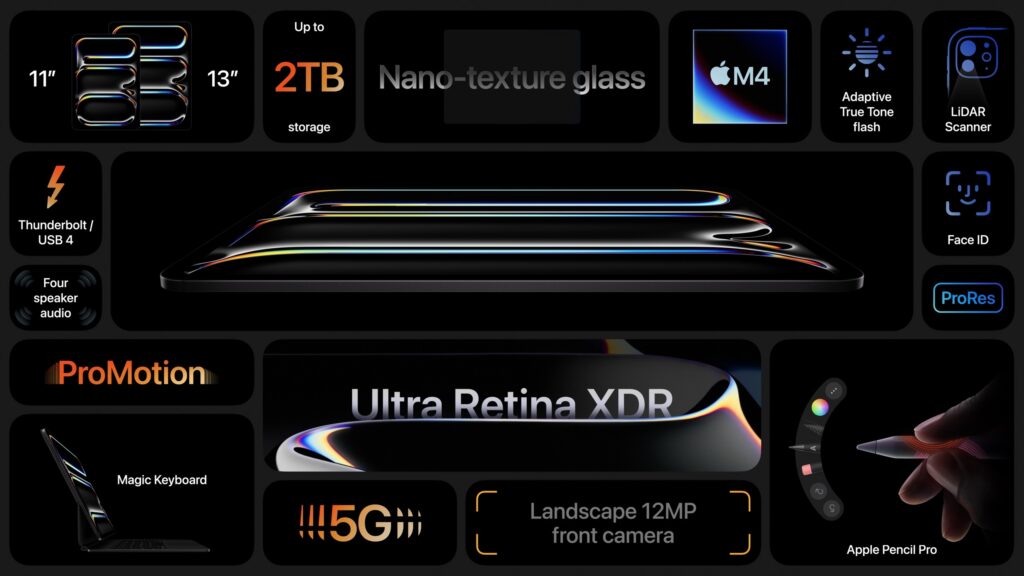
In part because of the Ultra Retina XDR display, the new iPad Pro models are thinner than before, so much so that the 13-inch iPad Pro is the thinnest product Apple has ever made at 5.1 mm thick. More impressive is that the 13-inch model also shed nearly a quarter of a pound in weight—103 grams. Ignore the fact that the iPad Pro is now thinner and lighter than the iPad Air, and that the iPad Air is the mid-range iPad, but the MacBook Air is the low-end MacBook. Air is just a name now.
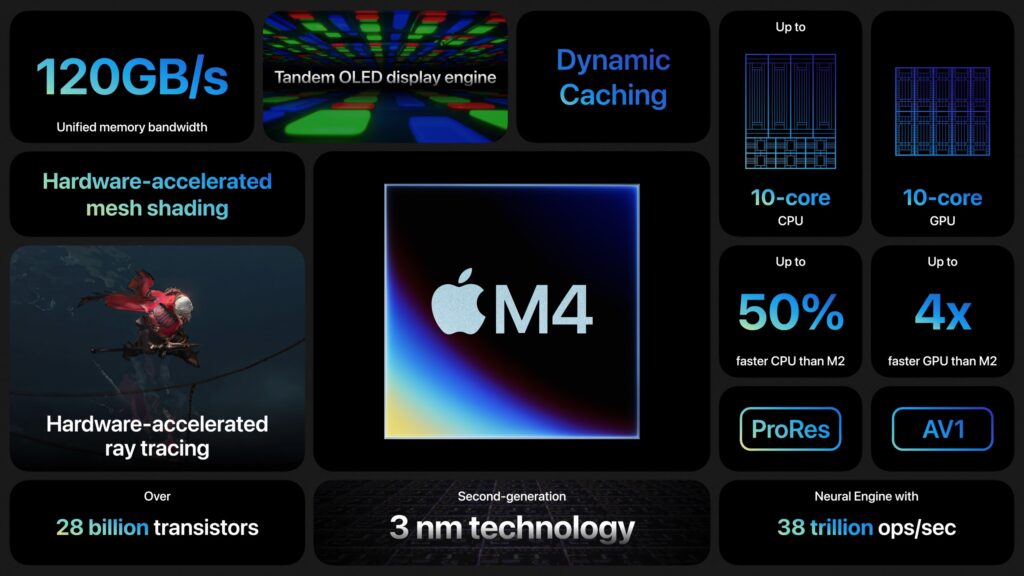
To power the Ultra Retina XDR display and make the iPad Pro models as thin as they are, Apple leapfrogged a chip generation, moving from the M2 to the new M4, which hasn’t appeared in any Macs yet. Apple says the M4’s CPU is 50% faster than the M2 in the previous models, and its GPU is up to four times faster.
For those who want a keyboard, the new iPad Pros are compatible only with the just-released Magic Keyboard for iPad Pro ($299 for 11-inch, $349 for 13-inch). As with the iPad Air, you can use either the new $129 Apple Pencil Pro or the $79 USB-C Apple Pencil.
Pricing for the 11-inch iPad Pro starts at $999, with the 13-inch iPad Pro at $1299. 5G cellular connectivity adds $200. Storage starts at 256 GB, up from 128 GB, and Apple offers tiers of 512 GB ($200 more), 1 TB ($600), and 2 TB ($1000). The nano-texture glass also adds $100 and is available only for models with 1 TB or 2 TB of storage. The only available colors are black and silver.
Apple Releases Apple Pencil Pro and Magic Keyboard for iPad Pro
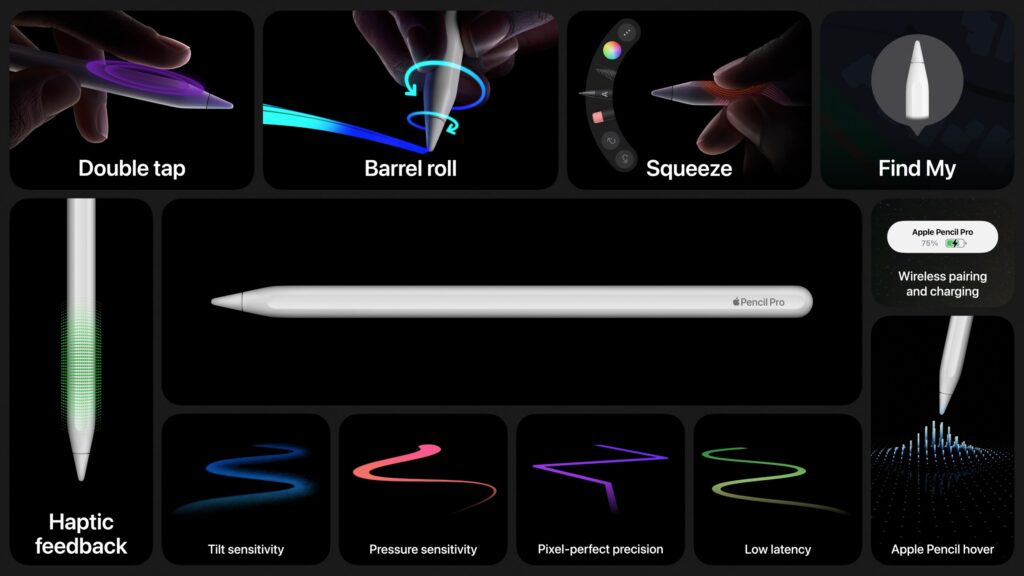
For artists, students, and others who like precise stylus input, the new Apple Pencil Pro offers a variety of new sensors and capabilities. A sensor in the barrel detects a squeeze that brings up a tool palette, and a gyroscope notices when you roll the barrel to change the orientation of shaped pen and brush tools. A new haptic engine provides confirmation of actions like squeezing, double tapping, and snapping to a Smart Shape. When used with the iPad Pro, the Apple Pencil Pro pairs, charges, and is stored on the side using a magnetic interface. If you lose it, you can now locate it with Find My.
While the new iPad Air models work with the existing Magic Keyboard, the new iPad Pro models are compatible only with the new Magic Keyboard for iPad Pro. It retains the design that floats the iPad Pro above the keyboard but adds a function row of keys for features like screen brightness and volume. The palm rest is made of aluminum, and it has a larger trackpad with haptic feedback, so it feels more like using a MacBook. It attaches magnetically and uses the Smart Connector to connect power and data without Bluetooth—there’s also a USB-C connector in the hinge for charging.
Buying Advice
All these products are available for order now and will ship next week. Who should buy what? Apple’s comparison page can be helpful, but here’s our advice:
- iPad: With the price drop to $349, the tenth-generation iPad becomes a remarkable deal, and it’s an ideal iPad for watching videos, browsing the Web, reading email, and other basic tasks.
- iPad mini: If smaller is better for you, the iPad mini remains in the lineup, starting at $499. It performs slightly better than the iPad, but its size is the main reason to buy it.
- iPad Air: The iPad Air is the workhorse of the iPad line, with sufficient performance to do nearly anything you want. The addition of the 13-inch model is particularly welcome because it’s $500 cheaper than the equivalently sized iPad Pro. Buy the iPad Air if you want to do more than the basics with your iPad.
- iPad Pro: The technology in the iPad Pro is impressive, but so is the cost. As with the Mac lineup, the Pro models are mainly targeted at creative professionals who need the ultimate power and are willing to pay for it.
A related question surrounds upgrades. Generally speaking, upgrading to a new iPad may not be worthwhile if you have the previous model. However, once you’re two generations back, the performance increases tend to be significant. The caveat to that advice is that if an iPad isn’t doing what you want, it’s time to upgrade. For instance, if you have an M1 iPad Air that runs your drawing app slower than you’d like, it’s worth considering either an M2 iPad Air or an M4 iPad Pro, depending on how important performance is to you.
Regardless, contact us if you have any questions about what iPad makes the most sense for you.
(Featured image by Apple)
Social Media: Apple has released new 11-inch and 13-inch iPad Air and iPad Pro models, plus a new Apple Pencil Pro and Magic Keyboard for iPad Pro. We round up the new features and provide advice on what to consider for your next iPad.