Check Your Input Source If Your Mac Types Unexpected Characters

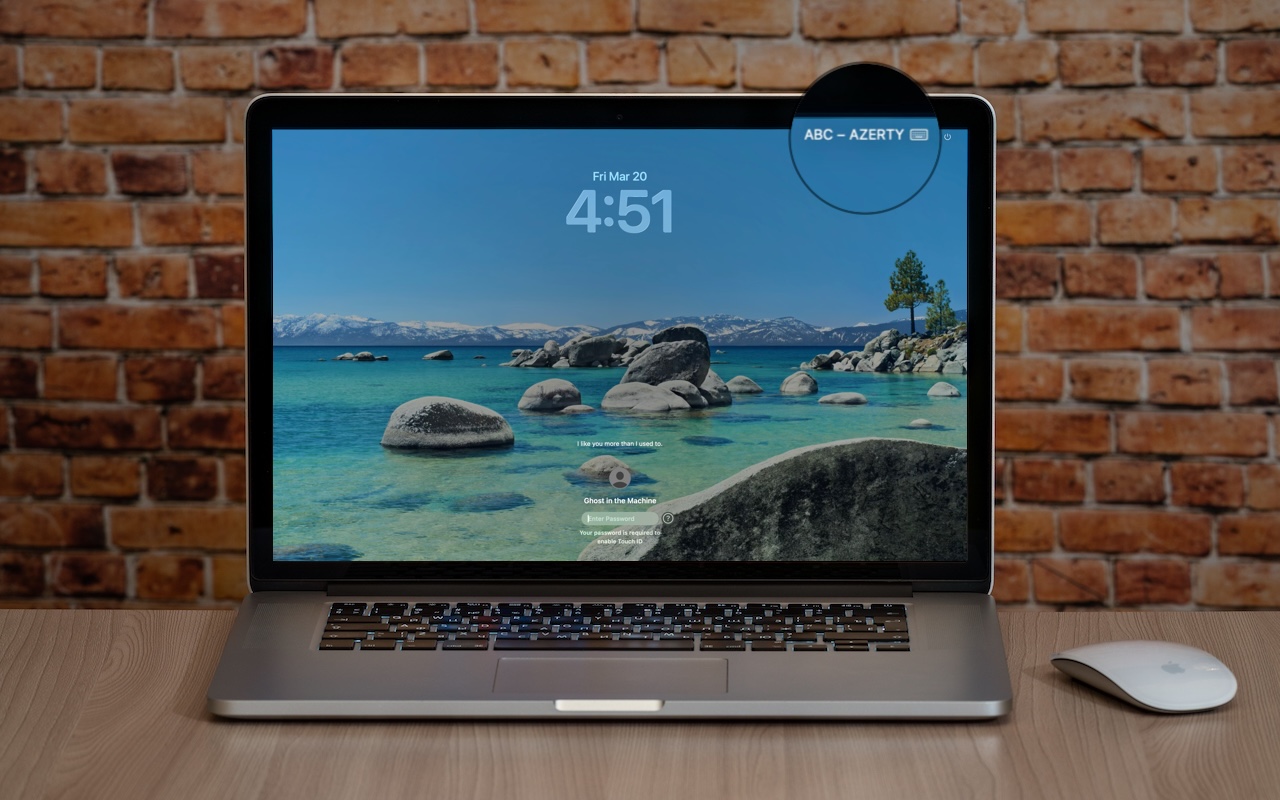
If your Mac starts typing unexpected characters—or rejects a password you know is correct—check to see if the Input Source menu appears in the upper-right corner of the screen, indicating that your Mac has more than one keyboard layout available for writing in other languages. Accidentally switching from the standard U.S. keyboard (or whatever you regularly use) to another layout—like the French ABC – AZERTY, which swaps the A and Q keys, among others—can cause keystrokes to produce different characters than expected. This key swapping is particularly confusing in password fields, where you can’t see what’s being typed. To fix it, click the Input Source menu and choose your default. To prevent this problem from recurring, go to System Settings > Keyboard, click Edit next to Input Sources, and delete any keyboard layouts you don’t use. You can also change what the Globe key does in System Settings > Keyboard—you can prevent accidental layout changes by switching it from Change Input Source to Show Emoji & Symbols, Start Dictation, or Do Nothing.

Estonia, Tallinn, July 11, 2020. Apple Macbook pro 15 Retina on table

(Featured image based on an original by iStock.com/Armastas)


Social Media: Is your Mac typing the wrong characters or rejecting your password? You may have accidentally switched keyboard layouts. Here’s how to check your input source and prevent it from happening again.


Similar Posts

  • _Dear Friends,_

    Definitely some weird weather in Vermont. One day it is below 0 F and the next day it is in the 40’s and raining. It makes for some tricky driving as wet pavement can hide some black ice. Hopefully as we enter March there will be some snow because the ski areas and local merchants are suffering from the weird weather. We can take a lot of snow and freezing temperatures but this freeze/thaw cycle is just annoying.

    Apple has very strong hardware sales but their hidden gem may be the recurring revenue streams that they develop. Of course, we know about the 11 million+ subscribers to Apple Music that pay a monthly fee and the iCloud storage fees but there are other much larger streams that provide Apple with consistent revenue. The iPhone is a big one that has two parts to it – on the one hand, people want to upgrade to the latest iPhone and that upgrade business is huge. There is also Apple’s new financing of iPhones that spreads the cost of the iPhone over several months and allows much easier iPhone upgrades. The carriers are also offering these easy upgrade programs which enhances the recurring revenue stream. It is sort of like printing money.

    This week’s Kibbles & Bytes exclusive features the “**Apple Factory Reconditioned 21.5-inch iMac**”:http://www.smalldog.com/wag900002159 with 2.7GHz i5 processor, 8GB of ram and a big 1TB drive. We are bundling this with the AppleCare Protection Plan which extends Apple’s 1-year warranty to 3-years and extends your 90-days of free technical support from Apple from 90-days to 3-years. To complete this bundle because we always want you to have a backup of your personal data, we are including the Apple Factory Reconditioned 2TB Time Capsule. The Time Capsule is the combination of an Airport Extreme base station and 2TB hard drive. Because you are buying it at the same time as the iMac it is also covered for 3-years by AppleCare! Normally, if you bought this bundle new it would cost $1769, bought normally as Apple Refurbished it would be $1399 but this week for Kibbles & Bytes readers you can get this great deal on an iMac with Time Capsule and AppleCare for only “**$1299.99!**”:http://www.smalldog.com/wag900002159