
Use Your AirPods as a Camera Remote

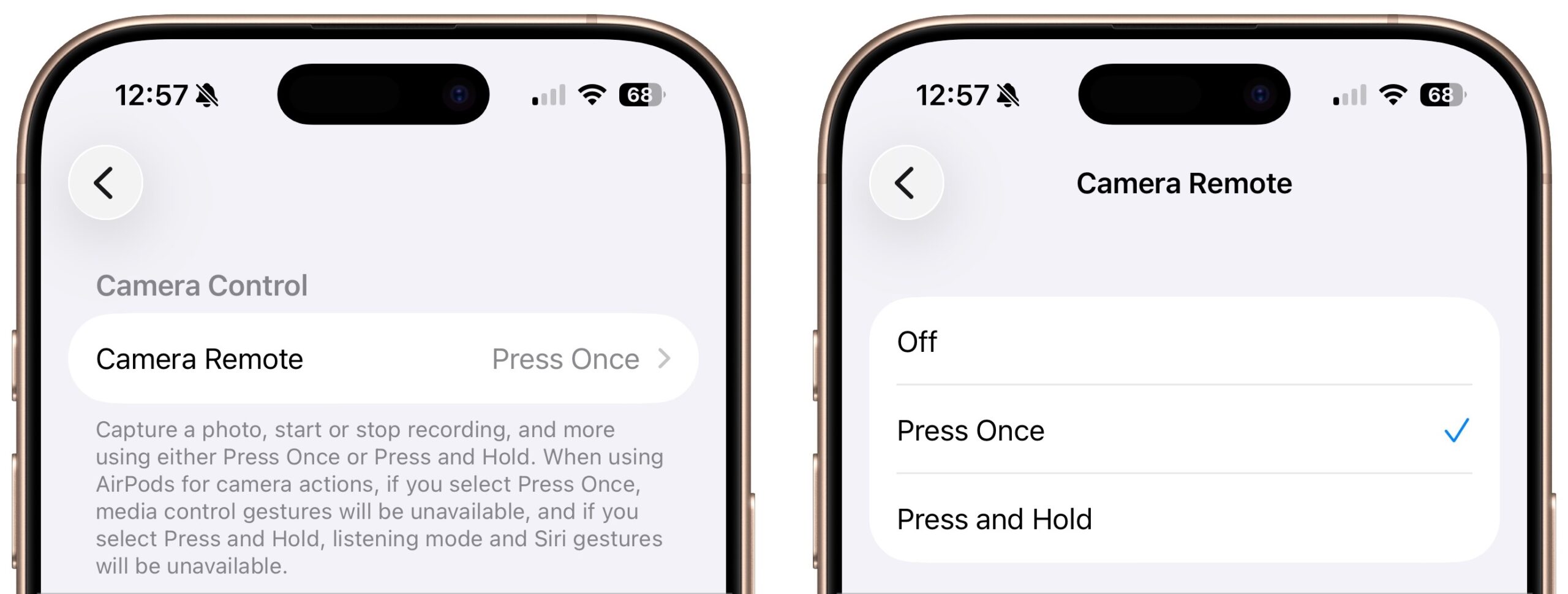
Have you ever wanted to activate the shutter button for your iPhone’s camera—for either a still photo or a video—when you’re not holding it? Selfie sticks often come with Bluetooth buttons that can do that, and starting in iOS 26, you also can use your AirPods 4 or AirPods Pro as a camera remote. While you’re wearing your AirPods, turn on the feature in Settings > AirPods > Camera Remote, where you can choose between triggering the shutter with a single press or a press and hold. Note that whichever option you turn on will override the usual actions for those triggers.
(Featured image by iStock.com/PeopleImages)


Social Media: Your AirPods can now double as a camera remote in iOS 26. Here’s how to set it up so a press or press-and-hold triggers the shutter to take a photo or start and stop a video.

Similar Posts

  • New Apple Creator Studio Bundles Pro Apps

    Apple has introduced Apple Creator Studio, a subscription bundle of Final Cut Pro, Logic Pro, Pixelmator Pro, Motion, Compressor, and MainStage, priced at…

  • Get Organized!

    I have tried a lot of apps over the years for keeping ideas organized, assigning tasks or just keeping track of my goals. The problem I’ve found with many of the organizational applications is that I don’t find them easy to access. If you’re not on your phone or at your computer, often these applications can’t be utilized easily or have widely varied interfaces depending on which device your using.

    “**Trello**”:https://trello.com/ has become my new favorite go-to app for keeping ideas and tasks organized. Trello is a free app with the ability to also pay for upgraded features for minimal fees. Why do I love Trello so much? It’s simple, I can easily use it on my computer, my iPhone or my iPad. There is an app for all three of my devices, and each version works seamlessly with the others. Working with several staff members in different departments here at Small Dog can make keeping track of tasks and to-do lists a bit of a challenge, but this simple application has really helped to streamline things.

    I easily and quickly create what they call “boards”, each board then allows you to create individual categories to which you can then add individual tasks. Within my lists I can upload photos, files, web links, assign due dates and add notes. Once I have created a board, I can also easily share that board with co-workers or whomever I choose to share them with. Anyone I have shared a board with can also be granted access to update and add to the boards, add notes or more files.

    A feature many of us have come to really rely on are the updates that you get from Trello notifying you that someone has made a change. I have found just one complaint thus far about the application. There appears to be no feature to mark a task as completed while still leaving it on your board. You can easily archive tasks and even entire boards, but I prefer to still be able to see those tasks while clearly seeming them marked as completed. However, all in all, I find this to be an invaluable app and one that I utilize all of the time. I have tried and do use google docs and google drive, and I’ve installed those on my devices as well, but for me nothing beats the ease and convenience of Trello.

  • My sister and her partner are coming to visit this week so I hope the sun comes out. It has been sort of cool and rainy here for this week. It is hard to believe that we are already in the middle of January and the Iowa caucuses are only a couple of weeks away.

    I know you will join me in congratulating (or consoling) Emily for her most recent promotion. A frequent contributor to Kibbles & Bytes, Emily has done just about every job at Small Dog, starting out in the shipping department way back when, when the computers were heavy. Emily is now the General Manager of Small Dog Electronics to reflect her pivotal role at the company.

    Thank you for reading this issue of Kibbles & Bytes and for all of the support for Small Dog Electronics. We know it is you, our loyal customers, that sustain us and we appreciate you!

    Your Kibbles & Bytes Team,

    _Don, Dean, Scott & Emily_