Not Sure If You’re Presentable for a Video Call? Try Hand Mirror

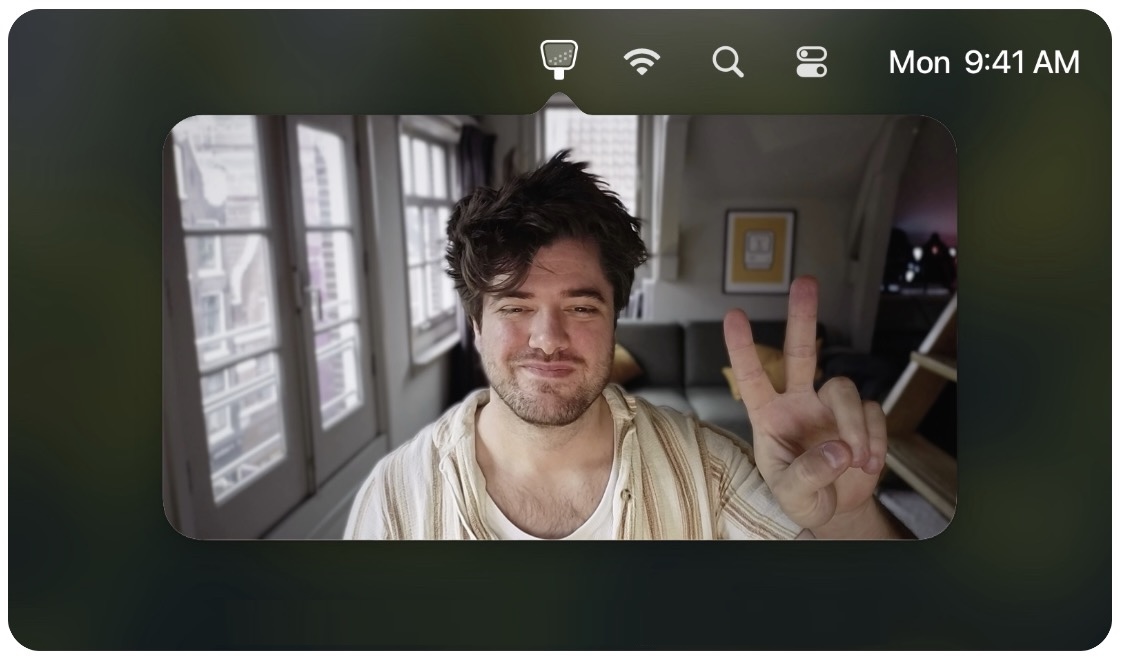
Since the pandemic, video calls have become a fact of life for many of us, so much so that it’s now possible to sit down for a meeting without thinking about whether you’ve changed out of your pajamas or brushed your hair. (No judgment; we’ve all done it.) To ensure that you’re presentable before you connect, use the Mac app Hand Mirror. It adds an icon to your menu bar that, when clicked, shows you what your webcam sees. Hand Mirror is free, but you can pay $6.99 for Hand Mirror Plus, which adds features like snapshots, a mic check, quick access to reaction icons, different window types, and more.
(Featured image by iStock.com/Tatsiana Volkava)


Social Media: About to join a video call? The free Mac app Hand Mirror adds a menu bar icon that instantly shows your webcam view so you can check your hair before anyone else sees it.


Similar Posts

  • Adjust AirPods Options in the Settings App

    If you sometimes have trouble configuring your AirPods, here’s the trick. The AirPods settings screen is available only when the AirPods are connected…

  • Get Organized!

    I have tried a lot of apps over the years for keeping ideas organized, assigning tasks or just keeping track of my goals. The problem I’ve found with many of the organizational applications is that I don’t find them easy to access. If you’re not on your phone or at your computer, often these applications can’t be utilized easily or have widely varied interfaces depending on which device your using.

    “**Trello**”:https://trello.com/ has become my new favorite go-to app for keeping ideas and tasks organized. Trello is a free app with the ability to also pay for upgraded features for minimal fees. Why do I love Trello so much? It’s simple, I can easily use it on my computer, my iPhone or my iPad. There is an app for all three of my devices, and each version works seamlessly with the others. Working with several staff members in different departments here at Small Dog can make keeping track of tasks and to-do lists a bit of a challenge, but this simple application has really helped to streamline things.

    I easily and quickly create what they call “boards”, each board then allows you to create individual categories to which you can then add individual tasks. Within my lists I can upload photos, files, web links, assign due dates and add notes. Once I have created a board, I can also easily share that board with co-workers or whomever I choose to share them with. Anyone I have shared a board with can also be granted access to update and add to the boards, add notes or more files.

    A feature many of us have come to really rely on are the updates that you get from Trello notifying you that someone has made a change. I have found just one complaint thus far about the application. There appears to be no feature to mark a task as completed while still leaving it on your board. You can easily archive tasks and even entire boards, but I prefer to still be able to see those tasks while clearly seeming them marked as completed. However, all in all, I find this to be an invaluable app and one that I utilize all of the time. I have tried and do use google docs and google drive, and I’ve installed those on my devices as well, but for me nothing beats the ease and convenience of Trello.