
AirNow and Paku: Two Helpful Apps for Monitoring Air Quality

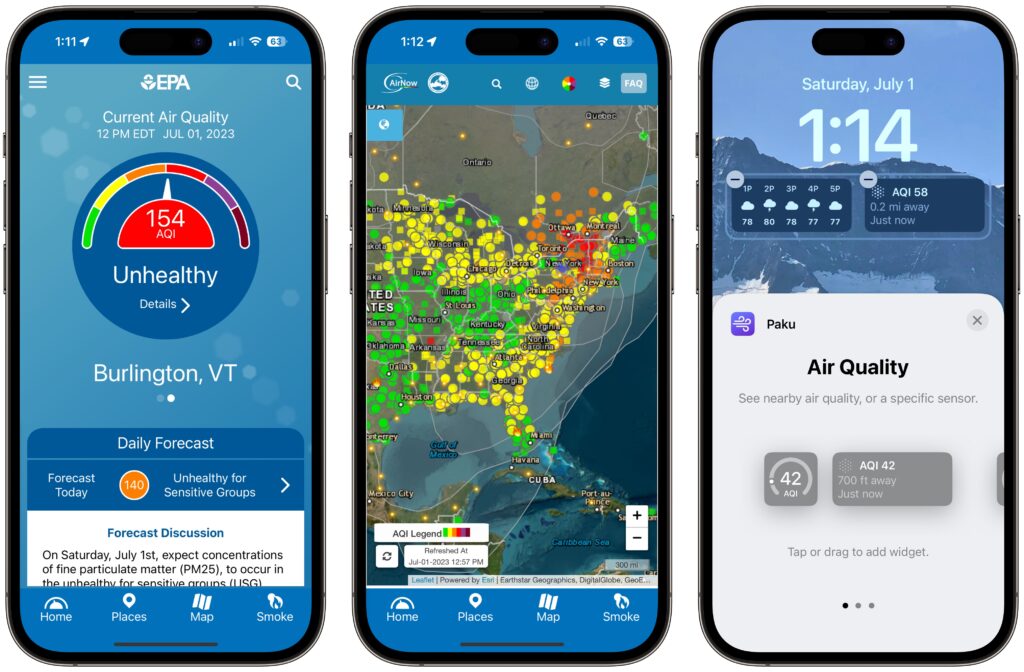
Smoke from wildfires is causing significant air quality problems for much of Canada and the US. It’s important to check the Air Quality Index (AQI) before spending a long time outside, and that’s especially true for sensitive populations (children, the elderly, anyone with asthma or other breathing issues) and for those exercising outdoors. Although numerous weather apps report air quality, their data can vary widely. Instead, turn to the official AirNow app published by the US Environmental Protection Agency. It provides the canonical AQI readings, and its Fire & Smoke Map lets you see where the smoke is and how that relates to air quality. (The AirNow website provides the same tools on a Mac, plus a lot of helpful background information.) For hyperlocal readings, check the PurpleAir network of inexpensive air monitors. PurpleAir’s website works in Safari on the iPhone, but the Paku app also provides iPhone widgets and Apple Watch complications showing the AQI from nearby monitors.
(Featured image by iStock.com/Daniiielc)


Social Media: With wildfire smoke causing air quality problems throughout North America, it’s important to check the Air Quality Index before spending a long time outside, particularly for exercise. We recommend the AirNow and Paku apps for the iPhone.


Similar Posts

  • Hey Dora, Follow Orders!

    Last week we talked about how to activate and use dictation to write emails and documents but there is a lot more that you can do. I keep thinking about Scotty from Star Trek when he went back in time and was “**confronted with a Mac Plus**”:https://youtu.be/LkqiDu1BQXY?t=1m8s. He picked up the mouse as natural as can be and said “computer…”. That time is coming and Dictation Commands are already built into your operating system.

    Once you have dictation activated you can activate dictation commands by going to the Accessibility system preference.

    * Choose Accessibility from System Preferences.

    * Choose Dictation from the list on the left side of the Accessibility pane.

    * Click the Dictation Commands button. You can see a list of available commands in the Dictation Commands sheet.

    * A starting set of commands are enabled by default. Additional speakable items like “Open document” and “Click item” are available by enabling advanced commands using these next steps:

    * Select (check) the option to “Enable advanced commands” in the Dictation Commands sheet that appears.

    * Click Done.

    p{text-align: center;}. !http://blog.smalldog.com/images/4710.png!

    After you have enabled advanced commands, you can also create your own commands by clicking the Add Command (+) button. This lets you link a spoken phrase to an app, a menu item, a keyboard shortcut, or an Automator workflow.

    You have enabled Dictation Commands and now you can speak any of the items in this list to perform the related action. Press the Fn key twice, then say a command to make it happen, such as “Search Spotlight for the Cubs score” or “select sentence” or “new document”. Give it a try and pretty soon you will be just like Scotty and the Mac Plus.

    As a shortcut, you can speak the command “Show commands” to see a list of the commands you can say.

  • My daughter Autumn and her husband Ismael are coming to visit next week which should be fun. Then we pack up and head back to Vermont. Hopefully the weather will cooperate but it seems like warmer weather is in the forecast for the Green Mountains.

    Thank you so much for reading this issue of Kibbles & Bytes!

    Your Kibbles & Bytes Team,

    _Don, Emily, Hadley & Amy_