Open the Mac’s Control Center with This Obscure Keyboard Shortcut

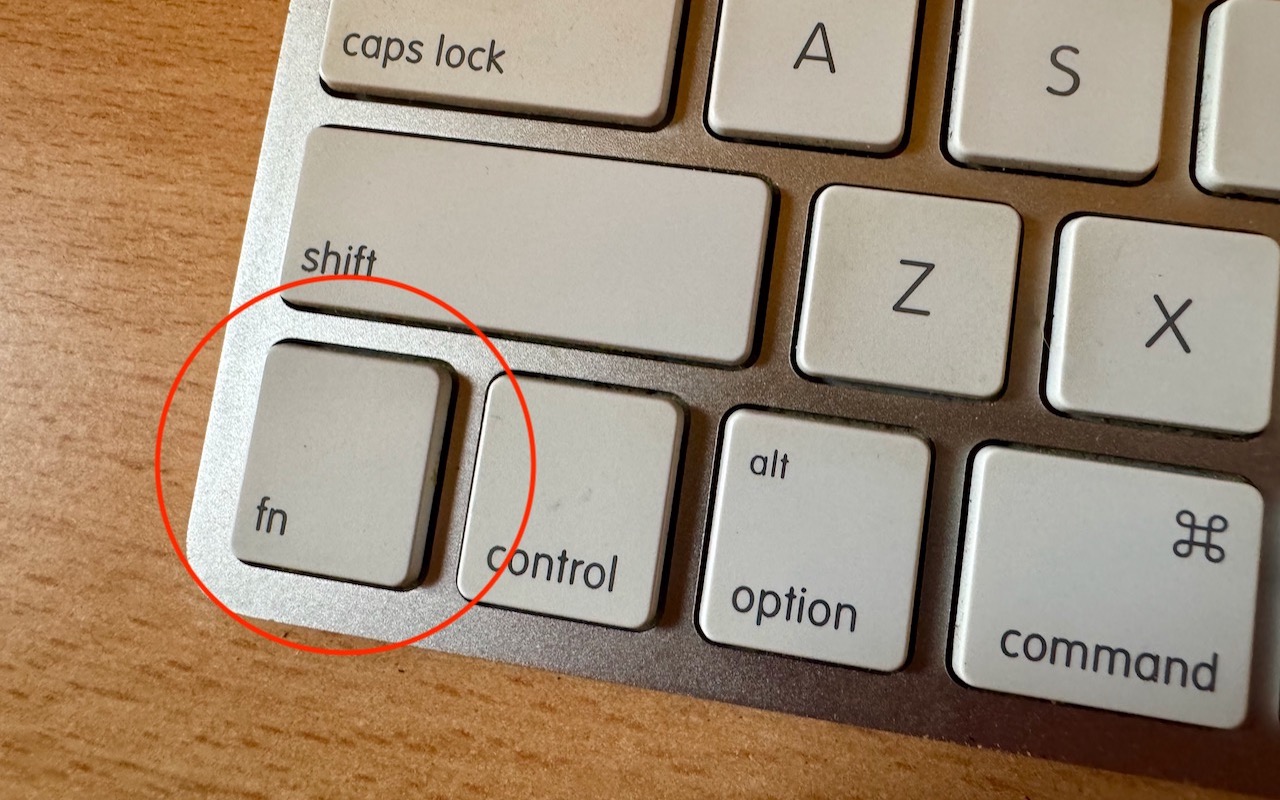
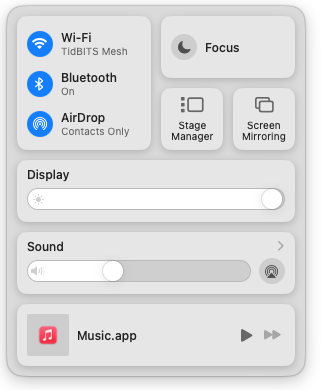
With macOS 13 Ventura, Apple brought Control Center from iOS to the Mac, providing a unified interface for features that users need to turn on and off regularly or that receive frequent adjustments, like screen brightness and audio volume. Clicking the Control Center icon in the menu bar brings it up, but it’s a small, hard-to-hit target. For faster and easier access to Control Center from within any app, press fn-C. (All current Apple keyboards have an fn key, but if you’re using a third-party keyboard that lacks one, you’re out of luck.)

(Featured image by Adam Engst)


Social Media: Control Center brings together controls for a collection of core macOS features, but its menu bar icon is small, making it hard for some to click. Luckily, there’s a hidden shortcut to bring it up quickly from the keyboard.

Similar Posts

  • _Hello Friends_,

    It is hard to believe that it is February already. There is almost no snow up in Vermont and Artie is reporting that farmers are already gathering sap from the maple trees to make syrup. The Iowa caucuses have come and gone and on Tuesday the first in the nation primary is next door in New Hampshire. Being a leap year my granddaughter, Gracie, will have her 4th real birthday on the 29th. She was recently chosen as guest composer on Vermont Public Radio. You can hear her interview and one of her “**compositions**”:http://digital.vpr.net/post/student-composer-showcase-gracie-bangoura#stream/0 online. 

    February is also Black History month and each week in Kibbles and on our “**blog**”:http://blog.smalldog.com we will be honoring Black History. It is fun researching and writing these little bios of Black American heroes and heroines.  

    Florida’s governor declared a state of emergency in four counties regarding the horrible tragedy unfolding in Brazil with the Zika virus. One thing that is not being widely reported is the apparent link to genetically modified mosquitos and the microcephaly disaster. Apparently, Brazil was the site of a massive experiment with genetically modified mosquitos that were released into the wild. They were proposing a similar release for here in the Florida Keys but it has not happened. The Zika virus has been around since 1947 and this is the first big outbreak of microcephaly. You can “**read more about it,**”:http://www.theecologist.org/News/news_analysis/2987024/pandoras_box_how_gm_mosquitos_could_have_caused_brazils_microcephaly_diasaster.html regardless of whether that analysis is true, I think releasing genetic mosquitos is a bad idea.

    I am happy to announce that Small Dog Electronics will be offering GoPro cameras and accessories in our stores this month. We have had lots of requests for these action cameras from our customers and we finally have secured the line for our stores. We will talk more about GoPro as we get them into stock.  

    This week’s Kibbles & Bytes special is a “**Hammerhead charging bundle**”:http://www.smalldog.com/wag900002149/special-save-20-on-hammerhead-charging-bundle As you know we manufacture rugged braided lightning cables that are certified by Apple with their MFI “Made for iPhone” designation. This means that our manufacturer has passed all the tests with Apple and use genuine Apple lightning connectors. You do not have to worry about compatibility with MFI designation. This bundle includes two of these braided cables, our Hammerhead 2-port home charger and Hammerhead 2-port car charger. Each of these chargers have the capacity to charge an iPhone and an iPad simultaneously. Sold separately, this bundle would be $72.96 but exclusively for Kibbles & Bytes readers this week you can have this handy bundle for only “**$49.99!**”:http://www.smalldog.com/wag900002149/special-save-20-on-hammerhead-charging-bundle 

  • New Features in iOS 26.1

    The first feature update to iOS 26 is now available—go to Settings > General > Software Update to install iOS 26.1. It doesn’t…

  • Keep Your IT Budget Working During a Slowdown

    When business slows down, it’s tempting to reduce IT spending. But that approach often backfires, creating bigger problems—and larger bills—down the road. Beyond…

  • Keyboard Shortcuts

    I got my start in using computers with CPM operating system and keyboard shortcuts were present there. I used them all the time so they come as second nature to me. But as I go out and talk with customers and help them with their Macs, I am surprised by the number of people that do not know that most of the things you can do with your mouse by clicking on a menu item can be done faster with keyboard shortcuts.

    The first thing to learn about shortcuts are the symbols that are used to show these keys.

    Command ⌘
    Shift ⇧
    Option ⌥
    Control ⌃
    Caps Lock ⇪
    Fn

    These work for your Mac Keyboard but if you are using a keyboard made for a Windows machine you need to substitute the Windows logo for the Command key and the Alt key for the option key. When you look at a menu in almost any application you will find the common commands for all these symbols next to them to indicate the keyboard shortcut. Here are some common ones:

    Command-X **Cut** Remove the selected item
    Command-C **Copy** the selected item
    Command-V **Paste** the contents
    Command-Z **Undo** the previous command
    Command-A **Select all** items
    Command-F **Find** open a Find window
    Command-G **Find Again** Find the next occurrence of the item previously found
    Command-H **Hide** the windows of the front app.
    Command-M **Minimize** the front window to the dock
    Command-M **New** Open a new document or window
    Command-P **Print** the current document

    Command-Space bar **Spotlight** show or hide the spotlight search field
    Command-Tab **Switch apps** switch to the next most recently used app
    Command-shift-3 **Screenshot** take a screenshot of the entire screen

    As you can see, there are endless keyboard shortcuts to use, and these are only a small fraction of what you can do with “**keyboard shortcuts.**”:https://support.apple.com/en-us/HT201236 So the next time you find yourself wondering what you can do if your mouse suddenly stops working or if your just looking for a more efficient way to do something, keyboard shortcuts might just be what your looking for!