Tame the Tangle! Quick Cable Management Tips

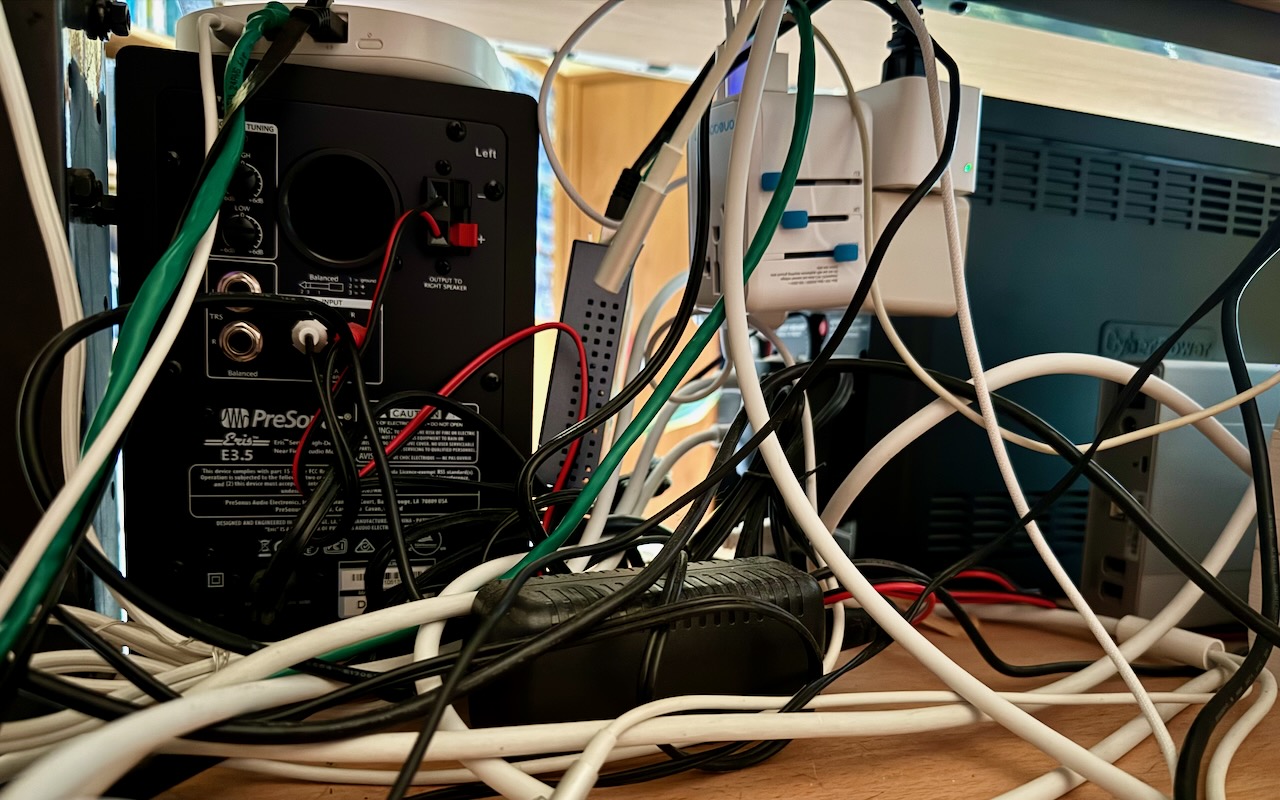
Take a moment and look behind your Mac. Do you see a tangle of cables? The main downside of a mess of cables is that it’s a cluster of chaos that attracts dust bunnies. However, it’s possible for power cables—especially when tightly bundled or looped—to emit electromagnetic interference that can disrupt or degrade the signal carried by nearby data or network cables. They can also heat up, which is generally best avoided. Plus, the more tangled the cable nest, the more likely you’ll cause harm if you pull too hard while attempting to remove a cable from the tangle.

Also, consider cables that extend beyond your desk. Do you have power cables that run across the ground or Ethernet cables that loosely snake up into the ceiling? To protect both people and equipment, ensure that cables aren’t a tripping or catching hazard.

If your cables are a complete disaster, take some time to shut down your devices, disconnect all the cables, clean underneath, and reconnect them in an organized fashion, removing unused cables and replacing damaged or unnecessarily long cables with new ones.

To keep your cables under control going forward, follow these tips:

Select and reduce cables:

  • Buy and use cables that are only as long as they need to be.
  • When buying new cables, prefer braided cables, which catch less and last longer.
  • If you have many cables, try to trim the number with judicious use of docks or hubs.
  • Upgrade to wireless accessories, like the Magic Keyboard and Magic Trackpad, that only need to be plugged in occasionally to charge.

Pay attention to cable location:

  • Try to keep cables off the floor, but use a floor cord cover if it’s unavoidable.
  • Attach long runs of network cabling to the wall or floor to reduce the chance of accidents.
  • Run cables through raceways or inside cable trays to keep them together under desks.
  • Add adhesive cable clips to the back or underside of desks without cable management options.
  • Ensure cables don’t interfere with workstation ergonomics, especially with movable sit/stand desks.
  • Keep power adapters away from other cables for better heat management.

Group your cables:

  • Use Velcro straps or cable ties to bundle power and data cables separately.
  • Avoid bundling too many power cables too tightly to avoid heat buildup.
  • Label cables with their type and use so you can easily distinguish between them.
  • Store extra cables in clear zip lock bags or bins, one per cable type.

Maintain your cables:

  • Throw out any damaged or suspect cables right away.
  • Periodically check and reorganize your cables, removing any that aren’t in active use.

You should be able to find a wide variety of cable management accessories, such as Velcro cable ties, cable labels, cable clips, and floor cord covers, at your preferred electronics retailer.

None of these suggestions are difficult to follow, and you’d be surprised how much you will appreciate having neatly organized cables in use and available when you need them.

(Featured image by Adam Engst)


Social Media: Do you have a rat’s nest of random cables behind your Mac? Follow our quick tips to bring order to the mess, reduce the chance of accidents, and avoid degraded data signals.


Similar Posts

  • BlueAnt Mini Wireless

    No, not some new invasive species, but rather some really cool wireless headphones! BlueAnt audio is one of our newest headphone lines that we have begun to carry here at Small Dog. The “Pump Mini”:http://www.smalldog.com/product/87884/blueant-pump-mini-wireless-hd-audio-sport-buds-purple Wireless HD Audio Sports Buds have become my latest must have! These are lightweight, hold a great charge and come in several colors.

    When I first saw these headphones I was a little skeptical. I actually hadn’t ventured into wireless earbuds before trying these headphones and had heard customer complaints in the stores about different varieties over the last year or so. The biggest issue that I had heard was comfort and how well they stayed in your ears, so I had no idea what I about to experience! I charged up the headphones and tested them out on some morning runs before work and was very pleased with them. I easily connected the headphones to my iPhone and enjoyed great sound out of them. They were comfortable and stayed in my ears easily. I was even able to take phone calls with them and those I was talking to could easily hear me. I also connected them to my Apple Watch and as you might guess, preferred this over carrying my iPhone with me.

    I’ve begun using these earbuds in the office as well with my MacBook Air. I unfortunately have to wear glasses, so I find that many over the ear headphones (and I’ve used countless ones!) inevitably give me a headache from the pressure the headphones put on my glasses behind my ears. Contacts aren’t an option for me so I have found these headphones have begun to serve a truly universal role!

  • _Dear Friends,_

    New data from Piper Jaffray’s teen survey show that Apple is dominating that market at least as far as mobile devices are concerned. They have 71% of the teen market for smart watches and almost 70% for iPhones and 64% for iPad. Another survey has Apple Mac sales showing positive growth while literally the entire PC market is in decline.

    I have been playing around with Amazon’s Echo and I have to say that I like it a lot. I wake up each morning and say “Alexa, what’s new?” and I get the news reports from NPR, CNN, Huffington Post and BBC as well as ESPN Sports and the local weather report. During the day, I ask Alexa to “play the blues” or “play some classical music” and while the speaker is not as good as my Sonos system it does fill the room. I can be around the corner or across the room and the Echo can hear me. Apple needs to step it up a bit and get Siri on the Mac or even better yet, integrated into their networking gear. I would love to be able to tell my Sonos app to play my music from my iTunes library!

    Speaking of networking here’s a Kibbles & Bytes exclusive! This isn’t for everyone but if you have a big house and your Wi-Fi signal isn’t reaching that far corner of the house this could solve three problems for you! I am bundling the Apple Factory Refurbished 3TB Time Capsule with an Apple Factory Refurbished Airport Express. Both have the same 1-year Apple warranty as new but you can save some bucks. The 3TB Time Capsule gives you the Airport Extreme wireless access point and automatic wireless back-ups to the integrated 3 terabyte drive. The Airport Express allows you to extend that wireless network. Normally “**this bundle**”:http://www.smalldog.com/wag900002195/extend-your-network-and-back-up-your-data-for-only-325-99? is around $500 new, but this week for Kibbles & Bytes readers, while supplies last you can buy this refurbished bundle for only “**$325.99!**”:http://www.smalldog.com/wag900002195/extend-your-network-and-back-up-your-data-for-only-325-99?