Tone Down Liquid Glass with macOS 27’s New Appearance Slider

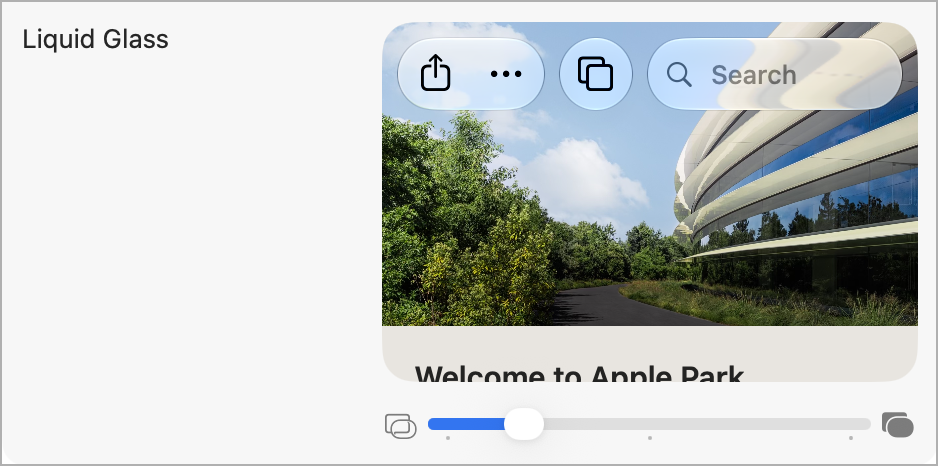
If macOS 27 Golden Gate’s Liquid Glass look makes toolbars, sidebars, or the Dock hard to read, you’re no longer stuck with macOS 26 Tahoe’s two choices of Clear and Tinted. Golden Gate asks you to set a new slider at the end of setup. If you accepted the default (the middle) or now regret your choice, open System Settings > Appearance and drag the Liquid Glass slider to the right for a more opaque, tinted look. Changes preview live as you drag, and the far right is as opaque as Liquid Glass gets. For solid backgrounds everywhere, turn on System Settings > Accessibility > Display > Reduce Transparency, which switches Liquid Glass off entirely and turns transparent areas like the Dock and menu bar solid gray. Be careful afterward: touching the Liquid Glass slider turns Reduce Transparency off, and it stays off until you turn it back on. (To change only the menu bar, open System Settings > Menu Bar and turn on “Show menu bar background.”) Try the slider first and turn on Reduce Transparency only if the slider isn’t enough—or ask us to set up your Macs the way you like them.

(Featured image by Trusted Content Network)


Social Media: Is macOS 27 Golden Gate’s Liquid Glass look making your Mac’s toolbars and sidebars hard to read? A new slider in System Settings lets you dial in more tint, and Reduce Transparency is still there if you want solid backgrounds.


Similar Posts

  • Get yourself some Dux

    What is a Dux you ask? Dux is a really great product line from STM and one that we are really excited to begin carrying here at Small Dog. This product line up has cases for your iPad and your computer and for the last week or so I have been testing out the Dux case for Macbook Air.

    My first impression is that it gives my computer a sharp new look. I feel as though my computer is highlighted more in this case. It features a primarily clear case and then a border that comes in an assortment of colors. The one I am using is black and it really looks sharp and sleek on the computer.

    I will be the first to admit that I am not a huge fan of hardshell cases for computers. They do add weight to your computer and they can be hard to put on and take off. However, this case did stand out to me as soon as I saw it and I immediately asked for a sample so that I could test it out. It’s the reinforced border that caught my eye. The plastic is slightly different from that of the clear case and really gives you a feeling of protection for your computer.

    Customers ask me all the time why someone might want a hard shell case, it’s a combination of accessorizing and protection. Hard shell cases are great for those who might like to sticker their computers. You can sticker all you want on a removable case and not damage your computer. For people who bring their computers everywhere it’s a great way to protect them from the dings and scratches that can happen just by pulling your computer in and out, especially those whom might fly a lot. One piece of advice I will give users of hardshell cases is that you still need to remove them! The idea and concept of hard shell cases is to provide added protection to your computer, to keep it looking like new under the case. However, if you don’t remove the case from time to time and clean the case and computer from dust and debris your computer will still get scratches. I have seen countless computers get just as scratched up with these kinds of cases than those without and the cause is always the same: dirt build up. This particular case comes on and off much easier than some others on the market making my recommended occasional cleanings much easier to perform. After all you’ve probably purchased a hard shell case to keep your computer looking new.

    Overall I am very happy with this case, but the biggest test is yet to come. I am flying to Arizona next week for an event with one of our vendors, and I’ll be keeping this case on my computer for my travels. The real test will be if I notice the added weight while making my way through airports, so far I haven’t really noticed the increased weight in my daily travels.

    P.S. Hadley, even if it means burpees and laps in an airport terminal I plan to maintain my lead in our competition. It’s ON!