Audit How You Appear in Google Search

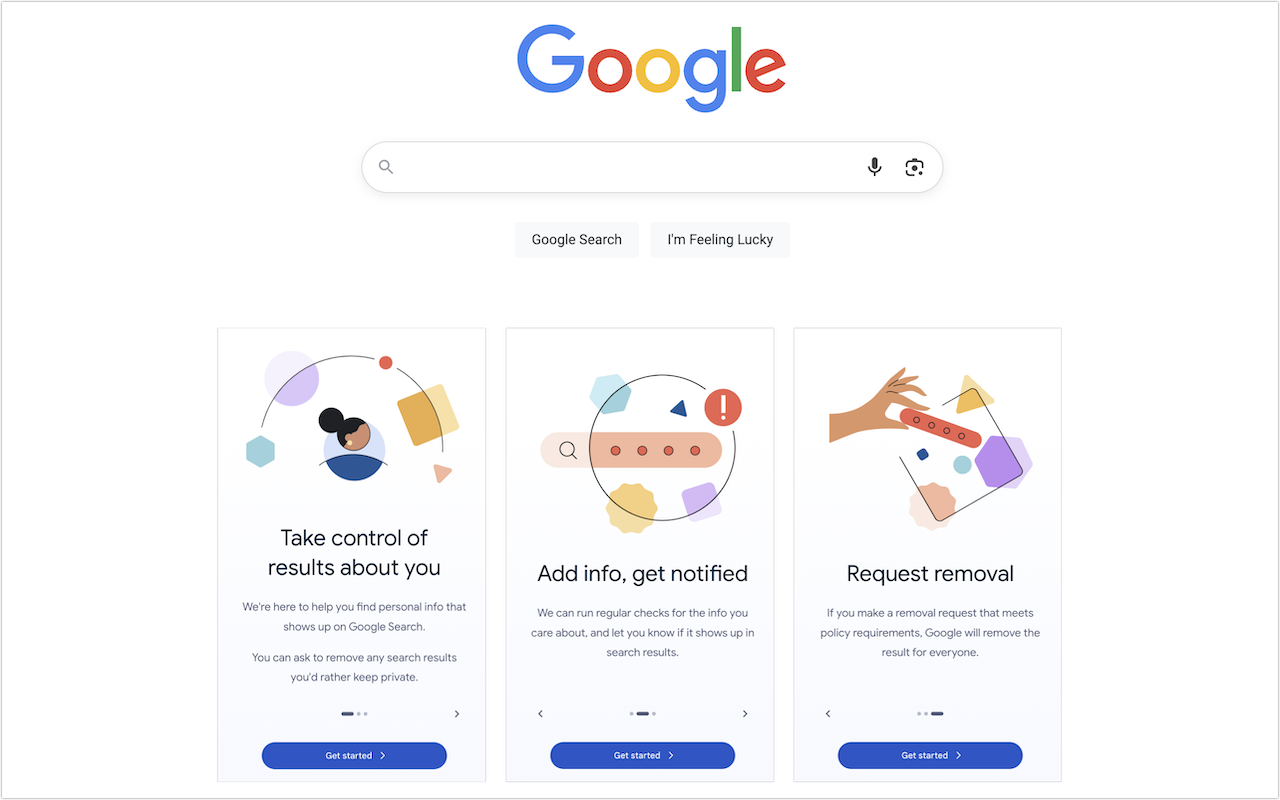
Google has created a free service that lets you see what of your personal and professional information has been published on the Web. Once you provide your name, address, phone numbers, and email addresses to Google’s Results About You website, Google will inform you if that info appears in search results. (Don’t worry, you’re not telling Google anything it doesn’t already know.) It may take a few days or weeks for the initial results to come back, and Google will keep adding more results over time. You can review each page with your information and, if it’s data you would prefer to keep private and it meets Google’s policy requirements, request its removal from the search results. This only removes your data from Google’s search results; to remove it from the Web entirely, you’ll need to contact the website hosting the information.

(Featured image by Google)


Social Media: Curious about how your personal information shows up in Google searches? Google’s Results About You service helps you monitor and manage your digital footprint.

Similar Posts

  • Expand your mind…er..text

    Speed Up Your Fingers with Text Expansion

    With all the advances in computing and communications, it’s amazing that–after nearly 150 years!–we still use the keyboard layout from the world’s first practical typewriter for entering text into our Macs, iPhones, and iPads. Sure there are some improving dictation solutions out there but typing is by far how we input text. But we have not gotten that much better as typists, nor do we enjoy typing more–if anything, we increasingly abbreviate to avoid typing, hence “LOL, BRB, etc.” Text messaging aside, wouldn’t it be nice to be able to type less without compromising meaning or making your text look like it was composed by a trained monkey? Thanks to text expansion features built into OS X and iOS, and extended with third-party utilities, you can.

    For basic text expansion capabilities in OS X, look in System Preferences > Keyboard > Text, and in iOS 9, go to Settings > General > Keyboard > Text Replacement. For both, you can enter a phrase, and a shortcut that expands into that phrase when typed and followed by a space or punctuation character. (Tip: If text expansion doesn’t work in a Mac app like Mail or Safari, make sure Edit > Substitutions > Text Replacement is selected.)

    If you’re signed into the same iCloud account on both your Mac and your iPhone, for instance, the text expansions sync between them automatically. So, you can type “smh” and tap the Space bar to get “Shaking my head!” typed out for you, regardless of what device you’re using. (Another tip: don’t create abbreviations that you will also want to type normally. It might seem like a good idea to use “np” for “No Problem,” but that will get in the way of talking about Nurse Practitioners.)

    With such a useful feature built into OS X and iOS, why would you want to spend money on a third-party utility, like “**TextExpander**”:https://smilesoftware.com/textexpander (Mac and iOS), “**Typinator**”:http://www.ergonis.com/products/typinator/ (Mac), or “**TypeIt4Me**”:http://www.ettoresoftware.com/products/typeit4me/. Unfortunately, OS X’s text expansion feature doesn’t work in all apps (it likely won’t work if the app lacks the Edit > Substitutions > Text Replacement menu command). The interface for creating new substitutions is cramped and hard to work with, you can’t configure the trigger characters that cause abbreviations to expand, and you can’t include text with styles, variable text like the date, or even graphics.

    That’s where text expansion utilities shine. They can include styled text and graphics in expansions, insert the current date and time, respect case when expanding abbreviations, include the contents of the clipboard in expanded text, automatically fix common typos, create fill-in-the-blanks snippets that you customize on each expansion, and much more.

    Here are some ideas for the kinds of things you might want to turn over to your computer for typing:
    Long or complex words or phrases, such as scientific names. Aedes aegypti, anyone?

    *Your address, phone number, and email address. One of my favorites is “@d” which inserts my email address. I get real tired of typing email address, phone numbers, etc. Text expansion speeds that up!

    *Boilerplate text for common email replies.

    *The current date and/or time.

    *Special characters, so blb could expand to the British pound symbol £.

    *Unix commands for Terminal, such as using ssh to log in to a remote computer.

    I am sure you can come up with dozens that might work for you and speed up your typing. So think about what bit of text you might want expand automatically and give text expansion a try today!

  • For the Best Mac Webcam, Use Your iPhone

    The near-ubiquity of videoconferencing is a lasting effect of the pandemic. The ease of gathering a group virtually usually more than makes up…

  • New Urbanears Active Headphones

    So by now, it might be clear that I am a bit of a headphone junkie. I’ve come to the conclusion that I can collect and use headphones like I do bags and purses! In my world I can never have enough, so I jumped on the opportunity this week to test our the new “**Hellas**”:http://www.smalldog.com/wag900002177 and “**Reimers**”:http://www.smalldog.com/wag900002181 from Urbanears.

    The Hellas are an over the ear bluetooth headphone. It took a few minutes to get them paired with my computer. My only complaint about these headphones is that I found the touch-less buttons to be a bit clunky to use. The sleek design means you can’t physically see the buttons, so it take some practice and time to learn where the buttons are. However, there are a ton of other features with these headphones that make them extremely appealing. They are incredibly lightweight, comfortable to wear and they have good sound to them. I think my favorite feature about these is that the fabric on the headband and the earpieces are machine washable. You can actually wash the fabric and return your headphones to new condition. As I just started to use these the other day I have not actually tried to wash the fabric, but as more and more people are working out with over the ear headphones this is a huge selling point. Another hidden feature is that there is a built in microphone, so if you are using these with your iPhone, you can take calls without having to remove your headphones.

    Also part of the active line are the Reimers. They deliver on fit and comfort while providing some great sound! I am impressed with how far ear buds have come over the years. What’s interesting about these headphones is that while they are in the active category, they are actually a wired set of headphones. However, Urbanears added several great features to ensure these headphones can stand up to the intensity of any workout. They have two clips for securing them to your clothing and they feature reflective cabling to light up during early morning or late evening runs. They use a new earlock technology that ensures they stay in during your workout, so no more fears of them falling out during sit-ups, push-ups and the like. I admit I am just a runner, so some of the more intense workouts I’ve not tried these, but judging by how well they stayed in for runs I am confident in saying they will stay put! Last but not least, they feature standard iOS controls we have all grown to expect out of headphones.

  • Advice for Good Office Ergonomics

    Let’s look at how to keep your body comfortable and healthy when you interact physically with your Mac. In a word: ergonomics. You’ll…