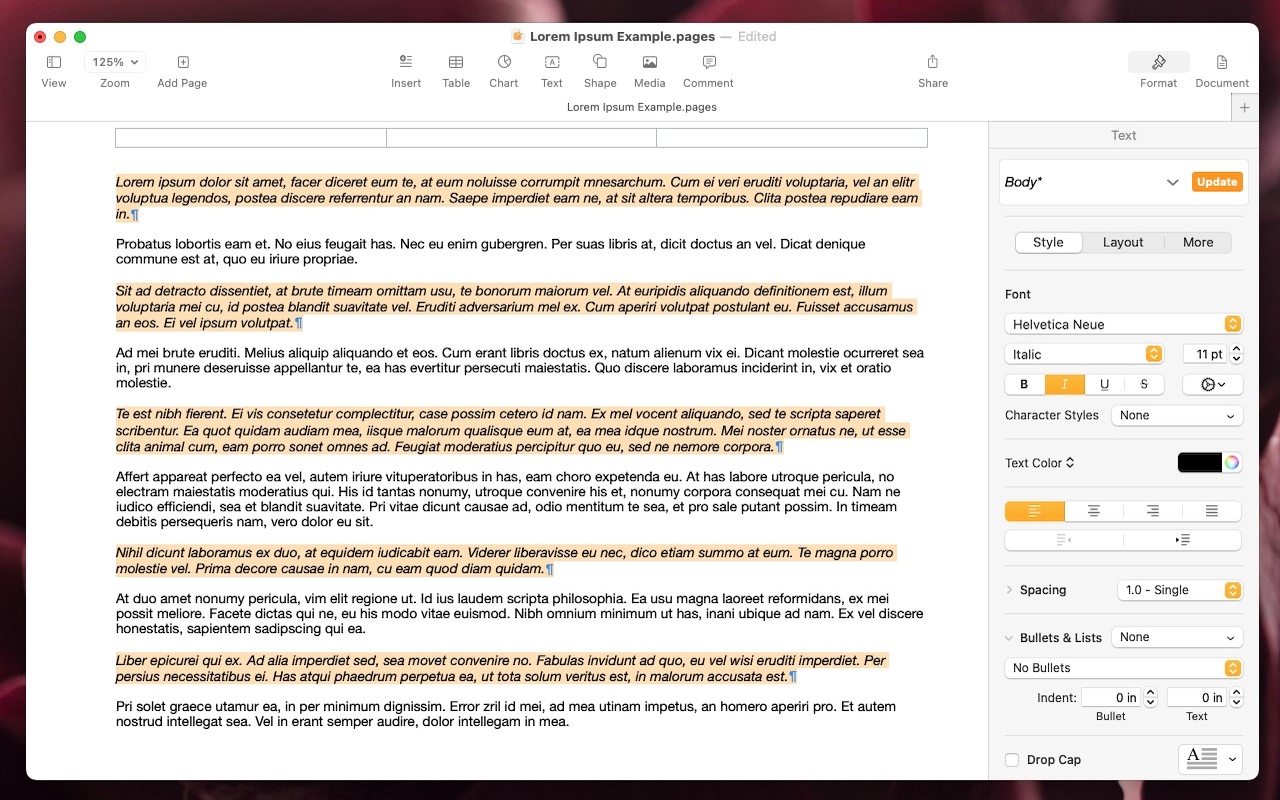
Select Non-Contiguous Text in Pages, Keynote, and Numbers 14

The latest versions of the Mac and iPad apps in Apple’s iWork suite—Pages 14, Keynote 14, and Numbers 14—have gained a helpful feature: non-contiguous text selection. By holding down the Command key, you can select chunks of text that aren’t next to each other. For example, imagine you want to make the first part of each item in a bullet list bold. Instead of bolding each one separately, hold down Command as you work to select all of them and then apply bold to the entire selection with a single command. Non-contiguous selection is particularly helpful when applying formatting, but you can also copy non-contiguously selected text or work with it in nearly any way you would interact with a contiguous text selection. (Note that while holding down Command, you can double-click to select words or triple-click to select paragraphs, just as you can normally without holding down Command.)

(Featured image by Adam Engst)

Social Media: A new feature in Pages, Keynote, and Numbers lets you select bits of text that aren’t next to each other so that you can, for example, format them or copy them all at once.


Similar Posts

  • Sonos and Apple Music

    A little over a week ago things became official: Apple Music is now available to those who use “**Sonos.**”:http://www.smalldog.com/category/?mmfg%5B0%5D=Sonos For some of us this wasn’t a huge announcement. I have been using the beta version now for several months and have been enjoying my Apple Music playlists as well as my own personal play lists on my iPhone. I have been a huge fan of Sonos for about two years and not being able to listen to Apple Music was my one complaint about the system, but not anymore!

    Apple Music isn’t the only great thing about Sonos either, did you know that you can also control your Sonos system from your computer? I admit, I didn’t realize this at first. With a huge focus on how easy the system is to set up and control from your iPad or iPhone, this is one feature that’s often overlooked. With a simple “App download”:http://www.sonos.com/controller-app on your computer, you can open up your entire (in most cases) music library for listening through your Sonos system. Another great feature of the Sonos App is the ability to set a sleep timer. If your someone who enjoys falling asleep to music, but prefers it doesn’t stay on all night this is a huge feature even if it is a bit hidden. The more info icon within the Sonos App hides a lot of features, including the sleep timer.

  • Last Minute Gift Ideas from Small Dog Electronics

    We know that this can be a stressful time of year and we would like to help you relieve that stress. Beginning *Thursday, December 17th*, our *South Burlington* location will be *open until 9pm* on every night except Christmas Eve and Sunday, 12/27. We will be open from 9am – 5pm on Christmas Eve and 10am – 6pm on Sunday. From now until December 24th *save 25% on all headphones* from Beats, Urbanears, Outdoor Tech and more!

    !http://blog.smalldog.com/images/4623.jpg!

    We also have tons of great *last minute gift giving ideas* for just about anyone on your shopping list. Not sure about picking out the right item? Our knowledgeable staff can guide you in the right direction and remove the stress of last minute gift shopping. For more great gifts visit “www.smalldog.com/macthehalls”:http://www.smalldog.com/macthehalls

    “!http://blog.smalldog.com/images/4622.jpg!:”http://www.smalldog.com/macthehalls