Sidestep MacBook Optimized Battery Charging When Necessary

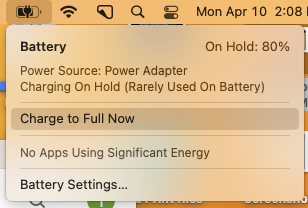
Have you ever run into a situation where the battery icon in your menu bar is stuck at 80% even though your Mac has been plugged in for hours? Luckily, there are several easy workarounds, but first, let us explain what’s going on.

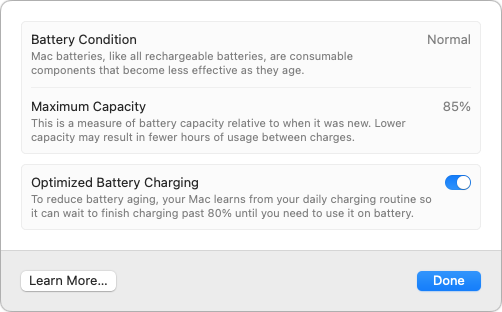
In the past few years, Apple has added optimized battery charging features to many of its battery-powered products, including the iPhone, the Apple Watch, and the MacBook Air and MacBook Pro. In all cases, Apple’s goal is to increase the lifespan of your devices’ lithium-ion batteries by reducing the amount of time they spend fully charged.

With the iPhone and Apple Watch, Apple achieves this by learning your charging patterns and delaying charging past 80% in certain situations. The optimized charging algorithm then charges the device to full just before you’re likely to unplug it. For most people, that probably happens overnight, so the device is ready in the morning.

With the MacBooks, the background is slightly different. Many people use their MacBooks at desks, often connected to large displays, so they spend a lot of time plugged into power. In the past, that would keep the battery fully charged and generate heat, both of which shorten the lifespan of lithium-ion batteries. So once again, Apple’s optimized battery charging technology tries to hold the battery at 80% and charges it to full only when it thinks you’ll need to use it away from the desk. If you seldom take it anywhere, it could be held at 80% most of the time.
That works best when you have a regular schedule, but it’s easy to end up in a situation where you need to grab your MacBook and head out—such as for an overnight trip—where you won’t be able to recharge easily. If the optimized battery charging algorithm wasn’t expecting that, you could find yourself with a battery that’s only at 80% to start, significantly reducing your battery life.

There are three ways to work around this problem, depending on how troublesome it is for you:

  • Resume charging: If the optimized battery charging algorithm has paused charging at 80% but you want to leave with a full charge, click the battery icon in the menu bar and choose Charge to Full Now. That will take some time, so make sure you initiate the final charging early enough. This workaround is most helpful if you only occasionally need a full charge.
  • Disable optimized battery charging temporarily: Let’s say you’re on that overnight trip and need to be sure that your MacBook is fully charged for your 6 AM flight home. To ensure you don’t wake up to a partially full battery, you can temporarily disable optimized battery charging. In macOS 13 Ventura, choose System Settings > Battery, click the ⓘ next to Battery Health, turn off the Optimized Battery Charging switch, and click Turn Off Until Tomorrow in the dialog that appears.
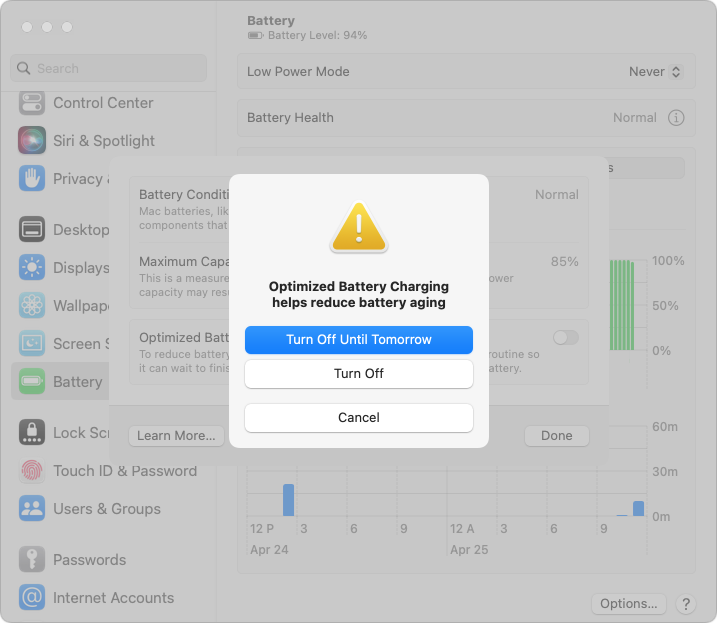
    In macOS 12 Monterey and earlier, choose System Preferences > Battery, deselect Optimized Battery Charging, and click Turn Off Until Tomorrow.
  • Disable optimized battery charging permanently: Some people have unpredictable schedules. While the optimized battery charging algorithm may simply throw up its hands and allow your battery to charge fully at all times, if you find yourself continually fighting it, follow the steps above and click Turn Off to disable it permanently. Be aware that this may reduce the overall lifespan of your battery.

If all this seems fussy, it’s because Apple was criticized some years ago when it introduced optimized battery charging for the iPhone without informing users, some of whom were upset by the seemingly unpredictable charging behavior. Apple now makes the controls accessible to users, which is good but adds complexity.

Although we recommend leaving optimized battery charging enabled in most situations, there are times when it’s reasonable to turn it off to ensure you have as much power as possible for the upcoming work session.

(Featured image by iStock.com/Konev Timur)


Social Media: Has your MacBook’s battery ever been stuck at 80% when you would prefer to have a full charge? We explain what’s happening and how to work around Apple’s optimized battery charging features.


Similar Posts

  • Get yourself some Dux

    What is a Dux you ask? Dux is a really great product line from STM and one that we are really excited to begin carrying here at Small Dog. This product line up has cases for your iPad and your computer and for the last week or so I have been testing out the Dux case for Macbook Air.

    My first impression is that it gives my computer a sharp new look. I feel as though my computer is highlighted more in this case. It features a primarily clear case and then a border that comes in an assortment of colors. The one I am using is black and it really looks sharp and sleek on the computer.

    I will be the first to admit that I am not a huge fan of hardshell cases for computers. They do add weight to your computer and they can be hard to put on and take off. However, this case did stand out to me as soon as I saw it and I immediately asked for a sample so that I could test it out. It’s the reinforced border that caught my eye. The plastic is slightly different from that of the clear case and really gives you a feeling of protection for your computer.

    Customers ask me all the time why someone might want a hard shell case, it’s a combination of accessorizing and protection. Hard shell cases are great for those who might like to sticker their computers. You can sticker all you want on a removable case and not damage your computer. For people who bring their computers everywhere it’s a great way to protect them from the dings and scratches that can happen just by pulling your computer in and out, especially those whom might fly a lot. One piece of advice I will give users of hardshell cases is that you still need to remove them! The idea and concept of hard shell cases is to provide added protection to your computer, to keep it looking like new under the case. However, if you don’t remove the case from time to time and clean the case and computer from dust and debris your computer will still get scratches. I have seen countless computers get just as scratched up with these kinds of cases than those without and the cause is always the same: dirt build up. This particular case comes on and off much easier than some others on the market making my recommended occasional cleanings much easier to perform. After all you’ve probably purchased a hard shell case to keep your computer looking new.

    Overall I am very happy with this case, but the biggest test is yet to come. I am flying to Arizona next week for an event with one of our vendors, and I’ll be keeping this case on my computer for my travels. The real test will be if I notice the added weight while making my way through airports, so far I haven’t really noticed the increased weight in my daily travels.

    P.S. Hadley, even if it means burpees and laps in an airport terminal I plan to maintain my lead in our competition. It’s ON!

  • Your Kibbles & Bytes Team,

    _Don, Emily & Dean_

  • The Most Profit Ever in a Single Quarter

    Apple posted record earnings and profit for the holiday quarter disappointing those analysts that predicted less than stellar results. Of course, the realistic guidance for the next quarter sent Apple stock plummeting while those same analysts maintain a price target that is $40-50 higher than the current price of the stock. Okay, so Apple’s profit and revenue were all time records for the company but the remarkable tidbit is that no public corporation ever has posted that much profit in a single quarter. Let’s see how Apple did that.

    First of all, Apple sold 74.8 million iPhones in the quarter. Not too shabby and that revenue is nearly 70% of Apple’s total. The average sales price (ASP) for the iPhone was up to $691 which also led to slightly higher gross margin. To put that is some perspective that is an average of 34,000 iPhones sold per hour 24/7 for 13 weeks.

    They finished the quarter with about $215 billion in cash which represents about $39/share. Macs sales were down a bit at 5.3 million units and the iPad continues to do moderate in sales with sales dropping year on year from 21.4 million units to 16.1 million units.

    Currency “headwinds” have caused some of these results to be muted. With the exceptionally strong dollar it is more difficult to export US goods and sales suffer a bit. The Euro and British Pound were down double digits and the Canadian and Australian dollars were down 20% or more. It gets worse. The Russian Ruble is down by 50% and Brazilian Real is down 40%. Apple estimated that if it were not for these global currency fluctuations that their revenue would have been over $80 billion representing an 8% increase. But despite those headwinds, Apple posted their best quarter ever.

    Other high points were service revenue which was the highest ever at over $6 billion. Wow, $6 billion in just iTunes, App store and a few other things. That is more revenue that quite a few well known companies and a 24% growth year over year. Other products which include the Apple TV, Beats and Apple Watch also were strong with $4.5 Billion in sales.

    In another milestone that just points to the success of the services side of Apple’s business Tim Cook announced that they now calculate that there are more than 1 billion Apple devices in use worldwide which is up 25% year over year. That is simply incredible considering that there are only 7.4 billion people on the planet!

    What sent Apple stock down was Apple’s realistic prediction that iPhones sales in their 2nd fiscal quarter would decline year over year by as much as 15-20%. Last year’s 2nd quarter was strong because of supply issues that moved some revenue from the 1st to 2nd quarter and the impact of the global currency situation has caused some price adjustments. Apple remains very bullish on the iPhone market and pointed to the fact that in China over 50% of the iPhones sold were to people buying their first iPhone. Apple pointed out that the growth of the middle class in China is unprecedented with the middle class comprising about 50 million people in 2010 and now it is projected to be $500,000,000 by 2020.

    Even if Apple sells “only” the 40-45 million iPhones in this quarter that would still be more revenue that most companies earn overall in a single quarter. To put this in perspective, Apple books more revenue at strong margins, than Amazon, Facebook, Google or Microsoft generate from all of their operations.

    All in all the financial results that Apple announced were an incredible testament to the quality and innovation of Apple products and of a company doing things right. Congratulations to the entire Apple team!

  • Motorcycling down here is sort of boring. I have my bike all tuned up but there is literally only one road and the fastest speed limit in Key West is 30mph. I think we may have to trade in Grace’s Vespa to get a real motorcycle for her so we can take some longer trips down here.

    Pitchers and catchers reported for spring training and the Cubs Kyle Schwarber is already breaking windshields in Arizona at the Cubs park. Maybe this year?

    Thank you so much for reading this issue of Kibbles & Bytes!

    Your Kibbles & Bytes Team,

    _Don, Emily, & Hadley_